Fluorescent
White balance selected for fluorescent
surrounding
Scene
Auto / Smart mode /
Landscape / Backlight /
Night scene / Portrait /
Sports
Scene setting
ISO Auto/50/100/200 Sensitivity select
Smile detection On / Off Smile detection setting
Anti-shaking On / Off Anti-shaking setting
Video
Resolution
720P 1280 x 720
VGA 640 x 480
QVGA 320 x 240
Video resolution set up
Date/Time YY/MM/DD Date or time setting
Auto power off Off / 1Minute / 3 Minutes Auto power off selection
Beep sound Off/On Beep sound setting
Language
German/English/Spanish/
Italian/French/Portuguese/
Dutch/Greek/Turkish/
Hungarian/Polish/Russian/
Danish/Swedish/Norwegian/
Finnish
Select display language
Date stamp Date &Time /Date /Off Date stamp
Frequency 50Hz / 60Hz
Select power frequency in your
location
Format SD card
Format the memory location
selection.
Default setting Cancel / OK
Default setting
Setup
Version See the firmware version
Note: The camera will remain the last setting when it is turned off.
5. Using the camera
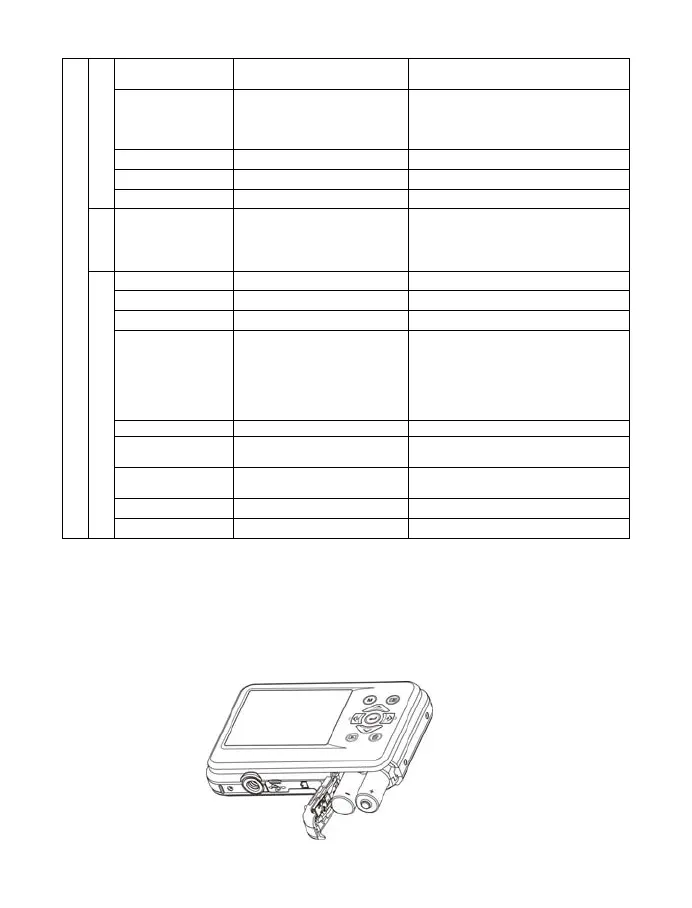
5.1 Installing the batteries
1. Open the battery compartment.
2. Insert 2xAAA alkaline batteries into the camera.
3. Close the battery compartment.










 To Next Page