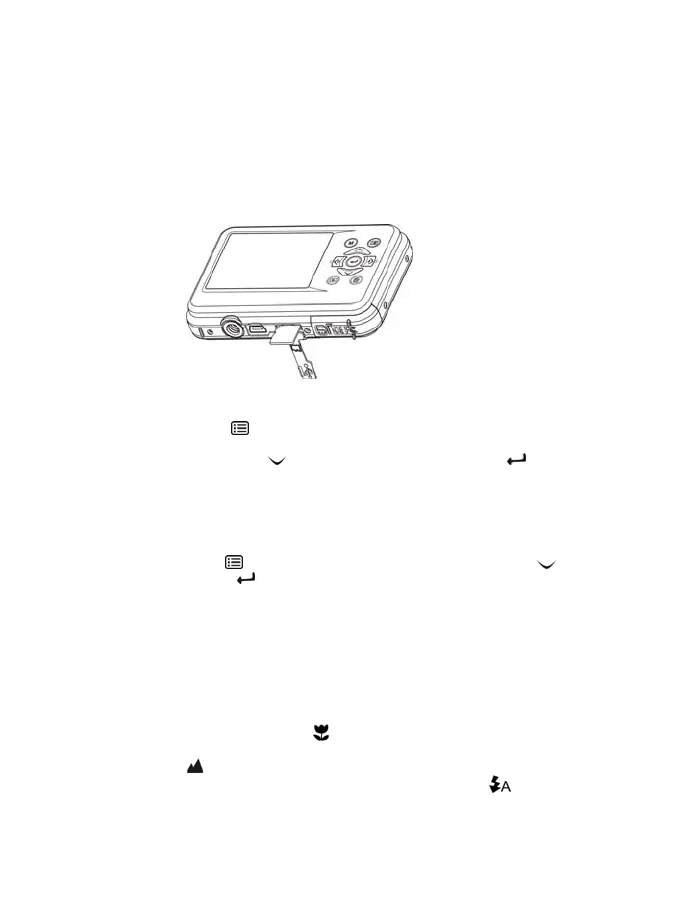
5.2 Inserting a memory card (not included)
Follow the instructions to insert the optional micro SD memory card into the camera.
1. Turn off the camera first.
2. Open the card bar.
3. Insert the micro SD card into the camera.
Note: There is only one right direction to insert the micro SD memory card into the slot. Do not force
the card into the slot, it may damage both the camera and the micro SD memory card.
Note: The micro SD memory card must be formatted before taking photographs. See the following
sections for more information.
5.3 Formatting the micro SD card
1. Press the menu button ( ) in PHOTO or VIDEO mode.
2. Select the setup mode by press the right button.
3. Select the format icon with the (
) button and press the ENTER button ( ) to
confirm.
4. Select SD card then press the ENTER button.
5.4 Setting the resolution
The camera can be set to different resolutions.
1. Press the menu button (
) in PHOTO mode, select the resolutions icon with ( ) key and
press the ENTER button (
) to confirm.
Resolutions: VGA (640 x 480), 1.3M (1280 x 960), 3M (2048 x 1536),
5M (2560 x 1920), 8M (3264 x 2448), 12M (4032 x 3024)
2. Six different resolutions will be displayed. Select the desired resolution by using the up or down
buttons and press the ENTER button to confirm the selection.
5.5 Taking photographs
1. Turn on the camera.
2. Depending on the distance to the object being photographed, use macro switch to adjust
the distance. Select the flower symbol (
) if you wish to take a close-up photograph
(11cm – 18 cm). To take videos or photographs in a distance of 0.5m to infinity, set the switch
to normal mode (
).
3. If you are not sure if there is enough lighting, turn the automatic flash(
) on by pressing the
flash button. (If the battery power is too low, the flash won’t be activated).
4. Use the LCD screen to aim the object you wish to take photograph.
Face detection function will be activate automatically in aiming at the people.










 To Next Page