17
Operating Instructions
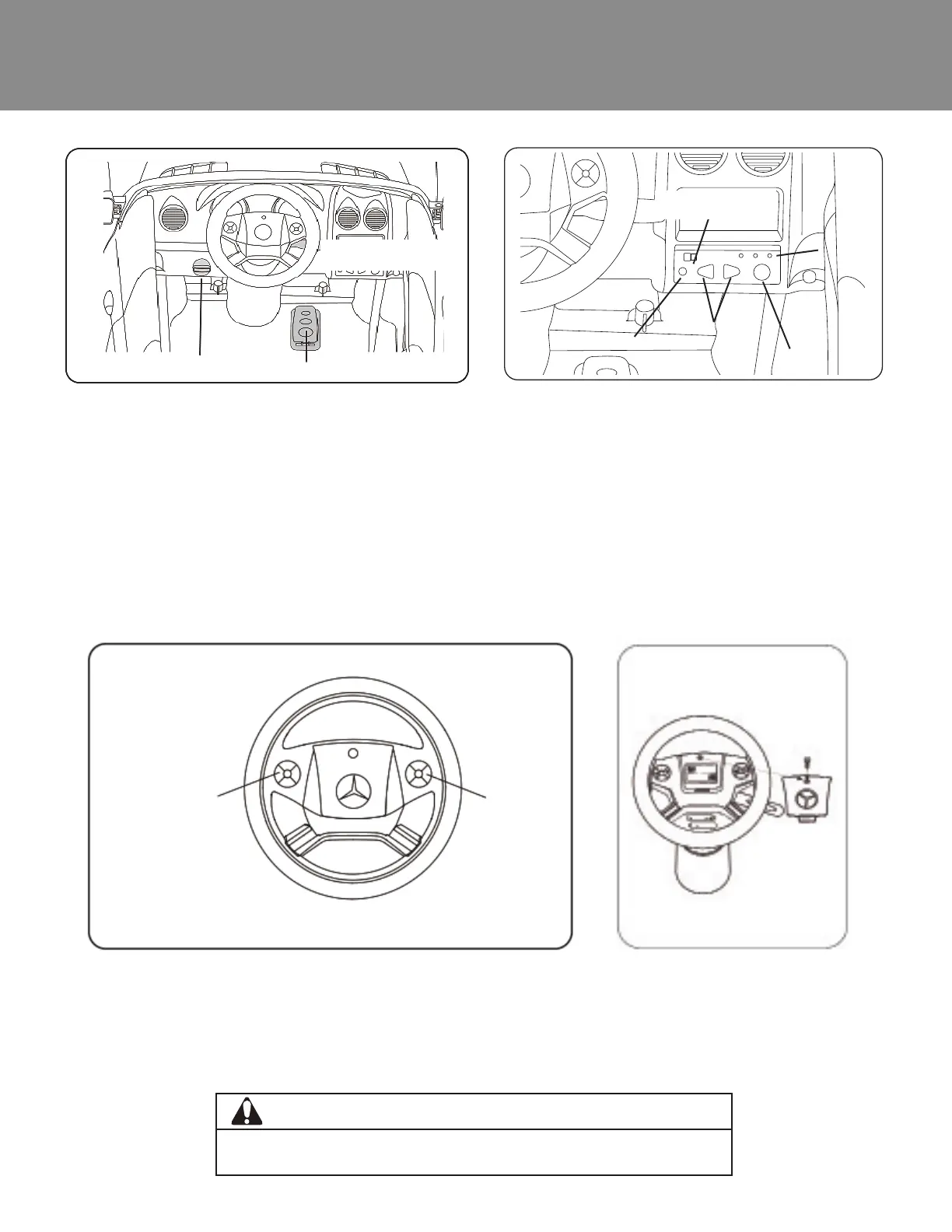
• Power: Push the power switch to turn on the car. Press the power switch again to turn off the car.
• Pedal: Press the foot pedal down to go. Release the foot pedal to stop.
• Forward/Reverse: Push the shifter up to move forward. Push the shifter down to go in reverse.
• MP3: Insert the MP3 cable into the MP3 jack and connect to your device. The car must be turned on to
use.
• Battery power indicator: When the car is on, press the power indicator button to check battery level.
• Green, Yellow, & Red Lights: Battery is fully charged. Yellow & Red Lights: Battery level is low. Red Light:
Battery power is lower than 5.5V, and the battery must be recharged.
• Radio: Slide the radio switch to use the radio function. Press the channel switch buttons to change radio
stations.
• Press the left and right buttons on the steering wheel to make sounds.
• Note: The steering wheel requires 2 x 1.5v AA/LR06 batteries to make
sounds. (See Page 13 for directions.)
Power Switch
Pedal
Shift Handle
Sounds
Sounds
WARNING
• Do not mix old batteries with new batteries or batteries of different types.
• Do not mix alkaline, standard (carbon-zinc), or rechargable (nickel-cadmium) batteries.
MP3
Jack
Power indicator
button
Power
indicator
Radio switch
Channel
switch












 To Next Page