5
Disposal of Batteries
• The batteries for the product include dangerous chemicals and must not be
thrown into an ordinary dustbin.
• Ensure that the batteries of the product are completely discharged before being
thrown into the designated battery recycling box.
• For product recycling, please follow local laws and regulation on battery recycling
and disposal.
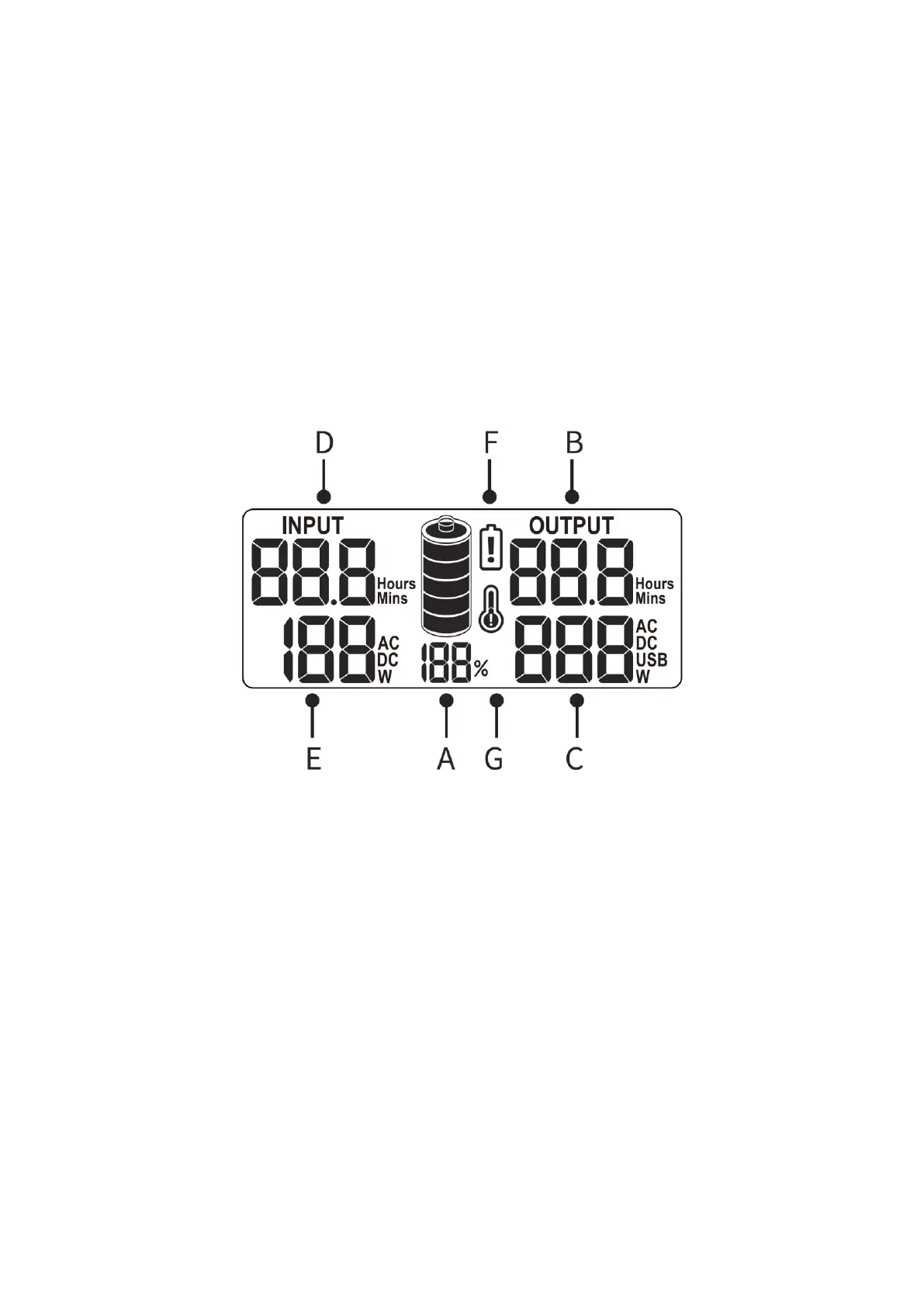
LCD Interface Introduction
A. Battery indication: The percentage and the number of battery bars show the
remaining power. The power icon will flash and jump when charging and stop
flashing when fully charged.
B. Battery time: The battery time is displayed in hours and minutes.
C. Output power: Indicates the total output power of AC, DC, and USB.
D. Remaining charging time: It is displayed in hours and minutes during the charging
of the power supply.
E. Input power: Indicates the current input of the energy storage power supply.
F. Low voltage warning: When this warning occurs, please charge the power supply.
G. Temperature warning: If this icon is displayed, it indicates that the temperature is
too high or too low. The device can be used normally when the temperature is
restored to room temperature.
Caution: When the AC switch is turned on and there is no output, the LCD will display
the output power, which is normal. Please turn off the output switch if it is not being
used.



 To Next Page