EasyManua.ls Logo

Rongta Technology RP310 - The Switch, Key and Indicator Light of Printer; Power Switch; Keys and Indicators

Rongta Technology RP310
16 pages
Print Icon
To Next Page IconTo Next Page
To Previous Page IconTo Previous Page
Loading...
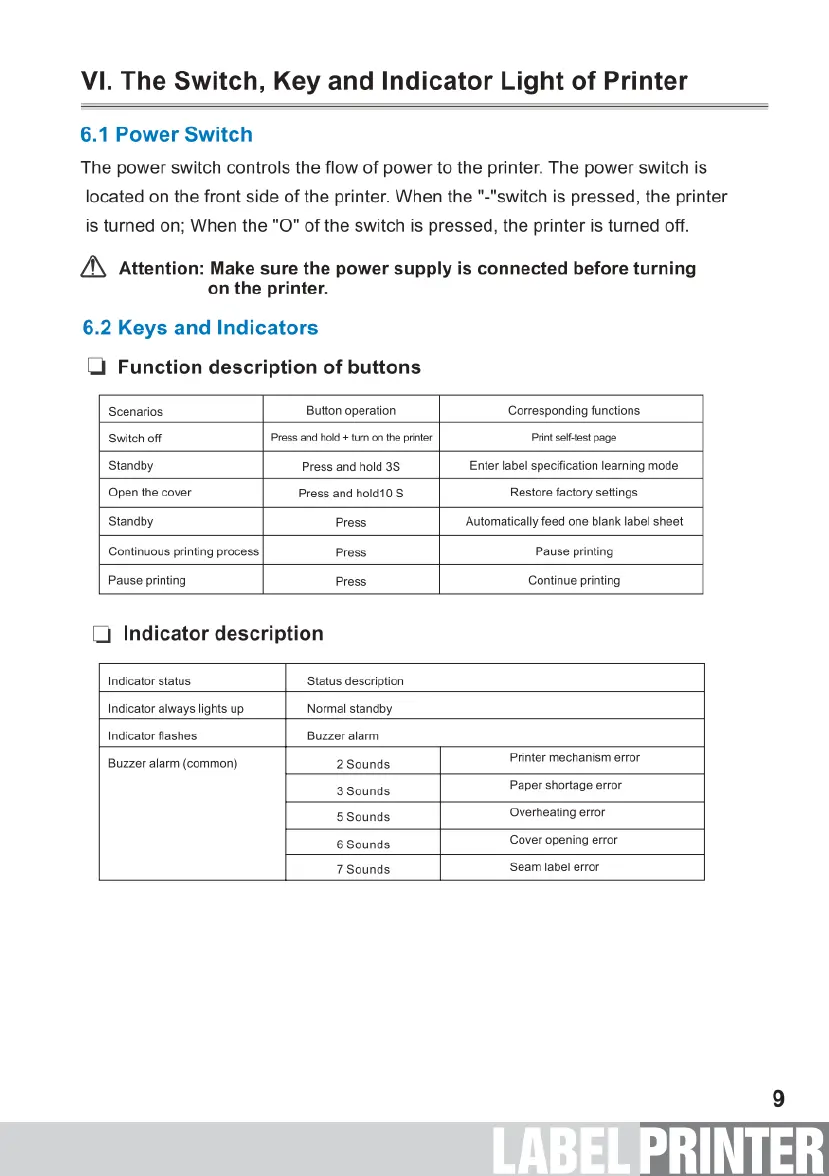
VI.
The Switch,
Key
and
Indicator
Light
of
Printer
6.1
Power
Switch
The
power
switch
controls
the
flow
of
power
to
the
printer.
The
power
switch
is
located
on
the
front
side
of
the
printer.
When
the
"-"switch
is
pressed,
the
printer
is
turned
on;
When
the
"O"
of
the
switch
is
pressed,
the
printer
is
turned
off.
&
Attention:
Make
sure
the
power
supply
is
connected
before
turning
on
the printer.
6.2
Keys
and
Indicators
[
Function
description
of
buttons
Scenarios
Button
operation
Corresponding
functions
Switch
off
Press
and
hold
+
u
on
the
prnter
Printsefftest
page
Standby
Press
and
hold
35 Enter
label
specification
learning
mode
Open
the
cover
Press
and
hold10
S
Restore
factory
settings
Standby
Press
Automatically
feed
one
blank
label
sheet
Continuous
printing
process.
Press
Pause
printing
Pause
printing
Press
Continue
printing
[
Indicator
description
Indicator
status
Status
description
Indicator
always
lights
up
Normal
standby
Indicator
flashes
Buzzer
alarm
Buzzer
alarm
(common)
2
Sounds
Printer
mechanism
error
3
Sounds
Paper
shortage
erfor
5Sounds
Overheating
error
6
Sounds
Cover
opening
error
7
Sounds
Seam
label
error

Related product manuals