EasyManua.ls Logo

Rongta Technology RP310 - Loading Paper

Rongta Technology RP310
16 pages
Print Icon
To Next Page IconTo Next Page
To Previous Page IconTo Previous Page
Loading...
[
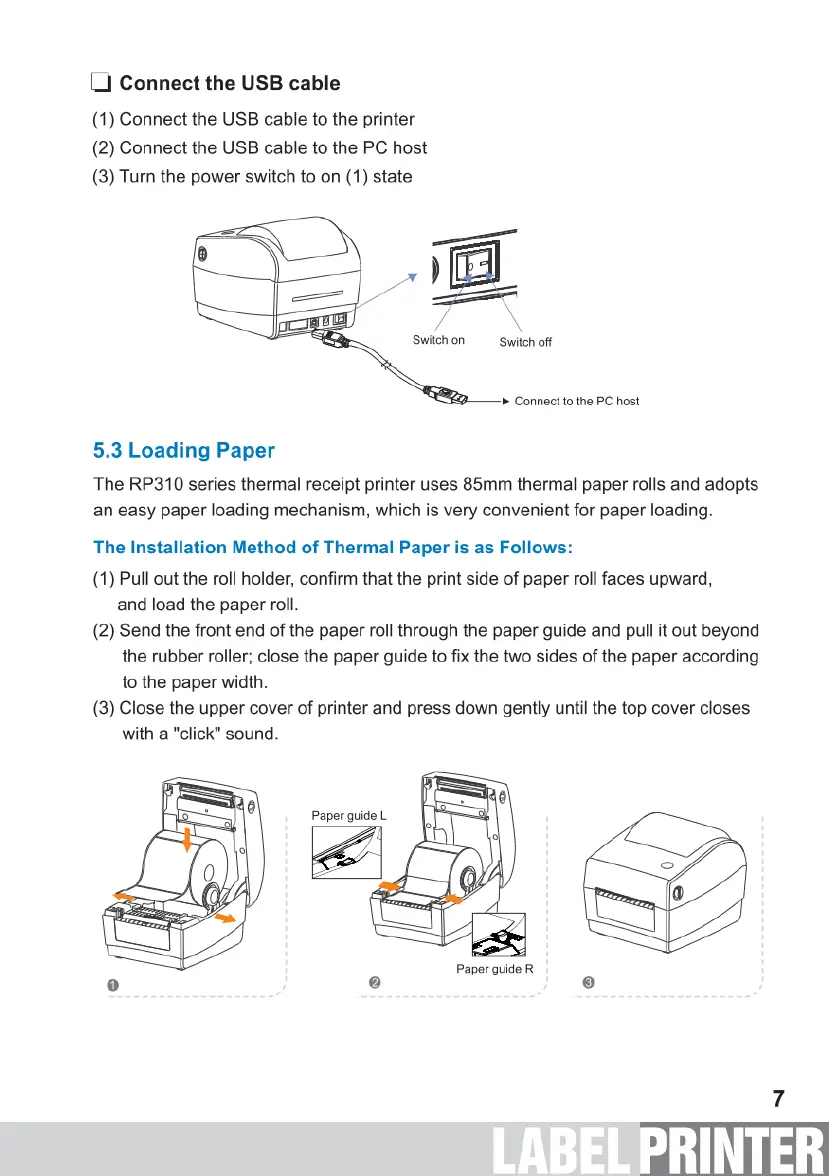
Connect
the
USB
cable
(1)
Connect
the
USB
cable
to
the
printer
(2)
Connect
the
USB
cable
to
the
PC
host
(3)
Turn
the
power
switch
to
on
(1)
state
Switchon
Switch
off
»
Connect
to
the
PC
host
5.3
Loading
Paper
The
RP310
series
thermal
receipt
printer
uses
85mm
thermal
paper
rolls
and
adopts
an
easy
paper
loading
mechanism,
which
is
very
convenient
for
paper
loading.
The
Installation
Method
of
Thermal
Paper
is
as
Follows:
(1)
Pull
out
the
roll
holder,
confirm
that
the
print
side
of
paper
roll
faces
upward,
and
load
the
paper
roll.
(2)
Send
the
front
end
of
the
paper
roll
through
the
paper
guide and
pull
it
out
beyond
the
rubber
roller;
close
the
paper
guide
to
fix
the
two
sides
of
the
paper
according
to
the
paper
width.
(3)
Close
the
upper
cover
of
printer
and press
down
gently
until
the top
cover
closes
with
a
"click”
sound.
£
Paper
guide
R

Related product manuals