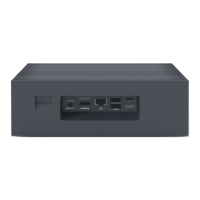
Power connector
Connect the power supply here.
HDMI port
This port can be used as a multichannel audio output.
This port can be used for diagnostics by the Roon support team
Ethernet port
Connect your Nucleus to your network via an Ethernet cable.
Nucleus will only connect to your network over Ethernet.
Note: the lights here should be on and blink even when the unit is not turned on.
USB 3.0 ports (2)
Can be used for connecting:
USB storage drive
USB audio device
USB network adapter
USB CD ripper
Internal Storage Size
Supports 2.5" HDD or SSD with a drive height of 7mm or 9mm.
Thunderbolt port
Currently not active. May become active in a future firmware update.
Nucleus Rev B
Power button and Power LED
Press the power button once to turn on the unit or initiate a clean shutdown.
A dim white LED will be lit when the unit is powered on.
Hold the power button for 4 seconds to hard power off.
Power connector
Connect the power supply here.
HDMI port (2)
This port can be used as a multichannel audio output.
This port can be used for diagnostics by the Roon support team
Ethernet port
Connect your Nucleus to your network via an Ethernet cable.
Nucleus will only connect to your network over Ethernet.
Note: the lights here should be on and blink even when the unit is not turned on.
USB 3.0 ports (2)
Can be used for connecting:
USB storage drive
USB audio device
USB network adapter
USB CD ripper
Internal Storage Size


 To Next Page
 Loading...