EasyManua.ls Logo

ROOTECH Accura 2300 - User Manual

ROOTECH Accura 2300
18 pages
Print Icon
To Next Page IconTo Next Page
Loading...
Accura
2300/2350
Quick Setup
Guide
Please refer to the User Guide for details
Question and Answer IconNeed help?

Do you have a question about the ROOTECH Accura 2300 and is the answer not in the manual?

Summary

Accura 2300;2350 Setup Procedure

Step 1: Accura 2350 Initial Setup

Illustrates the initial setup steps for the Accura 2350 model.

Step 2: Accura 2300 Initial Setup

Shows the initial setup steps for the Accura 2300 model.

Accura 2350 Button Operation

SET Button Functionality

Details the short and long press operations of the SET button on the Accura 2350.

Accura 2350 Setup Menu Navigation

3 P Module Setup Menu Flow

Outlines the sequence of menu items for configuring the 3-phase module.

1 P Module Setup Menu Flow

Outlines the sequence of menu items for configuring the 1-phase module.

Accura 2350-3 P CT5 A Configuration

CT5 A Module ID Setup

Describes how to set the unique identification number for the CT5A module.

CT5 A CT Ratio Configuration

Details the process for setting the Current Transformer ratio for the CT5A module.

CT5 A Phase Sequence;Load Direction

Explains setting phase sequence and load direction for 3-wire/4-wire CT5A connections.

Accura 2350-3 P General Setup

3 P General ID Setup

Covers the setup of the identification number for general 3-phase modules.

3 P Phase Sequence;Load Direction

Details setting phase sequence and load direction for 3-phase wiring configurations.

Accura 2350-1 P Configuration

1 P Module ID Setup

Explains the procedure for setting the identification number for single-phase modules.

1 P Wiring and Load Direction

Details setting wiring and load direction for single-phase connections.

1 P Phase Sequence Setup

Describes how to set the phase sequence for single-phase wiring.

Accura 2350-1 PSCSH Setup

1 PSCSH ID Configuration

Covers setting the identification number for the 1PSCSH model.

1 PSCSH Wiring and Load Direction

Details setting wiring and load direction for the 1PSCSH model.

Accura 2300 Button Operation and Navigation

Button Navigation Functions

Explains short/long press functions of ESC, SETUP, EVENT, and ENTER buttons.

Accura 2300 Setup Menu Overview

Setup Menu Categories

Lists main setup categories: Meter, Event, Module ID, and Information.

Accura 2300 Wiring Mode Selection

Connection Modes Overview

Presents an overview of available wiring connection modes for Accura 2300.

Accura 2300 Three Phase Wiring Diagrams

3-Phase 4-Wire Direct Connection

Wiring diagram for direct connection in a three-phase, 4-wire system.

3-Phase 3-Wire Direct Connection

Wiring diagram for direct connection in a three-phase, 3-wire system.

3-Phase 4-Wire 3 PT Connection

Wiring diagram for 3PT connection in a three-phase, 4-wire system.

3-Phase 3-Wire 2 PT Connection

Wiring diagram for 2PT connection in a three-phase, 3-wire system.

Accura 2300 Single Phase Wiring Diagrams

1-Phase 3-Wire Direct Connection

Wiring diagram for direct connection in a single-phase, 3-wire system.

1-Phase 2-Wire Direct Connection

Wiring diagram for direct connection in a single-phase, 2-wire system.

1-Phase 3-Wire 2 PT Connection

Wiring diagram for 2PT connection in a single-phase, 3-wire system.

1-Phase 2-Wire 1 PT Connection

Wiring diagram for 1PT connection in a single-phase, 2-wire system.

Accura 2300 PT Rating Configuration

Primary PT Rating Setup

Configuration of the primary voltage rating for Potential Transformers.

Secondary PT Rating Setup

Configuration of the secondary voltage rating for Potential Transformers.

Accura 2350-1 PSCSH Group Assignment

3-Wire;4-Wire Group Assignment (3 Modules)

Assigning modules to phases in a 3-wire/4-wire system with three modules.

3-Wire Group Assignment (2 Modules)

Assigning modules to phases in a 3-wire system with two modules.

Accura 2350 Module ID Setup

Module ID Parameters Overview

Explains parameters like communication, conflict, and total counts for module IDs.

Module ID Update Procedure

Details the steps for updating module identification information.

Overview

The Accura 2300/2350 series is a comprehensive energy monitoring system designed for both human and nature's energy solutions. This quick setup guide outlines the essential steps for configuring the devices, emphasizing ease of use and efficient operation. The system comprises two main components: the Accura 2350 modules, which are current transformers (CTs) with integrated measurement capabilities, and the Accura 2300 main unit, which acts as the central display and control interface.

Function Description

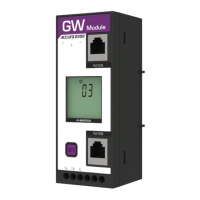
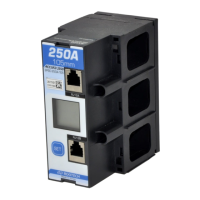
The Accura 2350 modules are designed to measure current and, in some configurations, voltage, providing real-time data on energy consumption. These modules come in various types, including single-phase (1P) and three-phase (3P) configurations, with different current ratings (e.g., 60A, 125A, 250A, 400A) and CT types (e.g., CT Inside, CT5A). They are equipped with RJ12 ports for communication with the Accura 2300 main unit, allowing for a modular and scalable energy monitoring system. Each Accura 2350 module can be individually configured for its ID, phase sequence, load direction, rated current, and leakage current settings, ensuring accurate data collection tailored to specific electrical installations.

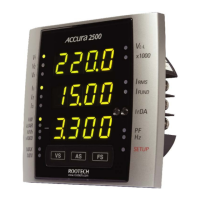
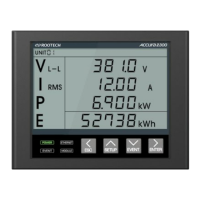
The Accura 2300 main unit serves as the central hub for the system. It receives data from the connected Accura 2350 modules and displays key electrical parameters such as voltage (V L-L), current (I RMS), active power (P), and total energy (E). The Accura 2300 features a clear LCD display and a user-friendly interface with dedicated buttons for navigation, setup, event viewing, and data entry. It supports various wiring modes, including three-phase 4-wire, three-phase 3-wire, single-phase 3-wire, and single-phase 2-wire connections, accommodating a wide range of electrical systems. The main unit also allows for the configuration of PT (Potential Transformer) ratings, which are crucial for accurate voltage measurements in systems with external voltage transformers. Furthermore, it provides functionalities for managing module IDs, detecting communication conflicts, and updating module information, ensuring robust system operation.

Usage Features

The Accura 2300/2350 system is designed for intuitive setup and operation. The quick setup guide provides a clear, step-by-step procedure, starting with the configuration of the Accura 2350 modules (Step 1) and then proceeding to the Accura 2300 main unit (Step 2).

Accura 2350 Module Operation:

Each Accura 2350 module has a single "SET" button for configuration.

  • Short press: This action is used to move to the next menu item or to change a displayed value. This allows users to cycle through various settings such as ID, phase sequence, load direction, rated current, and leakage current.
  • Long press: A long press on the "SET" button is used to select a menu item for modification (which typically makes the item blink) or to save a changed value. This ensures that settings are intentionally applied and stored.

Accura 2350 Setup Menu:

The setup menu for the Accura 2350 modules is organized by module type (3P Module for three-phase and 1P Module for single-phase).

  • 3P Module (Three Phase): Settings include ID, Phase Sequence/Load Direction, Load Connection, Load Phase Selection, CT ratio (for CT5A modules), Rated Current, LCD Display Direction, and Leakage Current. The ID, Phase Sequence/Load Direction, and CT ratio are marked as required settings.
  • 1P Module (Single Phase): Settings include ID, Wiring/Load Direction, Phase Sequence, Rated Current, Leakage Current, and Leakage Current Event. ID, Wiring/Load Direction, and Phase Sequence are required.

Specific setup examples are provided for different module types:

  • Accura 2350-3P CT5A Setup: This covers ID setup (range 0-39) and CT Ratio setup (range 0-999). The CT ratio calculation (Primary Rated Current / Secondary Rated Current) is clearly explained. Phase Sequence/Load Direction setup is illustrated with a three-phase 3-wire/4-wire 3CT through-hole wiring diagram, showing how to configure the load direction and phase sequence (e.g., L1(A), L2(B), L3(C)).
  • Accura 2350-3P Setup: Similar to the CT5A setup, it covers ID setup (range 0-39) and Phase Sequence/Load Direction for three-phase 4-wire/3-wire through-hole wiring.
  • Accura 2350-1P Setup: This includes ID setup (range 0-39), Wiring/Load Direction setup (VLN for Line to Neutral, VLL for Line to Line), and Phase Sequence setup for single-phase LN (Line to Neutral) through-hole wiring.
  • Accura 2350-1PSCSH Setup: This module type also covers ID setup (range 0-39) and Wiring/Load Direction (VLN, VLL). For phase sequence, it details configurations for three-phase 3-wire/4-wire with 3 modules and three-phase 3-wire with 2 modules, showing how to assign phases (L1(A), L2(B), L3(C)) and load direction.

Accura 2300 Main Unit Operation:

The Accura 2300 main unit features multiple buttons: ESC, SETUP, EVENT, and ENTER.

  • Short press: Used to move to the next menu item or change a value.
  • Long press: Each button has a specific function when long-pressed:
    • ESC: Do not save/Exit Setup mode.
    • SETUP: Enter Setup Mode (this is the primary way to access the main unit's configuration).
    • EVENT: Enter Event Mode.
    • ENTER: Select an item or save changes.

Accura 2300 Setup Menu:

The Accura 2300's setup menu is categorized into Meter, Event, A2350 Module ID, and Information.

  • Meter: Includes Voltage Wiring (Conn) and PT Rating (Pr, Sc). Voltage Wiring is a required setting, offering various connection modes like Three Phase 4-wire (3P4U), Three Phase 3-wire (3P3U), Single Phase 3-wire (1P3U), Single Phase 2-wire (1P2U), and Three Phase 3-wire Open-delta (3P3O). PT Rating allows setting primary (Pr) and secondary (Sc) line-to-line voltage ratings, with specific ranges provided. For direct connections without PTs, both values should be set to the same line-to-line voltage.
  • Event: Configures DIP Event and Swell Event settings.
  • A2350 Module ID: Manages module IDs, including communication status (Cn), conflict/standby IDs (CF), total connected modules (tO), and an option to update module ID information (IduP).
  • Information: Displays Serial Number (Sn), HW version (HUEr), and SW version (SUEr).

Accura 2350-1PSCSH Three Phase Group Assignment:

This feature allows users to assign Accura 2350-1PSCSH modules to specific phases (L1, L2, L3) and configure their IDs for three-phase systems. The setup process involves entering the group assignment menu, selecting the desired phase (a, b, or c), moving to the next digit, changing the value, and finally completing the setup.

Accura 2350 Module ID Setup (from Accura 2300):

The Accura 2300 can update the module ID information of connected Accura 2350s. This process involves navigating to the "IduP" option in the A2350 Module ID menu, long-pressing ENTER to initiate the update (IduP blinks), and then long-pressing ESC to return to the display mode once the update is complete (IduP stops blinking).

Maintenance Features

While the quick setup guide primarily focuses on initial configuration, several aspects contribute to the system's maintainability:

  • Modular Design: The Accura 2350 modules are separate from the Accura 2300 main unit, allowing for easier replacement or expansion of individual components without affecting the entire system.
  • Clear Error Indicators: The Accura 2300's display provides information on "conflict/standby IDs" (CF), which helps in identifying and troubleshooting issues related to module communication or ID conflicts.
  • Firmware Updates: The presence of "HW version" and "SW version" information suggests that the system supports firmware updates, which can improve performance, add new features, or fix bugs, extending the lifespan and functionality of the devices.
  • User Guide Reference: The repeated instruction to "Please refer to the User Guide for details" indicates that a comprehensive manual is available, providing in-depth information for advanced troubleshooting, detailed wiring diagrams, and maintenance procedures beyond the scope of the quick setup. This ensures that users have access to complete documentation for ongoing support and maintenance.
  • Robust Wiring Diagrams: The detailed wiring diagrams for various connection types (direct, 3PT, 2PT, 1PT for three-phase and single-phase systems) facilitate correct installation and troubleshooting of wiring issues, which are critical for accurate measurements and system reliability.
  • Parameter Saving: The "Long press" function to save changed values on both the Accura 2350 modules and the Accura 2300 main unit ensures that configurations are persistent, reducing the need for frequent re-configuration and improving system stability.

In summary, the Accura 2300/2350 system offers a robust and user-friendly solution for energy monitoring, with a focus on flexible configuration, clear operational procedures, and built-in features that support both initial setup and long-term maintenance.

ROOTECH Accura 2300 Specifications

General IconGeneral
CategoryInfrared Thermometer
Measurement Range-50°C to 2300°C (-58°F to 4172°F)
Response Time500ms
Spectral Response8-14μm
Distance to Spot Ratio50:1
Operating Temperature0°C to 50°C (32°F to 122°F)
Resolution0.1°C / 0.1°F
EmissivityAdjustable 0.10-1.00
DisplayLCD with backlight
Battery Type9V Battery
Battery Life12 hours (continuous use)

Related product manuals