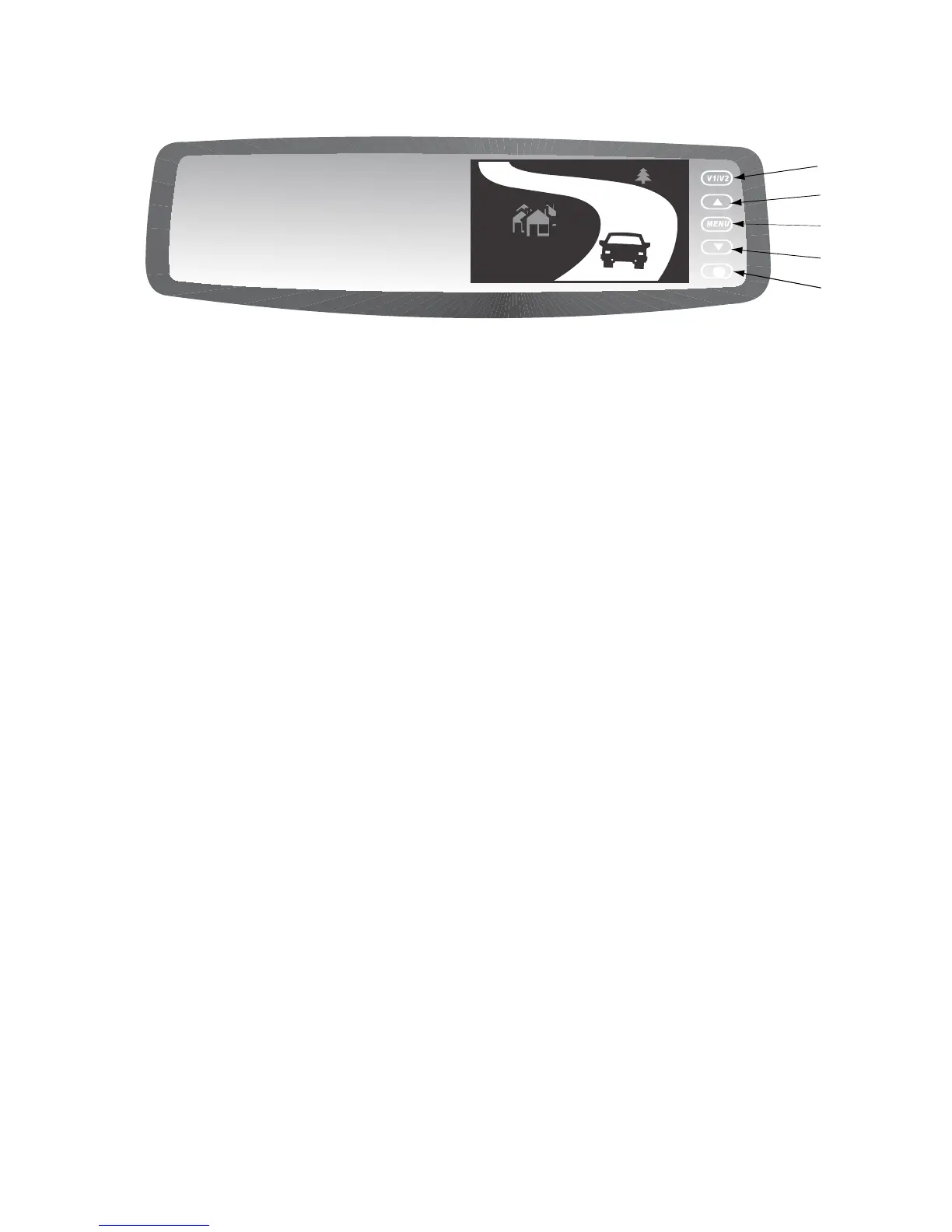
How To Operate Display:
1. V1/V2 - Not Applicable.
2. "Up" - Menu selection control.
3. Menu - Switches to setup menu.
4. "Down" - Menu selection control.
5. Power - Switches monitor off.
Typically not used
How To Set Your Monitor:
On-screen menu commands may be
selected pressing the MENU button
while the mirror/monitor is on:
Brightness
Contrast
Saturation
Hue
Sharpness
4:3/16:9
Reset
How To Operate Display
Monitor Technical Specications:
Screen: 4.3" TFT Color LCD
Brightness: 500cd/m
2
Contrast ratio: 300:1
Resolution: 480 x 272
Current Draw: Max 120mA
Video format: NTSC/PAL
Display format: 4 : 3 or 16 : 9
Power Supply: 12V
Working Temp.
°F(°C): -5° to 158°
(-20° to 70°)
IMPORTANT: The Rearview Mirror/
Monitor is not intended to be used for
prolonged periods of time. Therefore
the monitor stays off until triggered by
reverse circuit.


 To Next Page