7
Gaming Case
PRISM S / PRISM S-LITE
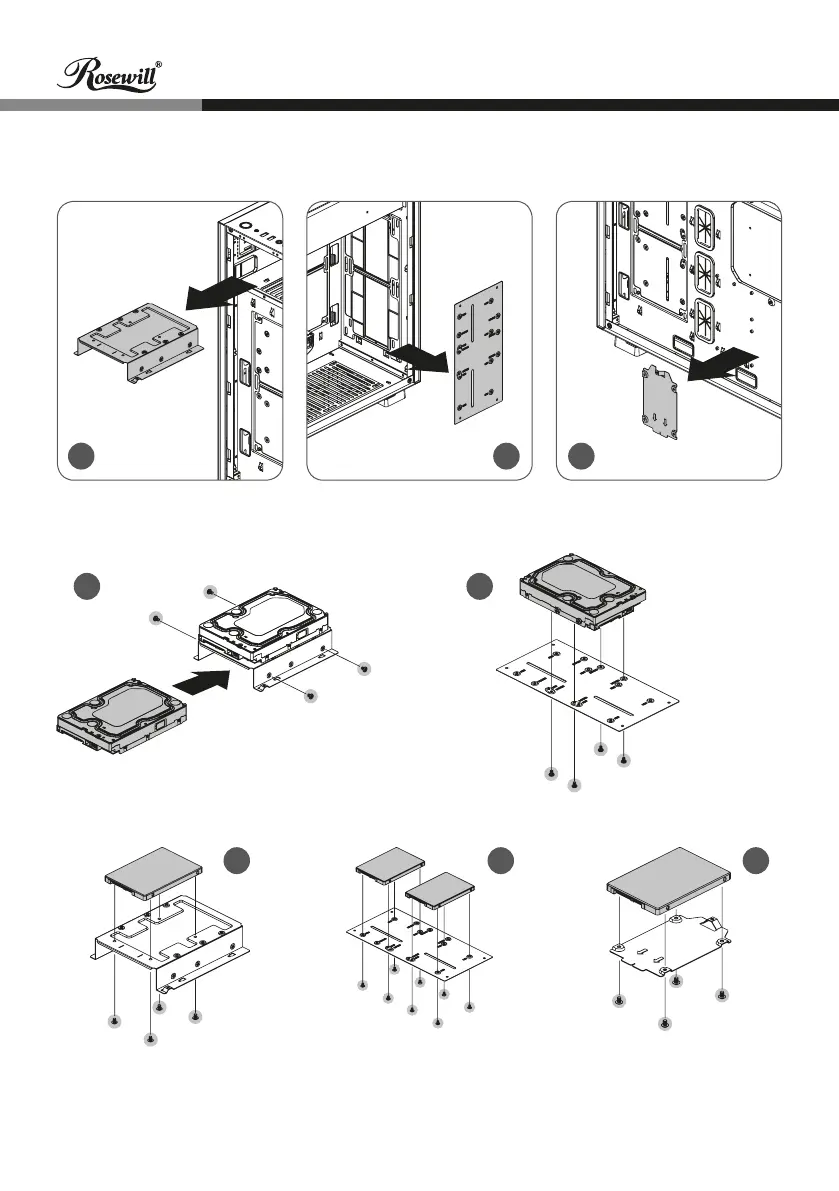
5a
5d
5f 5g 5h
5e
5c
5-2. Secure the 3.5" drive onto the tray/plate with Screw-B (Figure 5d/5e).
5-3. Secure the 2.5” drive onto the tray with Screw-C (Figure 5f/5g/5h).
* If drive is installed on 5e or 5g, water cooling radiator cannot be added.
5-4. Put the tray/plate back onto the chassis and secure with screws.
5. Install 3.5”/2.5” HDD/SDD
5-1. Take out the 3.5”/2.5” HDD/SDD trays/plates from the chassis (Figure 5a/5b/5c).
5b


 To Next Page