12
© All rights reserved by Rosewill
User ManualRISE
CASE
Thank you for purchasing a High-Quality Rosewill Product.
Please regoster your product at : http://www.rosewill.com
for complete warranty information and future support for your product.
If you have any question while using our products, please visit our website : www.rosewill.com
for user manual or feel free to contact us.
Support Phone Number: 800-575-9885
Support Email: techsupport@rosewill.com
Appendix B :
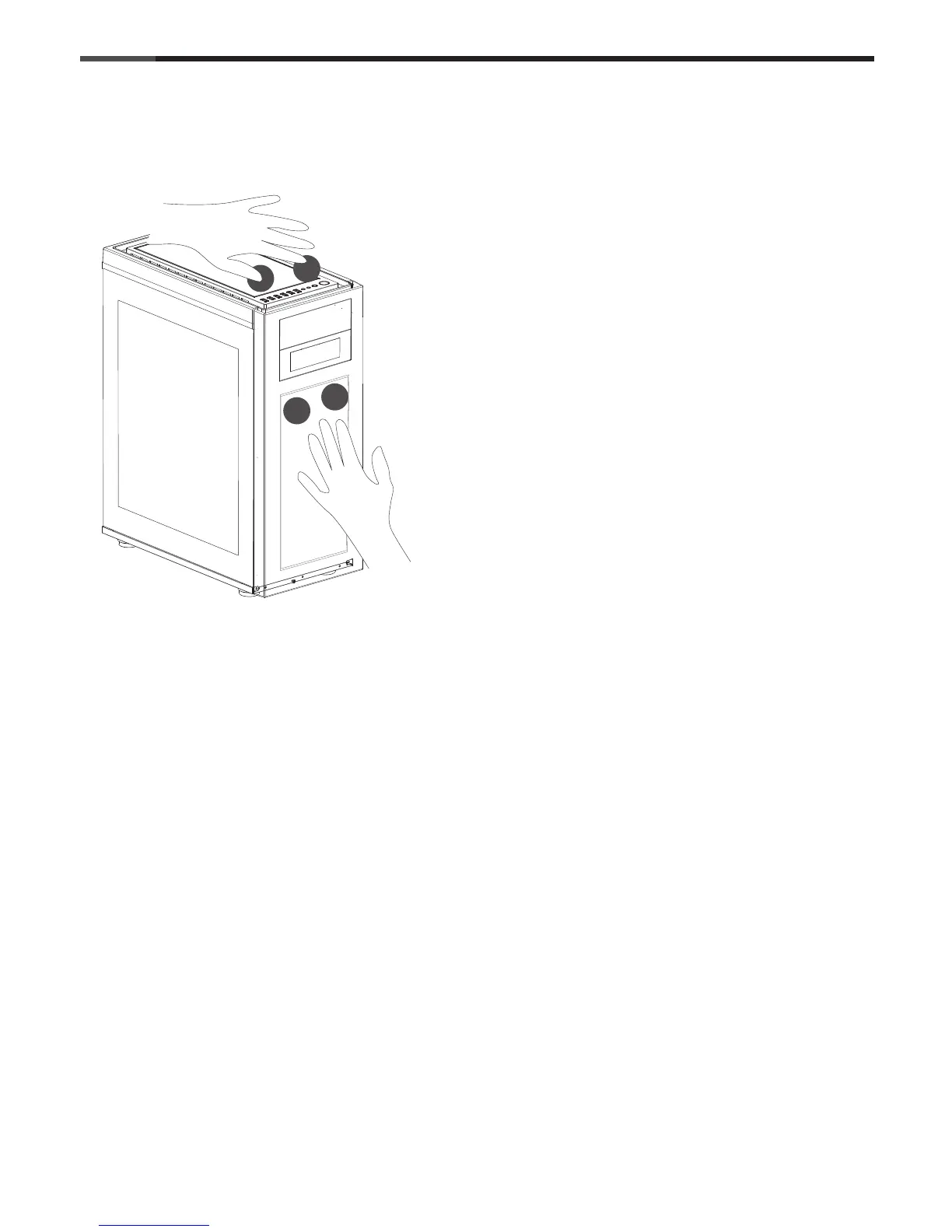
How to remove the POP out dust filter ( front & top)
By default, the pop out dust filter doors are locked down by one thumb screws to prevent damage during
transport. The thumb screws will first need to be removed before the dust filter doors can be easily popped
in and out. Should you prefer to disable the pop out feature, simply leave the thumb screw in place.
Remove the Front and then the Top panel of the case.
Locate the thumb screw and twist counterclockwise to remove.
Push down on the highlighted spots simultaneously
to unlatch the dust filter for removal.
A click sound can be heard.
Push down on the highlighted spots simultaneously
to latch in the dust filter when maintenance is complete.
A click sound can be heard.




 To Next Page