PAGE 7
Rositek Technologies
www.rositek.com
© 2021 Rositek
All rights reserved
Email: support@rositek.com
PREPARING
PRESS
1. Prepare materials you wish to press.
2. Make sure the press stands on a shorter flat workbench or ground.
3. Ensure the press is clean and free of residue or dust buildup.
4. Make sure the switch is turned OFF.
5. Insert the included power cord into the power cord socket and then
plug the other end into an electrical outlet.
OPERATING INSTRUCTIONS
STARTING
PRESS
1. Flip the ON / OFF switch to turn the press on. The PID temp controller and
the power switch both become lit.
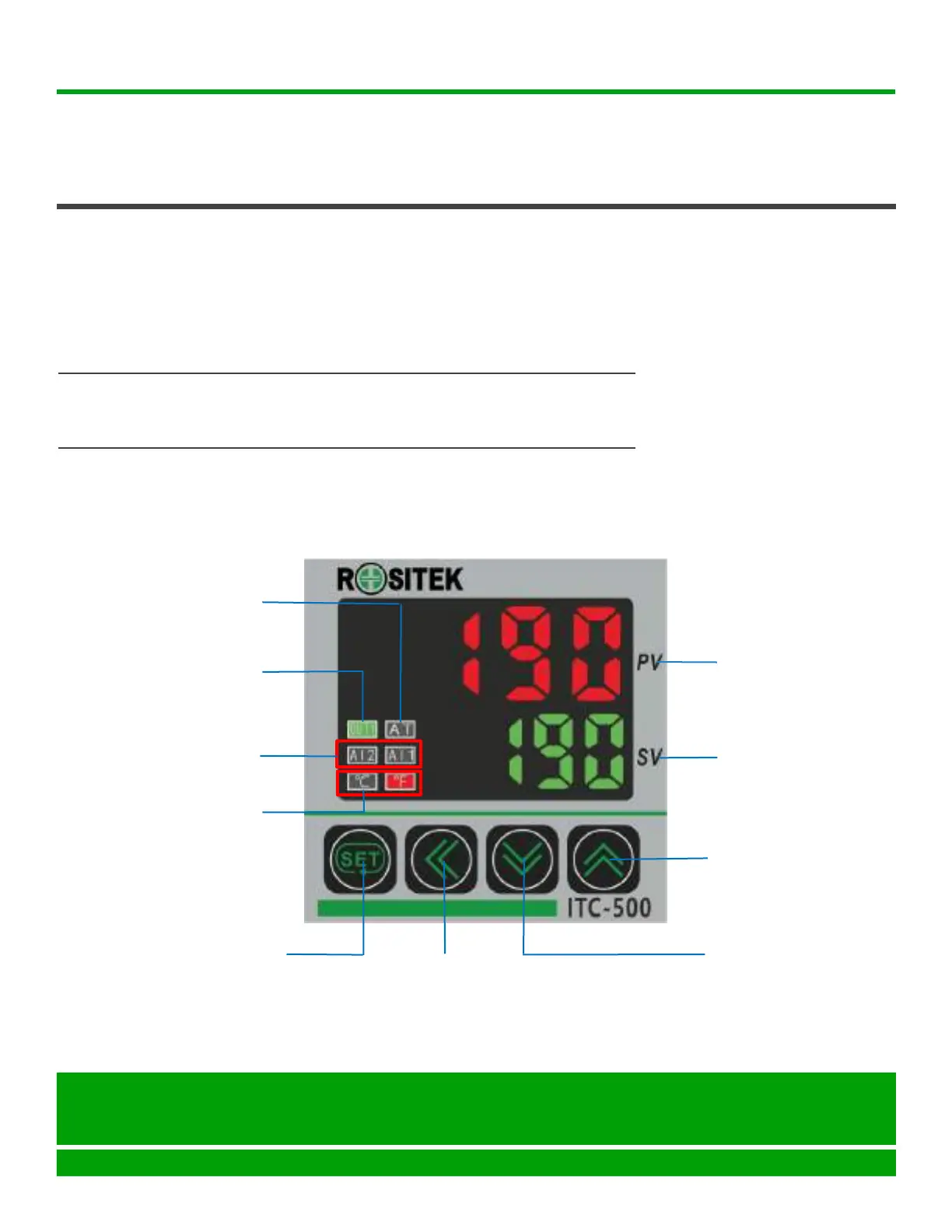
PID CONTROLLER INSTRUCTION FOR RMP2
PV (Process Value)
Red color
SV (Set Value)
Green color
UP Key
DOWN Key
SHIFT Key
Press this key to shift left
and right position.
SET (Parameter Setting)
Press this key to shift digit
of parameter value setting.
OUT(Output Lamp)
Green light on while
heating up
AL1, AL2(Alarm Lamp)
Red light while working
AT(Autotune Lamp)
Flash Green while working
℃ and ℉ Pilot Lamp
Red light while working
USER GUIDE AND TROUBLESHOOTING -- RMP2


 To Next Page