EasyManua.ls Logo

Ross TC700MC - User Manual

Ross TC700MC
44 pages
Print Icon
To Next Page IconTo Next Page
Loading...
MN700-MC0010
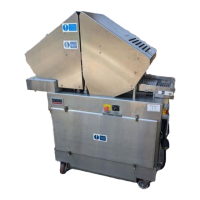
MODEL TC700MC
TENDERIZER
MADE IN USA
Ross Industries, Inc.
Midland, Virginia 22728
Phone: (540) 439-3271
(800) 336-6010
Fax: (540) 439-2740

Questions and Answers

  • H
    heather83Aug 18, 2025
    What to do if Ross TC700MC Commercial Food Equipment conveyor does not advance?
    • D
      Debra RichardsonAug 18, 2025
      If the conveyor on your Ross Commercial Food Equipment does not advance or advances irregularly, there are several potential causes. It could be that the cam follower is out of adjustment. To fix this, remove the side panel and conveyor box cover, rotate the conveyor drive shaft to its extreme lateral movement, loosen the lock nut on the cam follower, manually rotate the motor until the cam plate is at the top of its stroke, adjust the screw on the cam follower so the index pawl just contacts a tooth on the index wheel, and then tighten the lock nut. Other possible causes include a broken index pawl, a broken rocker bar spring, or a broken pin holding the index wheel to the drive shaft, all of which would require replacement.
  • V
    Virginia BrownAug 25, 2025
    How to prevent excessive blade bending in Ross TC700MC Commercial Food Equipment?
    • J
      juancomptonAug 26, 2025
      To prevent excessive blade bending in your Ross Commercial Food Equipment, ensure that the operator is promptly removing bent blades and is properly trained on the machine's cleaning and maintenance. Blade assemblies should be removed daily for cleaning, and any bent or damaged blades must be replaced. Also, check if the reset pads are worn and replace them if necessary. If you are processing very thin cuts of meat, make sure to stack them so they will be held down by the guide frame.
  • S
    Samantha BarnesAug 28, 2025
    Why Ross TC700MC vibrates and makes banging noise?
    • D
      Denise ParrishAug 29, 2025
      If your Ross Commercial Food Equipment runs but exhibits severe vibration and loud banging noises during the upstroke, along with excessive blade bending, a likely cause is a worn or broken guide stop. Inspect and maintain the toggle and guide raiser assemblies. The toggle clamp should pivot freely, and both assemblies should be centered. Look for wear or damage, including the condition of the unlock cushions. Replace any worn parts. Ensure both toggles unlock simultaneously and check the snap-ring positions on the main and guide uprights.
  • J
    joseph16Sep 1, 2025
    Why Ross TC700MC vibrates constantly?
    • R
      reeddeborahSep 1, 2025
      If your Ross Commercial Food Equipment experiences constant vibration during both up and down strokes while running, worn bearings and/or uprights are a likely cause. Inspect these components and replace them as needed.
  • M
    Matthew DavisSep 4, 2025
    What causes Ross TC700MC conveyor to advance too far?
    • D
      Desiree RobertsSep 4, 2025
      If the conveyor on your Ross Commercial Food Equipment advances further than normal, the belt is likely too loose. To resolve this, tighten the belt tensioning screws until the overshoot stops, ensuring you tighten both screws equally. Avoid overtightening. If necessary, remove a link from the conveyor chain.
  • M
    Michael JohnsonSep 7, 2025
    Why does Ross TC700MC conveyor belt jump off?
    • E
      Erica LawsonSep 7, 2025
      If the conveyor belt on your Ross Commercial Food Equipment keeps jumping off the drive shaft, the belt is likely too loose. Tighten the belt tensioning screws until the jumping stops, making sure to tighten both screws evenly. Do not overtighten. If the problem persists, consider removing a link from the conveyor chain.
  • V
    Veronica LopezSep 12, 2025
    Why Ross TC700MC Commercial Food Equipment bangs at bottom of stroke?
    • K
      Kimberly TravisSep 12, 2025
      If your Ross Commercial Food Equipment makes a loud banging noise at the bottom of each stroke while running, the guide frame may be hitting the side of the conveyor. Inspect the guide frame and replace it if necessary.
  • N
    Nathan HughesNov 14, 2025
    Why Ross TC700MC Commercial Food Equipment won't start?
    • A
      Aaron HoltNov 14, 2025
      If your Ross Commercial Food Equipment doesn't start, even when plugged in with guards closed and the main power switch pulled out, several issues could be the cause. First, there might be no incoming power; check the voltage at the power socket, measuring from phase to phase, not to ground. Second, the power cord or plug could be faulty; disassemble the plug cap to check connections or measure voltage from terminals 1 to 2 to 3 in the electrical compartment, again, not to ground. Third, the safety guard switches may not be operating; you can test this by temporarily connecting terminal 7 of relay K2 to ground and pressing the start button. If it starts, inspect the guard switches for damage or misalignment and replace the reed switch if necessary. Lastly, the fuse F5 might be blown; check...
  • J
    Joshua ShepherdNov 20, 2025
    What to do if Ross TC700MC only clicks when starting?
    • C
      craiggomezNov 20, 2025
      If your Ross Commercial Food Equipment only produces a clicking sound when the start switch is pressed, and the relay seems to be operating, consider these potential issues. The transformer T1 might be faulty or incorrectly connected; check the voltage between terminals X1 and X3 of the transformer, ensuring it reads 120 VAC. The power switch S1 could also be defective; verify the voltage between the left terminal of the switch and ground reads 120 VAC when the switch is on. Another possibility is a faulty START switch S2; with the power switch on and the start switch pressed, check for 120 VAC between the right terminal of the start switch and ground. Furthermore, relay K2 might be faulty; measure the voltage between terminals 2 and 7 of the relay while attempting to start the machine, wh...

Summary

WARRANTY POLICY

INTRODUCTION

SAFETY FIRST!

DAILY CLEANING PROCEDURE

1 SPECIFICATIONS

ELECTRICAL SPECIFICATIONS

Details voltage, frequency, current, and power cord specifications for the tenderizer.

2 DESCRIPTION

2.1 MECHANICAL DESCRIPTION

Explains the mechanical operation of the tenderizer head, blades, and conveyor drive.

2.2 ELECTRICAL DESCRIPTION

Describes the electrical control system components and their location within the tenderizer.

2.2 ELECTRICAL CONTINUED

Details the power flow, starter, safety sensors, and head adjusting motor circuit operation.

3 INSTALLATION

3.1 UNCRATING INSTRUCTIONS

Instructions for safely removing the tenderizer from its shipping crate and skid.

3.2 INSTALLATION GUIDELINES

Guidance on positioning the tenderizer, floor requirements, and caster care.

3.3 ELECTRICAL REQUIREMENTS

3.4 POWER PHASING

3.5 INSTALLATION CHART

4 SPARE PARTS

5 ILLUSTRATIONS

5.1 GUARD;SAFETY SWITCH

Details the components and part numbers for the guard and safety switch assembly.

5.2 HEAD CARRIER ASSEMBLY

Lists components and part numbers for the head carrier assembly of the tenderizer.

5.3 HEAD ASSEMBLY

Provides a breakdown of the head assembly, including blades and retainers.

5.4 CONVEYOR DRIVE ASSEMBLY

Details the components and part numbers for the conveyor drive assembly.

5.5 CONVEYOR ASSEMBLY

Lists components and part numbers for the conveyor assembly, including rails and belt supports.

5.6 MOTOR;REDUCER ASSEMBLY

Details the components and part numbers for the motor and reducer assembly.

5.7 CAM DRIVE ASSEMBLY

Lists components and part numbers for the cam drive assembly.

5.8 CAM ASSEMBLY

Provides a breakdown of the cam assembly components and their part numbers.

5.9 RETURN SPRING;CAM ASSEMBLY

Details components and part numbers for the return spring and cam assembly.

5.10 TOGGLE CLAMP;RETURN SPRING ASSEMBLY

Lists components and part numbers for the toggle clamp and return spring assembly.

5.11 MAIN FRAME;ROCKER BAR CAM FOLLOWER

Details components and part numbers for the main frame and rocker bar cam follower.

6 OPERATION

6.1 MACHINE OPERATION

Step-by-step instructions for operating the tenderizer safely and effectively.

6.2 CLEANING AND BLADE REPLACEMENT

Provides daily cleaning procedures and instructions for replacing tenderizer blades.

6.3 HEAD ASSEMBLY INSTALLATION

Illustrates the process of installing the head assembly onto the tenderizer.

7 MAINTENANCE

7.1 INSPECTION

Outlines the nature and frequency of inspections for bent blades and height controls.

7.2 LUBRICATION

Details lubrication requirements based on operating hours and frequency.

7.3 ADJUSTMENTS;SPECIFIC REPAIRS

Covers adjustments for conveyor link belt stretch and height adjusting mechanism.

7.3.2 HEAD HEIGHT ADJUSTMENT

Explains how to check and adjust the clearance between blades and the conveyor belt.

7.3.3 HEIGHT ADJUST CAM MECHANISM

Details the operation and potential issues of the height adjust cam mechanism.

7.3.4 RESET PAD;PLATE CLEARANCE

Explains the function and importance of reset pads and their clearance.

7.3.5 TOGGLE RING REPLACEMENT

Step-by-step instructions for replacing the toggle ring assembly.

8 TROUBLESHOOTING

TROUBLESHOOTING CHART

A chart detailing common problems, their causes, and recommended remedies.

9 WIRING;SCHEMATIC

Ross TC700MC Specifications

General IconGeneral
BrandRoss
ModelTC700MC
CategoryCommercial Food Equipment
LanguageEnglish

Related product manuals