3 x Operation
29
BA ROTEX HPSU compact 2 - 04/2011
3.4.4 Display operating data
After the machine is switched on, the current operating data appear on the display of the additional control unit (HPRA1).
If you are currently within a menu item belonging to the main menu, you can return to the operating data display by making a
multiple selection and confirming with "<<<" (= menu item "Calculation" - fig. 3-9).
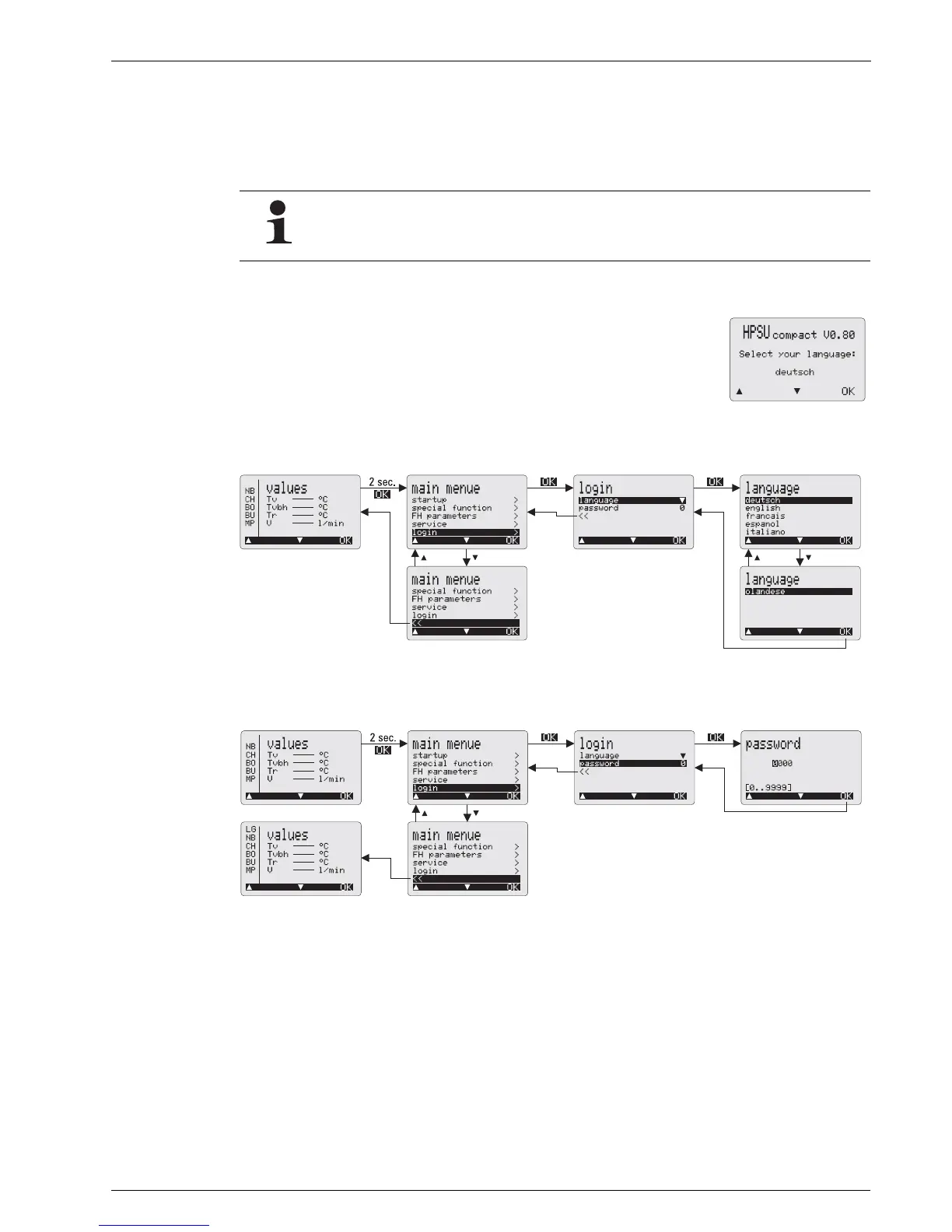
3.4.5 Changing the display language
During operation, you can change the language at any time as follows:
3.4.6 Restarting the additional control unit (RESET)
Various operating data are only visible by entering the appropriate password in the "Login" menu item
(specialist heating technician).
The following display appears when setting up the first time or after a reset.
1. Select the required language with the "" and "" keys.
2. Confirm with the "OK" key.
Fig. 3-10 Start screen
Fig. 3-11 Setting the display language of the additional control unit with the specialist’s code
Fig. 3-12 Restarting the additional control unit






 To Next Page