ROTH SUB ZERO
12 | Roth Sub Zero User Manual
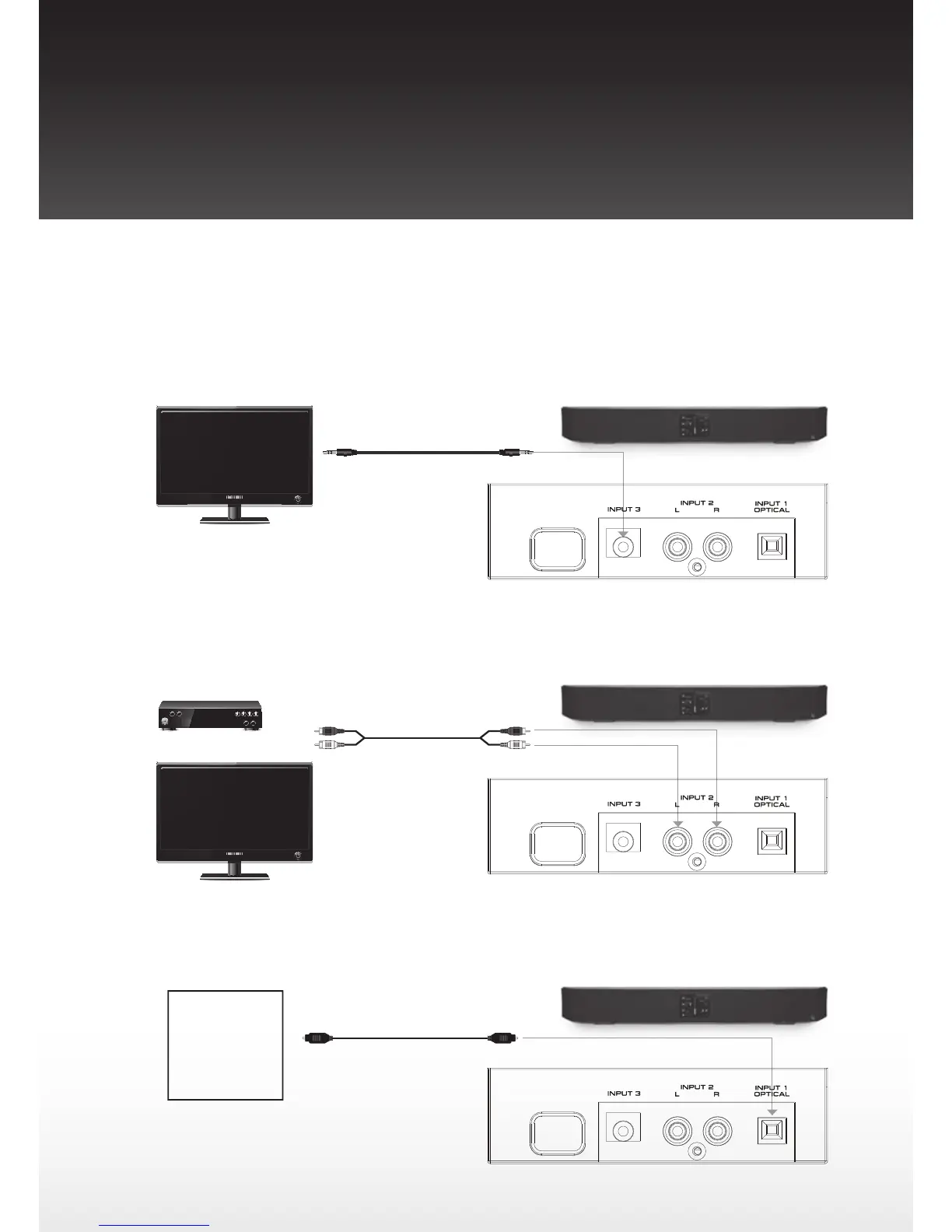
Hookup Diagram
TV Audio Hookup - Case 1
If your TV has a headphone output, plug the supplied 3.5 mm mini stereo cable into the headphone output from your
TV and plug the other end to the Input 3 jack on the back of your Sub Zero.
TV Audio Hookup - Case 2
If your TV does not have a headphone output and you are using a set top box, plug one end of the included RCA cable
into the audio outputs from your set top box and plug the other end into Input 2 on the back of your Sub Zero.
Audio Hookup - Other Device
The Input 1 can be attached to Blu-ray, DVD or CD players or Home Video Game systems.
Sub Zero
To Input 1 (Optical) of Sub Zero
Optical Cable
To Audio Output
Other Device
Blu-ray Players
DVD Players
CD Players
Home Video Game
Systems
Sub Zero
RCA Cable (Supplied)
To Audio Output of
Set Top Box or TV
To Input 2 (RCA jack) of Sub Zero
[Note]
Some TV’s do not have a headphone
output but do have Audio outputs with
RCA jacks. You can connect them to
Input 2 by using the RCA cable. This will
also work fine except that the Sub Zero
volume must now be adjusted using the
Sub Zero remote.
Set Top Box
Or TV
Sub Zero Rear Connectors
Sub Zero Rear Connectors
3.5mmMiniStereoCable
(Supplied)
To Headphone
output of TV
Sub Zero
Sub Zero Rear Connectors
ToInput3(MiniStereo
jack) of Sub Zero
Roth Bar 1 SubZero Manual NoStrap.indd 12 2/5/12 12:08:33


 To Next Page