49
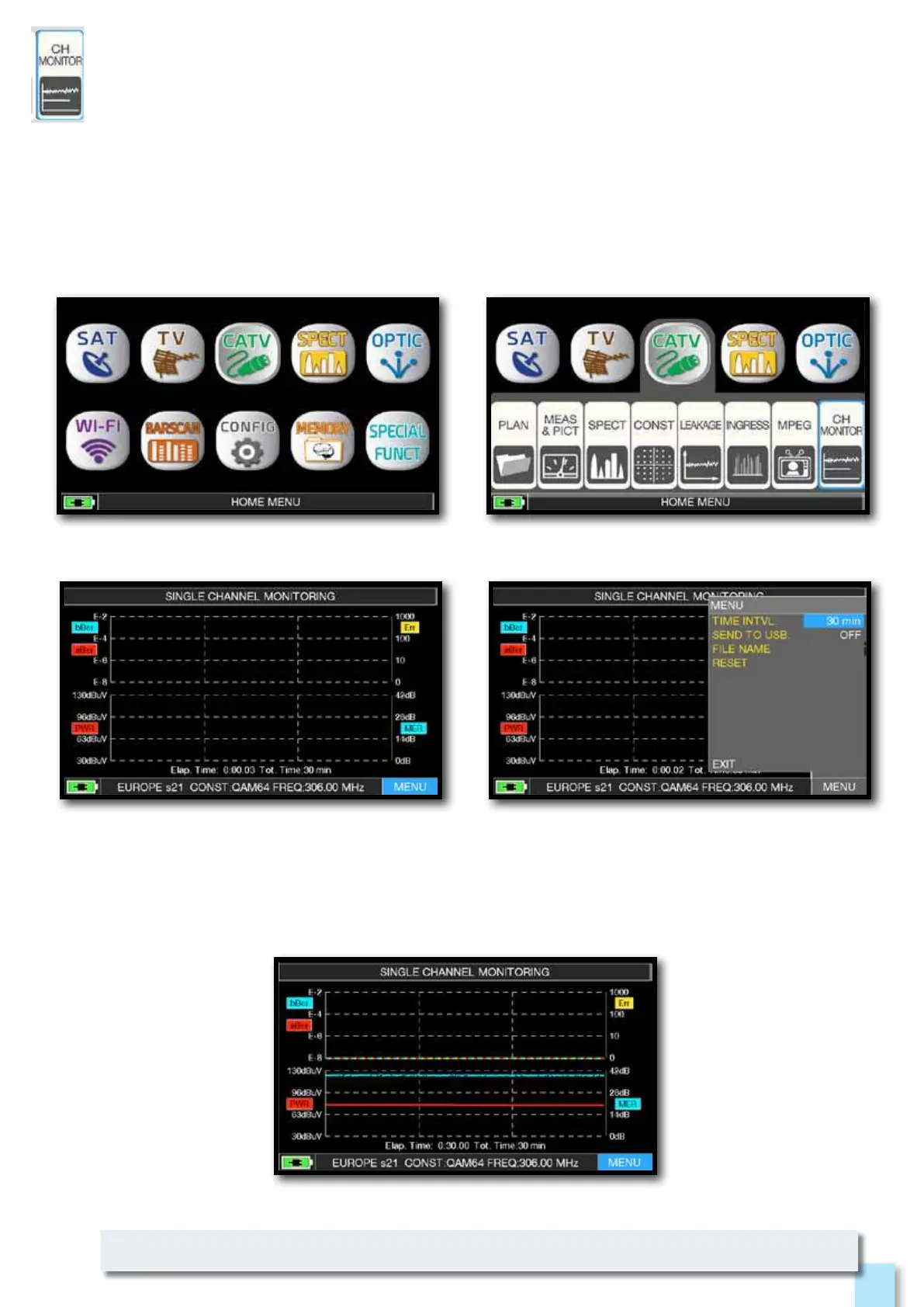
Touch “MENU”
the Channel Monitor function is available also in TV and SAT mode.
Press the “HOME” key.
Touch “CATV” and then “CH MONITOR”
or use the encoder.
________________________________________
The weekly application of SW CHANNEL MONITOR allow you to control and register the
trend of the main parameters of a digital signal over time (from 30 minutes to one week):
TV, CATV & SAT. This application is indicated to resolv the reception problems which occur
occasionally, it allow you also to measure, memorize and visualize (local or in remote) the
digital signals parameters tested: DVB-S/T/C = Power, MER, ERROR, bBer, aBer; DVB-S2 / T2 / C2
= Power, MER, ERROR, aBer, Lber, PER, LDCP.
Every registered parameters is graphically represented on the display using differents colours
for a easy identification.
SINGLE CHANNEL MONITORING: 30 minutes.
Select the time interval (TIME INTVL) and where you
want to store the file, either in the meter’s memory,
or in the USB memory stick (send to USB-ON),
with the relative file name (File name).



 To Next Page