5
HOME AND NAVIGATION
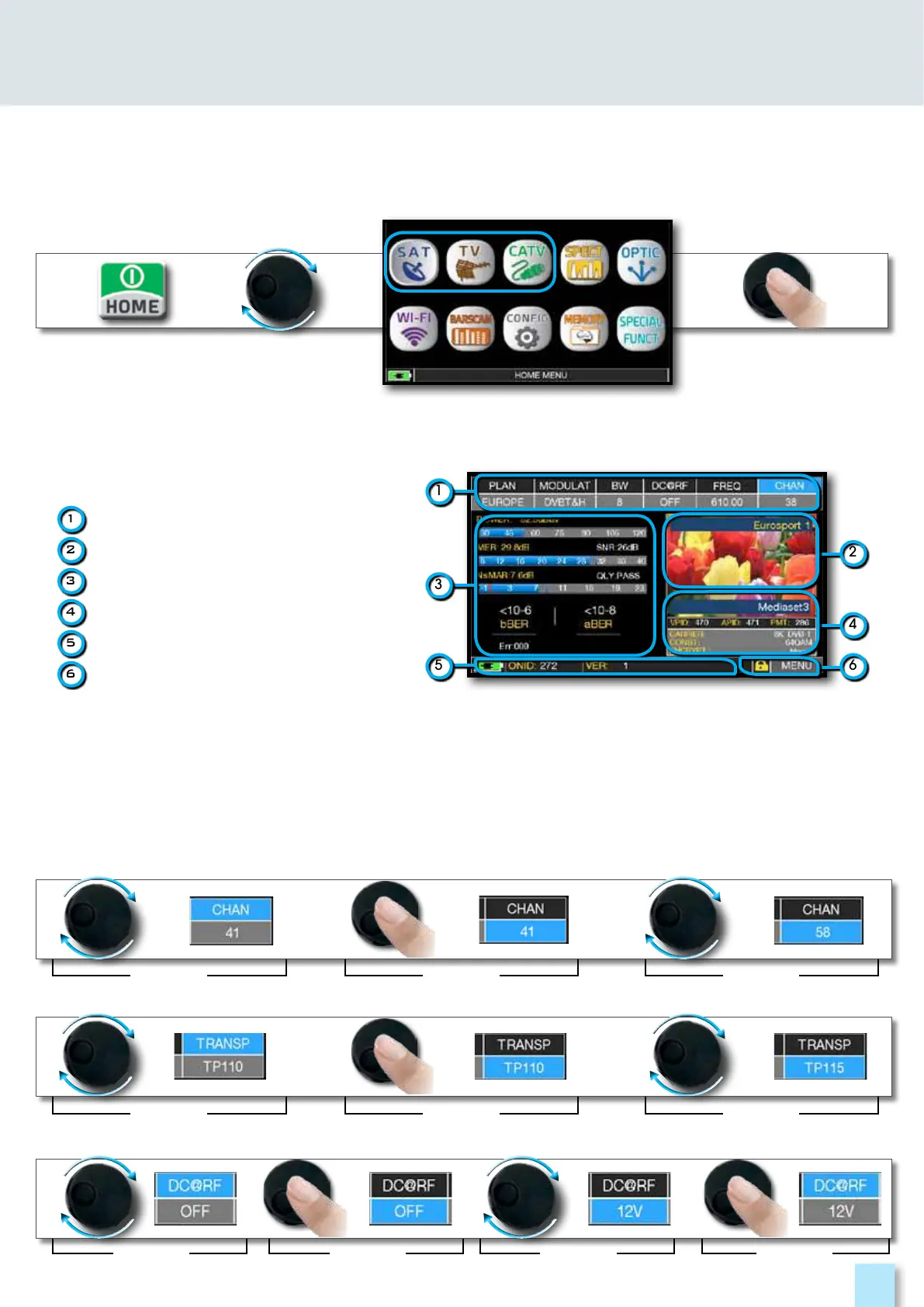
Press the ‘HOME’ key to go to the home screen, then rotate the wheel to navigate on ‘SAT’,
‘TV’ or ‘CATV’ icons and press the wheel to select the measurement mode required.
________________________________________________
Press the ‘HOME’ key at any time to
return to the home screen
____________________________________________________
Use the touch screen and the wheel to navigate across the screen and to change values
1
tuning parameters
2
live picture
3
measurements
4
channel info
5
transport stream info
6
context sensitive menu
How to select from the menus and adjust the value:
•Rotate the wheel and select from the menu required (fig. 1)
•Press the wheel (fig. 2)
•Rotate the wheel to adjust the value (fig. 3)
•Press the wheel and confirm the selection (fig. 4)
Example of TV/CATV channel selection:
fig. 1
fig. 1
fig. 1 fig. 3fig. 2 fig. 4
fig. 2
fig. 2
fig. 3
fig. 3
Example of SATELLITE transponder selection (TP/TS):
Example of remote TV-CATV power supply selection (DC&RF):
2
4
6
1
5
3



 To Next Page