ㅤ EN ㅤ
16
1. Platter
2. Lifting Bracket
3. Lift lever
4. Tonearm
5. Speed selector (33, 45RPM)
6. Mode button: PHONO/Wireless Audio/USB
7. Volume control knob/Power knob
8. Indicator LED light
9. Tonearm lock
10. Cartridge with Styluss
11. 45 RPM adaptor
12. Previous track
13. Next track
14. Play/Pause, Del key
15. Mode / REC key
16. USB port
17. DC power jack(12V,2A)
18. Speaker out jack-Right channel
19. Speaker out jack-Left channel
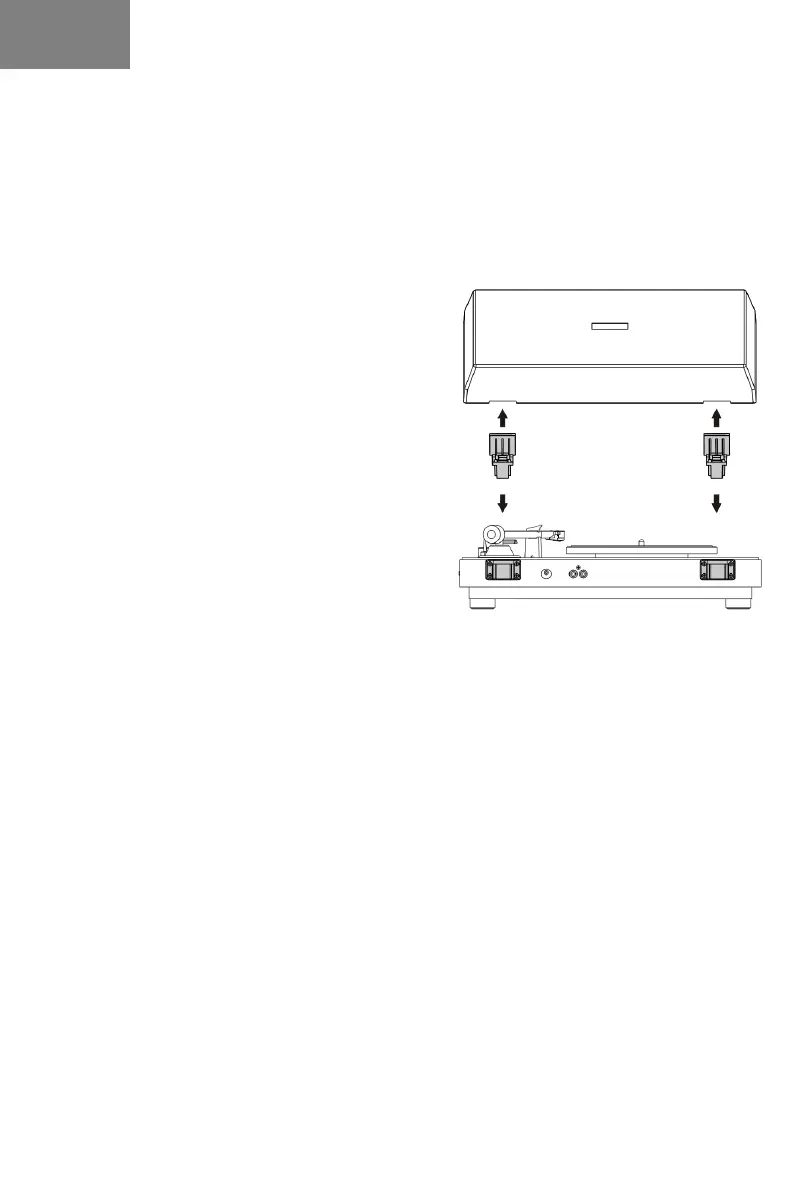
DUST COVER ASSEMBLE
Install the hinge clamp in the position of the dust
cover slot in the correct direction (Hinges are in
the attachment).
Then install the dust cover on the turntable, note the hinge clamp should be aligned with the
hinge base on the turntable.
MAINS CONNECTION
EXTERNAL SPEAKER CONNECTION
Plug the speaker cable into the RCA audio output on the back of the turntable.
NETWORK CONNECTION
Insert the supplied power adapter into the socket and into the product then press the POWER
knob.
Adjust the desired volume by turning the appropriate knob.
Select the desired source between PH (Turntable), BT (Wireless Audio) and USB using the
appropriate knob.
To activate Standby mode, long press the POWER knob. When the device is in Standby, the
status LED flashes red. To reactivate the device, press the POWER knob again. If the device is
not used for a long period, disconnect the power supply from the mains.


 To Next Page