ㅤ EN ㅤ
17
PLAYING RECORDS
⚫ Place the record on the turntable. If you use a 45 rpm record, use the appropriate adapter.
⚫ Select the Turntable (PH) source with the appropriate knob.
⚫ Using the platter rotation speed selection button, choose between 33 or 45 rpm,
depending on the type of vinyl you want to play.
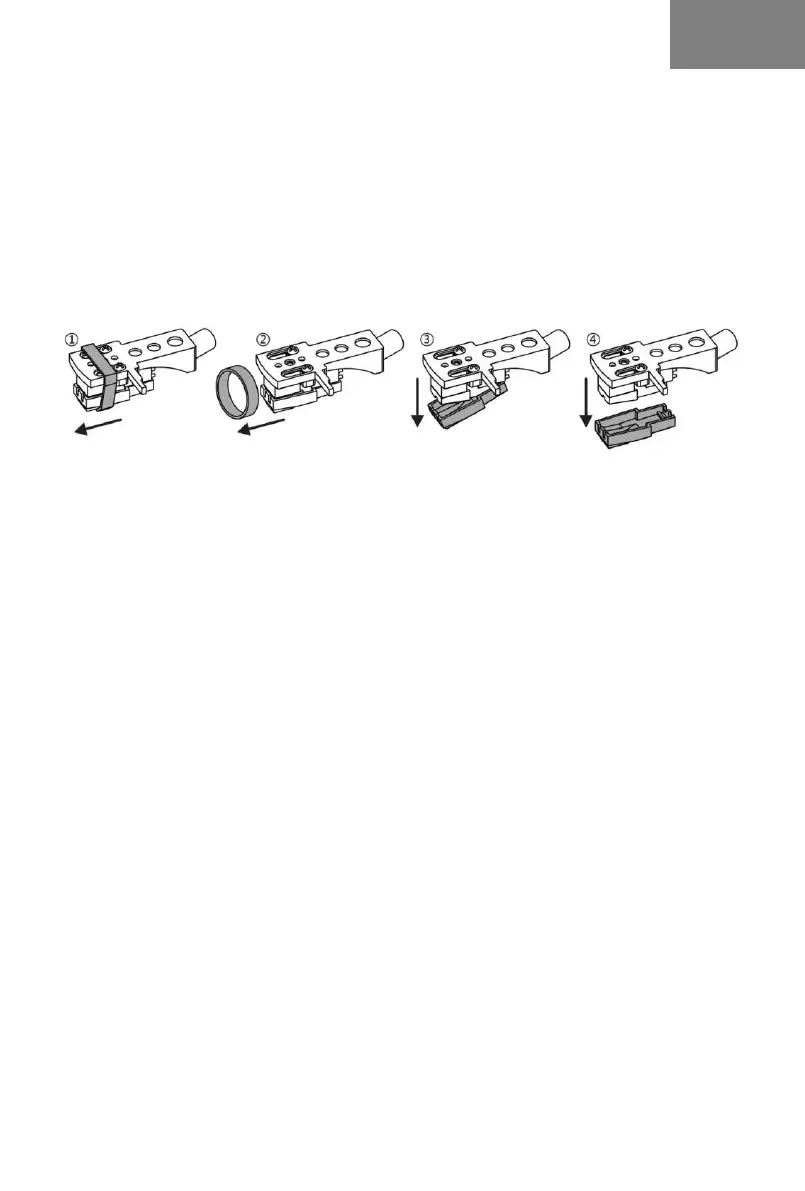
⚫ Remove the head protectors being careful to avoid damage to the stylus (any breakages are
not covered by the warranty):
⚫ Turn on the product and adjust the volume to an appropriate level.
⚫ Open the hook that blocks the tone arm, lift it using the dedicated lever and position it over
the record. The platter will begin to rotate automatically.
⚫ Lower the arm with the appropriate lever to make the needle adhere to the surface of the
record and start playing.
⚫ To manually stop or resume playback, raise or lower the arm using the appropriate lever.
⚫ At the end of use, return the arm to the initial position, lower it using the dedicated lever
and lock it with the hook.
⚫ The product is equipped with the Auto-stop function which automatically stops the rotation
of the platter when the record is finished.
NOTE:
⚫ In Turntable mode, if no audio signal is received for 15 minutes, it will automatically enter
Standby mode. In this mode the red light flashes slowly, press the POWER knob to exit
Standby mode.
⚫ Auto-stop function may not be compatible with some discs. In particular, if the disc does
not have a standard format or if it has an area that does not match the default settings of
this product, the Auto-stop function may stop playback of the disc prematurely.
WIRELESS AUDIO FUNCTION
⚫ Make sure the turntable arm is on the stand.
⚫ Select the Wireless Audio (BT) source with the appropriate knob and turn on the product, a
sound will be emitted to confirm the activation of the Wireless Audio function.
⚫ Start the relevant function on the external device and search for the name “Roxel VRP-120”
(enter 0000 if required).
⚫ After pairing, start playback from the external device.
⚫ Press the NEXT TRACK / PREVIOUS TRACK buttons to go to the next song / return to the
previous song
⚫ During music playback you can briefly press the Play/Pause button to pause playback. To


 To Next Page
 Loading...