14
User
Manual
4.2.2. DMX Connection
The
CLUSTER S2
is fully controllable by DMX (USITT DMX512-A standard, based on RS-485) Art-Net, sACN and
RDM.
4.2.2.1. Cable Connection
If using a cabled DMX system, connect the DMX IN cable to the input connector (male 5-pin XLR connector) and
DMX OUT cable to the output (female 5-pin XLR connectors).
For outdoor installations, use only IP65-rated XLR connectors.
Use shielded twisted pair cable designed for RS-485 devices. The cables are daisy chained between the xtures,
and up to 32 xtures can be connected to the same DMX link. Up to 300 meters (1000ft.) of cable is achievable with
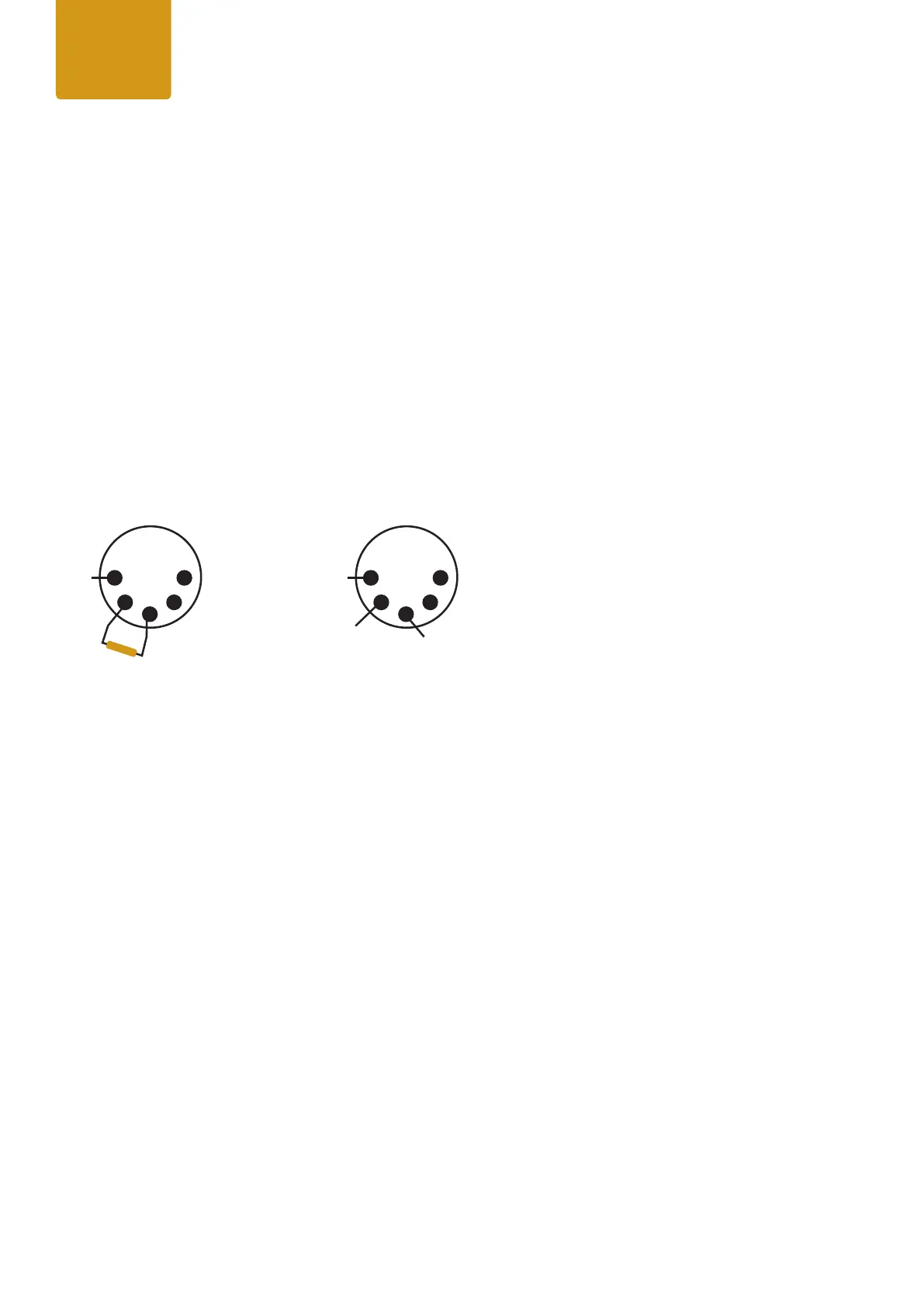
high quality DMX cables. All DMX links must be terminated in the last xture by connecting a DMX termination plug
to the last xture’s 5 pin DMX out connector.
Standard microphone cable is not suitable for transmitting DMX.
1DATA
GND
DMX Termination
on last xture DMX out
DATA -
DATA +
120 Ohm
+/- 5%
5
2 4
3
1DATA
GND
XLR pin out
DATA -
DATA +
5
2 4
3


 To Next Page
 Loading...