25
User
Manual
Main
Menu
Menu
level 2
Menu
level 3
Menu
level 4
Menu
level 5
Menu
level 6
Remark
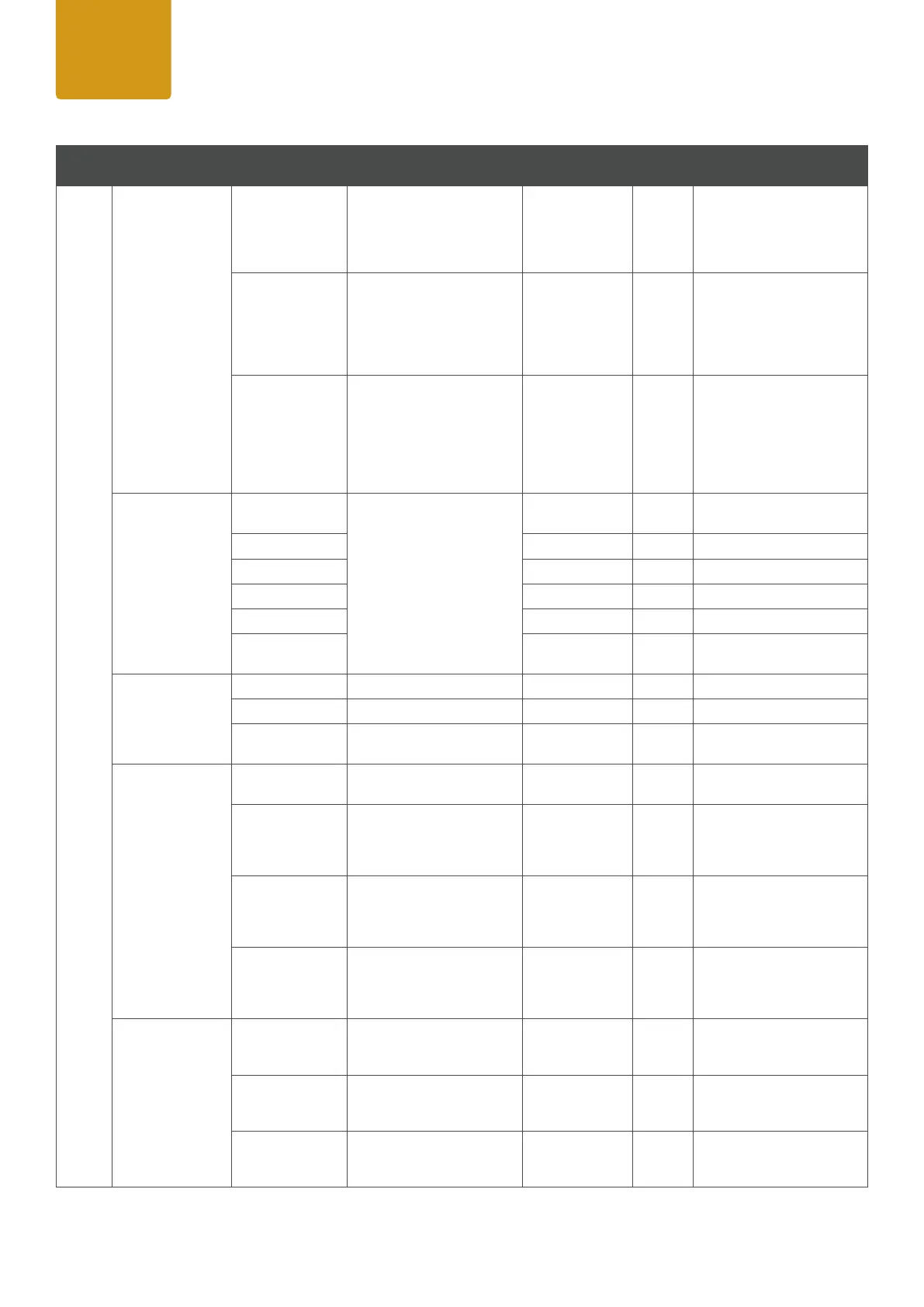
Settings
Display
Display Flip
<on/off>
On= Flip control panel
display by 180° (e.g. for
overhead installation)
Off= normal control panel
dispaly
Backlight
<on/off>
On= controls permanent on ,
display itself will deactivate
after 60 minues of incativity
Off= controls and display
deactivation after approxi-
mately 1 minute of inactivity
Auto Lock
<on/off>
On= Automatically locks the
controls after approximately
1 minute of inactivity. After
attempted input the display
shows: "Locked!" Unlock pro-
cess: press arrows up, down,
up, down consecutively
Startup Mode
(using last adjust-
ments of Stand-
alone Modes)
DMX / Art-Net /
sACN
Select your default opera-
ting mode when xture is
powered on
Auto
Color Macro
Quick Color
Tunable White
User Color
(User Color 1-5)
DMX Fail
Hold Hold= last command retains
Blackout
Blackout= Activates Blackout
Emergency Light
Emergnecy Light= Fixtures
changes to 5600K
Dimmer Curve
Linear
Linear= Light intensity increa-
ses linear with DMX value
Exponential
Exponential= Light intensity
can be set more smooth at
lower DMX values and bro-
adly at higher DMX values.
Logarithmic
Light intensity can be bro-
adly adjusted at lower DMX
values and more smooth at
higher DMX values
S-Curve
Light intensity can be adjus-
ted smoothly at lower and
higher DMX values and bro-
adly at medium DMX values
Dimmer
Response
LED (Fast)
The LED responds abruptly
to DMX value changes at
brightness
Medium
The LED responds with
medium delay to DMX value
changes at brightness
Halogen (Slow)
The LED responds similar to
a halogen xture with soft
changes at brightness.


 To Next Page
 Loading...