26
User
Manual
Main
Menu
Menu
level 2
Menu
level 3
Menu
level 4
Menu
level 5
Menu
level 6
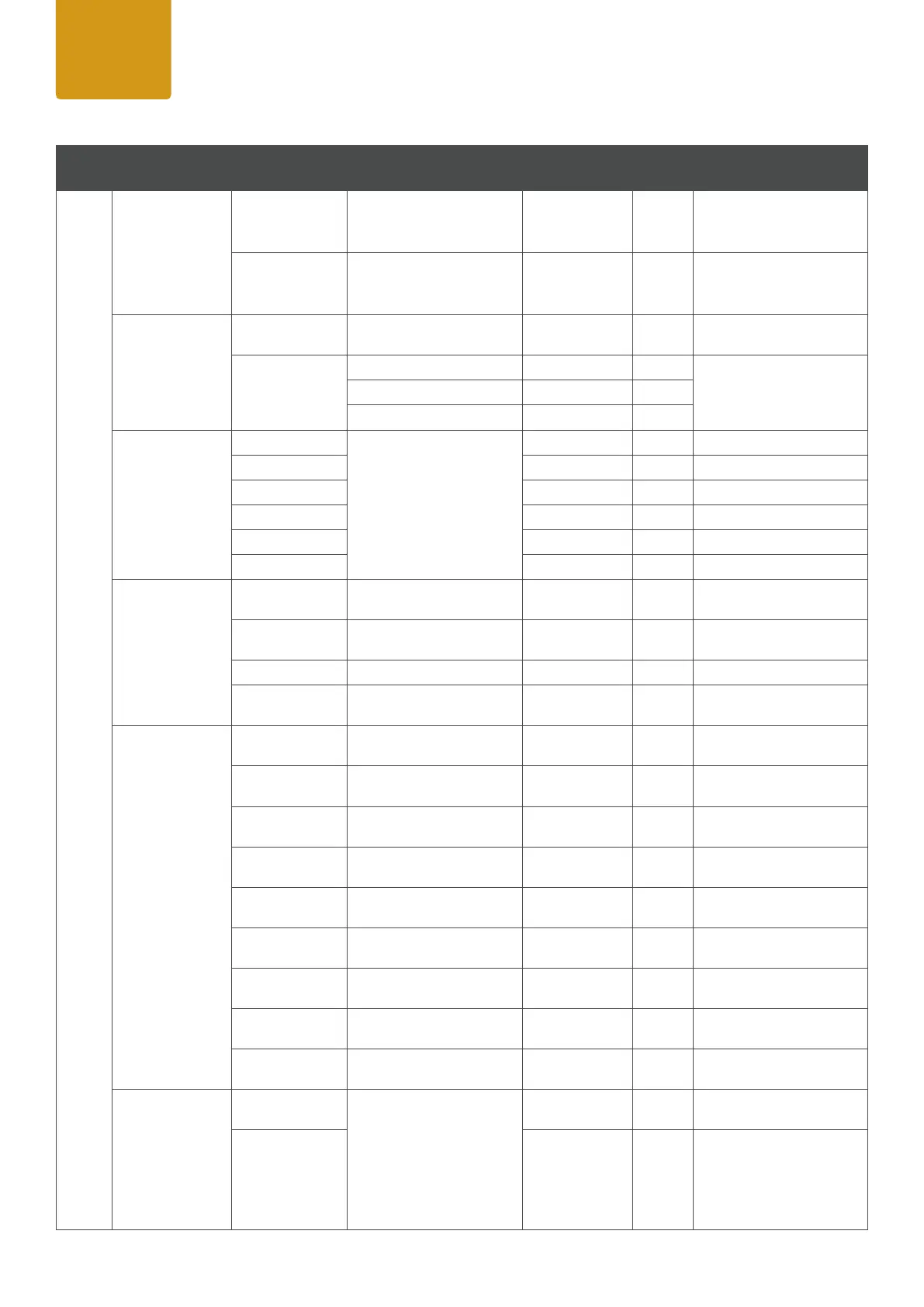
Remark
Settings
Color
Calibration
(affetcs Calibrated
DMX modes and
Stand Alone)
Full Calibration
Calibration on RGB Panels
for CCT & Colors
CCT Calibration
Calibration on RGB Panels
on CCT only, RAW Colors
RAW Balance
(affects DIRECT
DMX modes and
Stand Alone)
RAW
R,G,B with maximum value
of brightness
User Calibration
Red <0-255>
individual color calibration
of R,G,B for each single eye
Green <0-255>
Blue <0-255>
LED Frequency
800 Hz
Select preferred LED PWM
frequency
1200 Hz
2000 Hz
3600 Hz
12000 Hz
25000 Hz
Fan
Auto
Adjust fan speed relative to
internal xture temperature
Silent
Low fan speed for silent
operation
Fan Off Fan Off
Max. Power
High fan speed for maxi
-
mum cooling effect
Invert / Swap
Mapping
RGB Panel 1 On / Off
Inverts the pixel layout of
the xture
RGB Panel 2 On / Off
Inverts the pixel layout of
the xture
Centric Tube On / Off
Inverts the pixel layout of
the xture
Single Tube 1 On / Off
Inverts the pixel layout of
the xture
Single Tube 2 On / Off
Inverts the pixel layout of
the xture
Single Tube 3 On / Off
Inverts the pixel layout of
the xture
Single Tube 4 On / Off
Inverts the pixel layout of
the xture
Swap RGB Panels On / Off
Swaps the RGB Panels of
the xture
Swap Single
Tubes
On / Off
Swaps the Single Tubes 1+2
/ 3+4 of the xture
Transfer
Conguration
Including
DMX Address
Transfer the same menu
settings of this xture to
all the other in daisy chain
(same model), either with
DMX address or without.
After power off and on
again, the transfered set-
tings should stay the same.
Without
DMX Address


 To Next Page
 Loading...