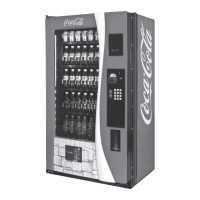
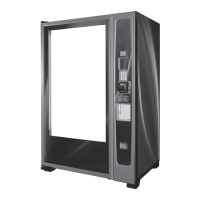
The Merlin IV Plus is a microprocessor-controlled vending machine designed for dispensing cold beverages. It offers electronic space-to-sales programmability and can collect, store, and transfer MIS data fields to a hand-held computer (HHC) or on-line device via a DEX port.
Technical Specifications:
The Merlin IV Plus comes in three models: 768, 650, and 542, referring to their 12 oz can capacities. All models share a depth of 34" (86.5 cm) and operate on 115 VAC, 60 Hz with an amperage rating of 9 Amp. The refrigerant charge is 6.5 oz (0.18 kg) of R134a. Construction involves a steel cabinet and steel rack.
- Model 768: Height 79.5" (202 cm), Width 37" (94 cm), Empty Weight 648 lbs (294 kg).
- Model 650: Height 72" (183 cm), Width 37" (94 cm), Empty Weight 620 lbs (281 kg).
- Model 542: Height 72" (183 cm), Width 31" (79 cm), Empty Weight 550 lbs (249 kg).
The vending machine requires a minimum of a 15 amp dedicated circuit and the service outlet voltage must not exceed 129 VAC or fall below 103 VAC. It features a three-wire grounding cord for electrical shock protection. A battery backup on the control board retains programming information during power loss.
Usage Features:
The Merlin IV Plus is programmed via a Service Mode, accessed by opening the door and pressing the service mode button on the control board. Navigation through menus and sub-menus is done using the first three selection switches:
- Button 1 (UP): Increase, next, up.
- Button 2 (DOWN): Decrease, previous, down.
- Button 3 (tap) (ENTER): Enter, accept, save.
- Button 3 (hold) (EXIT): Exit, cancel, home.
The controller automatically returns to Sales Mode after approximately five minutes of inactivity, if the service mode button is pressed a second time, if "Return to Sales" mode is activated, or if the door is closed.
- Cash Counter Display Mode (CASH): Displays non-resettable total cash and resettable cash counts per selection.
- Sale Counter Display Mode (SALE): Displays non-resettable total paid vends and resettable vend counts per selection.
- Card Counter Display Mode (Card): Displays total historical money from debit/credit card sales and product sold via card.
- Token Counter Display Mode (toKn): Displays total historical money from token sales and product sold via token.
- Free Vend Accounting Mode (FrEE): Tracks cash counts, sales counts, and cost of all free vends.
- Error Code Display Mode (Eror): Helps diagnose vender problems by displaying summary and detailed error codes. Errors can be cleared by holding "up" or "down" for two seconds.
- Test Vend Modes (tESt): Tests the control board's ability to distribute 24 volts DC to vend motors and the mechanical vending circuit. Test vends do not affect sales totals.
- Price Setting Mode (Pri C): Allows setting universal or individual selection prices from $0.00 to $99.95.
- Space-to-Sales Programming Mode (StoS): Determines which columns vend for each selection, offering factory preset or custom configurations.
- Selection Depth Setting Mode (SdEP): Sets columns to double-depth (2) for cans/small packages or single-depth (1) for bottles/long packages.
- Configurations Mode (Con): Enables various options such as single/multi-price mode, optional menu enable, open-door totals, door switch reset, cheat mode, bill acceptance, forced vend attempt, multi-vend, bill escrow, error code display restriction, column quantity (12 or 10 columns), ENERGY STAR® Tier setting (Tier 1 or Tier 2), and MDB Level 2 communication for cashless devices.
- Optional Menu Items (if C2 is set to "1"):
- Exact Change Value Mode (ECO): Controls the "Exact Change Only" light based on available change.
- Coin Payout Mode (CPO): Allows manual payout of coins for testing, updating MIS tube counts.
- Tube Fill Mode (tUFL): Allows depositing coins into tubes, updating inventory and manual fill counters.
- Recycler Payout Mode (rPO): Allows manual payout of bills for testing, updating MIS manual dispense counters.
- Discounted Sale Counter Mode (dSAL): Tracks product dispensed during discounted sales periods.
- Differential Cash Counter Mode (diFC): Monitors the difference between discounted and regular prices.
- Set Discount Pricing Mode (SdiS): Sets discount prices for selections in conjunction with the built-in timer.
- Set Timer Control Mode (StCL): Enables selections to be turned off by the built-in timer or optional key switch.
- Time Setting Mode (tinE): Sets current year, date, time, day of week, and timer settings (on/off times for selections, discounting, refrigeration, and illumination). Includes daylight savings time enable/disable.
- Refrigeration Control Mode (FriG): Controls energy conservation, start/stop times for refrigeration, temperature display units (Fahrenheit/Celsius), set point temperature, storage temperature, and display of cabinet temperature. Includes a relay test mode for fan, machine light, heater, and compressor relays.
- Password Preview Mode (PAS): Allows changing the external password.
- Language Selection Mode (LAnG): Selects vending message language (English, French, Spanish, Hebrew, German, Custom).
- Return to Sales (rtn): Returns the controller to sales mode.
Accessible by entering a 4-digit password when the door is closed. Allows reading sales counts and error codes but not clearing them.
Vend Cycle:
- Stand-By Condition: Displays greeting, vend price, and optional features.
- Establishing Credit: Accepts coins until vend price is met, returning excess change.
- Valid Selection: Control board enables vend upon selection.
- Vend Sequence: Distributes 24 VDC to the vend motor, rotating the rotor to dispense product.
- Product Delivery: Delivery sensor detects product drop, control board acts according to programmed depth (double-depth allows automatic reload).
- Column Sequencing: Vends from the same column until depth is met, then proceeds to the next assigned column for even vending.
- Sold-Out: Display shows "SOLD OUt" if a column is jammed, genuinely sold out, sensor is maladjusted, or no column is assigned. Forced vend attempt ensures credit is used.
- Resetting Sold Out Selections: Cleared by opening the door or door switch.
Maintenance Features:
- Cleaning:
- Electrical/Electronic Components: NEVER use water.
- Cabinet and Vend Mechanism: Steam clean as required; avoid petroleum cleaners.
- Condenser and Evaporator Coils: Clean dirt/debris with a light-bristled brush, vacuum, or compressed air.
- Control Board: Keep enclosed; blow out with compressed air if desired.
- Product Chute: Keep clear of bottles/cans to ensure proper airflow and sensor performance.
- Lubrication:
- Inner Door Gasket: Periodically lubricate with silicone-based grease to prevent peel-back and air leaks.
- Latch Strike Nut: Lubricate as needed.
- Refrigeration Unit: Sealed system, no lubrication required for unit or fan motors.
- Anti-friction Sheets: Apply a thin layer of food-grade silicone; keep clean and free of debris.
- Preventive Maintenance:
- Vender Leveling: Ensure the vender is level to prevent standing water, freezing, and improper vending.
- Lighting System: Disconnect power before working. Replace blackened/discolored/flickering bulbs. If not using, unplug the ballast; DO NOT remove bulbs and leave ballast plugged in to avoid electrical noise.
Troubleshooting:
The Merlin IV Plus includes an error code diagnostic system to aid in troubleshooting. Error codes should be cleared after resolving problems. Common issues and corrective actions are provided for:
- Coin Acceptance: No power to control board, cut/disconnected harness, short in coin mechanism, defective control board, coin return lever, dirty acceptor, improperly tuned changer.
- Bill Acceptance: Validator not pulling in bills (wrong harness, acceptance disabled, faulty harnessing, defective validator, control board, switch settings, interface harness), validator pulling in bills but not establishing credit, validator taking bills but not erasing credit, validator allowing payback without selection.
- Vending Problems: Multiple vending (delivery sensor issues, control board sending power to motor, mechanical error), wrong product vending (misloaded, space-to-sales not set, miswired motor/selection button), no vend/dry vend (delivery sensor issues, defective control board), no vend from some columns (selection switch issues, wiring issues, control board issues).
- Refrigeration Problems: Unit running constantly (cut-out temperature, temperature sensor, short in wiring harness, welded relay contacts), unit not running (defective unit, master control disabled, cut-in/cut-out settings, temperature sensor, short in wiring harness, defective relay).
- Miscellaneous Problems: LED not working (no power to control board, LED harness, LED itself), display showing "SOLD OUt" immediately (door switch wiring, door switch, control board).

 Need help?
 General

 To Next Page