2D
3D
3. GETTING TO KNOW YOUR MOON
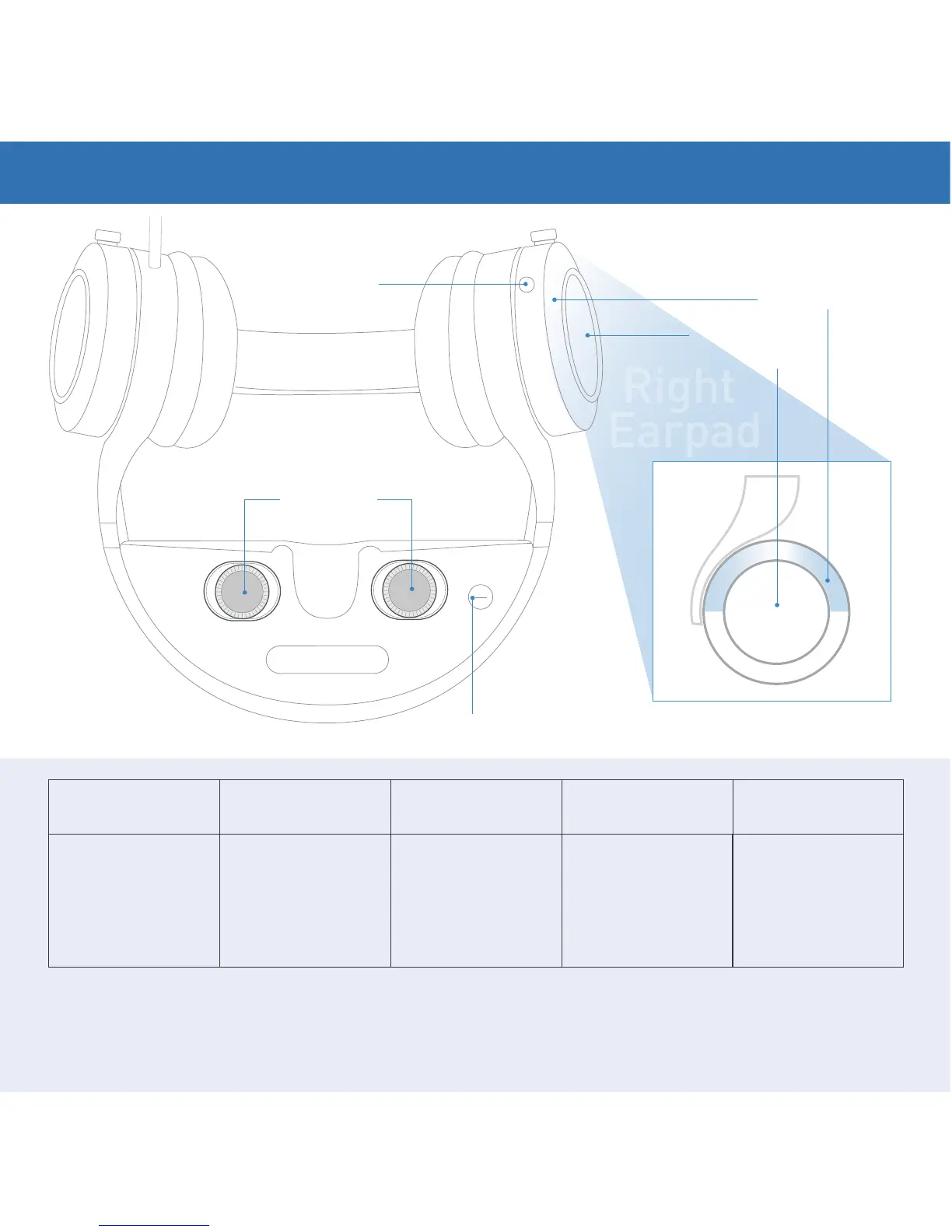
Home Button 2D/3D Button Focus Wheels Volume Control
OS Navigation
Control
Double pressing takes
you back to the main
menu. Press-and-hold
functions vary based
on the selected menu
screen.
Some 3D sources do
not communicate
effectively. As a
result, if you see two
individual images
instead of one, press
once.
Two functions. Press
and slide to fine-tune
interpupillary distance.
Twist wheels clockwise
and counter- clockwise
to focus each eye's
screen.
Touch Control Sensor
on the right earpad's
thin upper ring.
Touch Control Sensor
on the right earpad’s
large circular area.
For a more detailed description of Moon’s Buttons, Wheels, Volume, and Navigation
Touch Control, please see your manual or go to www.royole.com/support.


 To Next Page