12
Heavy Duty True RMS Digital Multimeter/English Heavy Duty True RMS Digital Multimeter/English
13
13/08/2017 Version No. 00113/08/2017 Version No. 001
emperature Measurements
Bluet ooth
5
20A for
30 sec
MAX
every
15 min
TEMP
CA P
4~ 2 0
%
TE
M P
°
C °
F
RANG E SETUP SAV E HOL D
Auto r ange 00:0 0
True RM S Multi meter
020. 00
µF
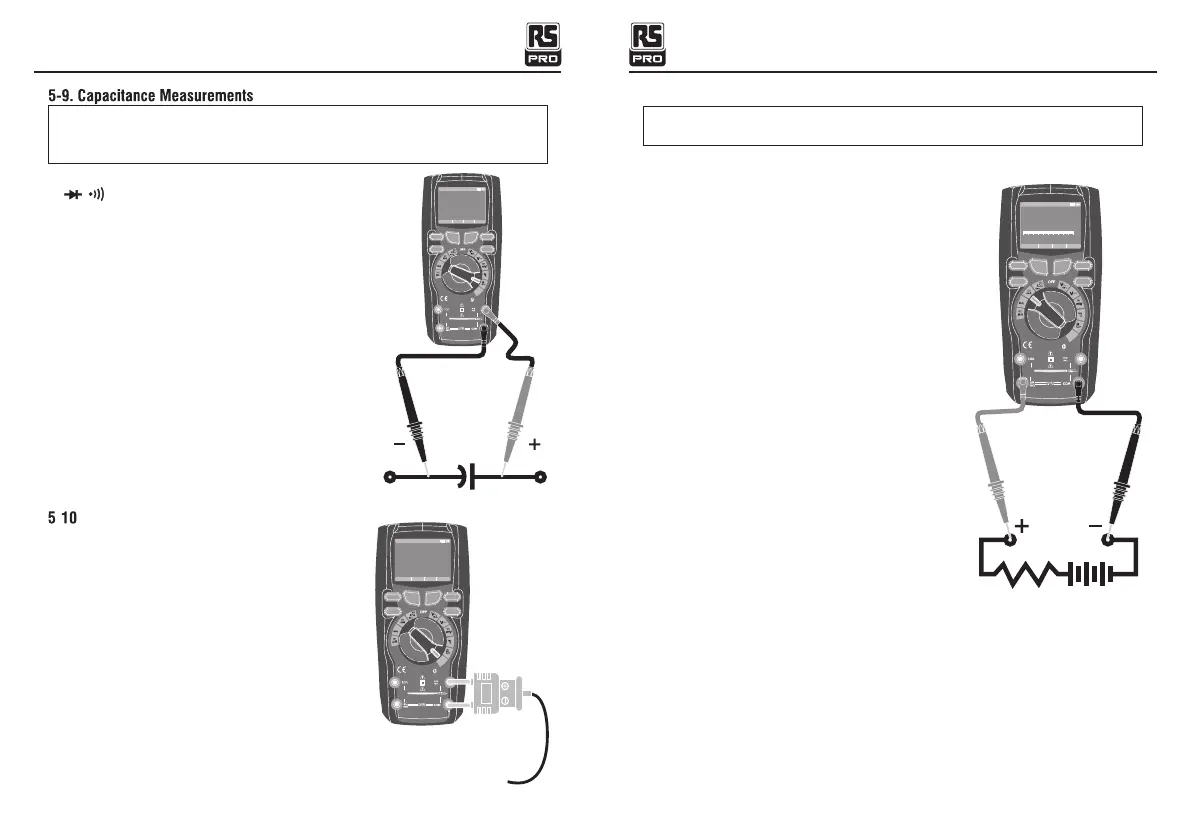
WARNING: To avoid electric shock, disconnect power to the unit under test
and discharge all capacitors before taking any capacitance
measurements. Remove the batteries and unplug the line cords.
1.Set the rotary function switch to the green Ω CAP
position.
2. Press the softkey labeled Mode. Switch to CAP
3.Insert the black test lead banana plug into the
negative COM jack. Insert the red test lead banana
plug into the positive V jack.
4.Read the capacitance value in the Display
- . T
1.Set the function switch to the green TEMP(°C
or °F) position.
2.Press the softkey labeled Mode. Switch TEMP
(°C or °F).
3.Insert the Temperature Probe into the input jacks,
making sure to observe the correct polarity.
4.Read the temperature in the display
Blue tooth
5
20A for
30 sec
MAX
every
15 min
TEM P
CA P
4~ 20
%
TE
M
P
°C °F
RAN GE SETU P SA VE H OLD
Aut o range 00 :00
True RM S Multi meter
0078 0.
°F
F1
HOLD
REL
RANGE
F2 F3 F4
F1
HOLD
REL
RANGE
F2 F3 F4
Blue tooth
5
20A for
30 sec
MAX
every
15 min
TEM P
C A P
4~
20
%
TE M P
°C °F
RAN GE SETU P S AVE HOL D
Aut o range 00 :00
True R MS Mult imete r
1 00. 00
A~
0
1
2
3
4
5
5-11. DC Current Measurements
CAUTION: Do not make 20A current measurements for longer than 30
seconds.
Exceeding 30 seconds may cause damage to the meter and/or the test leads.
1.Insert the black test lead banana plug into the
negative COM jack.
2.For current measurements up to 5000µA DC,
set the function switch to the yellow µA position
and insert the red test lead banana plug into the
µA/mA jack.
3.For current measurements up to500mA DC,
set the function switch to the yellow mA position
and insert the red test lead banana plug into the
µA/mA jack.
4.For current measurements up to 10A DC, set
the function switch to the yellow 10A position
and insert the red test lead banana plug into the
10A jack.
5.Press the MODE button to indicate “DC” on the
display.
6.Read the current in the display.
F1
HOLD
REL
RANG E
F2 F3 F4
A~


 To Next Page