Installation
4
1. Insert memory card
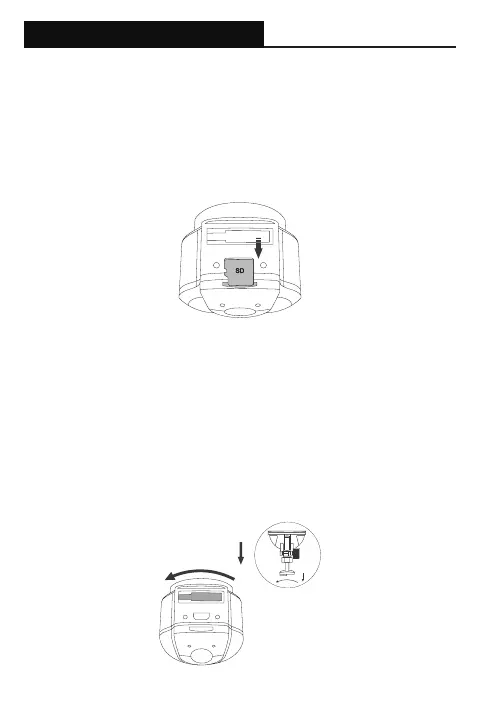
Please insert a microSD memory card into the memory card slot located at
the top of the camera. Be aware of the orientation shown in the picture below
(Electrical contacts of the memory card should be facing the camera lens side
of the camera.) When the memory card is successfully inserted, a ‘click’ sound
should be heard.
It is recommended to use a Class 10, 8GB or above microSD memory card. The
camera supports up to 64GB of memory capacity.
2. Installing camera mount
Align the notch of the mount with the mounting slot on the camera, then slide
the mount to the left. Ensure the mount is secured before proceeding with
install. To remove the mount, simply slide the mount to the right.
Position the camera to the desired install location on your windshield with
optimal viewing angle, and proceed with mounting.
Please note: Suction cup mounts should not be placed over the defrost grid
(Mostly in dotted form) of the windshield, as the suction cup will not have
sufcient mounting capability due to uneven surface.


 To Next Page