EasyManua.ls Logo

RTI KA8 - User Manual

RTI KA8
4 pages
Print Icon
To Next Page IconTo Next Page
Loading...
Reference Guide
8” Touchpanel Controller
KA8
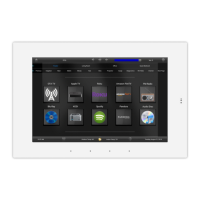
KA8 Touchpanel
The KA8 touchpanel provides simple, intuitive control of the entertainment, environment and security systems
in residential or commercial facilities. It features a fully customizable 8” widescreen LCD display with 1280x800
WXGA resolution and integrated capacitive touchscreen. The sleek touchpanel is easily wall mounted or an
accessory stand is available for table top installations. The ambient light and proximity sensors automatically
adjust the screen brightness and LED backlight according to the environmental light level. Built-in gigabit Ethernet
with PoE enables powerful two-way control via the RTI control system, video from IP security cameras, and remote
programming updates.
The KA8 provides superior quality and reliability as well as these features:
8” widescreen LCD with 1280x800 WXGA resolution and integrated capacitive touchscreen for fast touch response.
Fully customizable display for simple, intuitive control.
Innovative design allows wall mount or table top installation using stand accessory (sold separately).
Ambient light and proximity sensor adjusts the screen brightness and LED backlights automatically according to
the environment light level.
Powered by PoE (Power over Ethernet) or a power supply (sold separately).
Gigabit Ethernet with PoE enables two-way control via the RTI control system, video from IP security cameras, and
remote programming updates.
Question and Answer IconNeed help?

Do you have a question about the RTI KA8 and is the answer not in the manual?

RTI KA8 Specifications

General IconGeneral
BrandRTI
ModelKA8
CategoryController
LanguageEnglish

Summary

KA8 Touchpanel Overview

KA8 Overview and Installation

Mounting Bracket Installation

Details on installing the KA8 mounting bracket for wall or table mounting, including depth and height recommendations.

Powering the KA8

Explains how to power the KA8 using PoE or a 24V power supply, including connection requirements.

Powering Up the KA8

Describes the automatic power-on sequence when power is applied to the KA8 unit.

KA8 Mounting and Dimensions

Mounting KA8 Steps

Step-by-step instructions for physically mounting the KA8 unit onto the bracket, including loosening and tightening screws.

Removing the KA8

Procedure for safely detaching the KA8 unit from its mounting frame using captive screws.

KA8 Dimensions

Provides detailed physical dimensions for the KA8 in front, rear, and side views.

KA8 Communication and Programming

Ethernet Communication

Details how the KA8 connects to a network via DHCP and automatically joins the LAN.

Touchscreen Display Programming

Explains that the KA8 display is programmed using RTI Integration Designer software.

Updating Software

Describes how RTI's Integration Designer data files can be downloaded to the KA8 via Ethernet.

Product Information and Compliance

Product Contents

Lists the items included in the KA8 touchpanel package.

Safety Suggestions

Provides essential safety and operating instructions for the KA8 unit.

Federal Communications Commission Notice

Details FCC compliance for Class B digital devices and potential interference.

Limited Warranty

Outlines the three-year limited warranty for the KA8 product, including coverage and exclusions.

Related product manuals