PortaMonitor Calibration and Service Page 8-1
8. Calibration and Service
8.1. Calibration
The PortaMonitor uses state of the art DSP technology. Scale and
ballistics are defined in software. Based on this facts long term stability
is guaranteed. Adjustment and calibration are not required.
8.2. Reference level change
If it is necessary to operate the unit with a reference level other than
set by the factory, proceed as follows:
Input level range 0 dBu to +10 dBu:
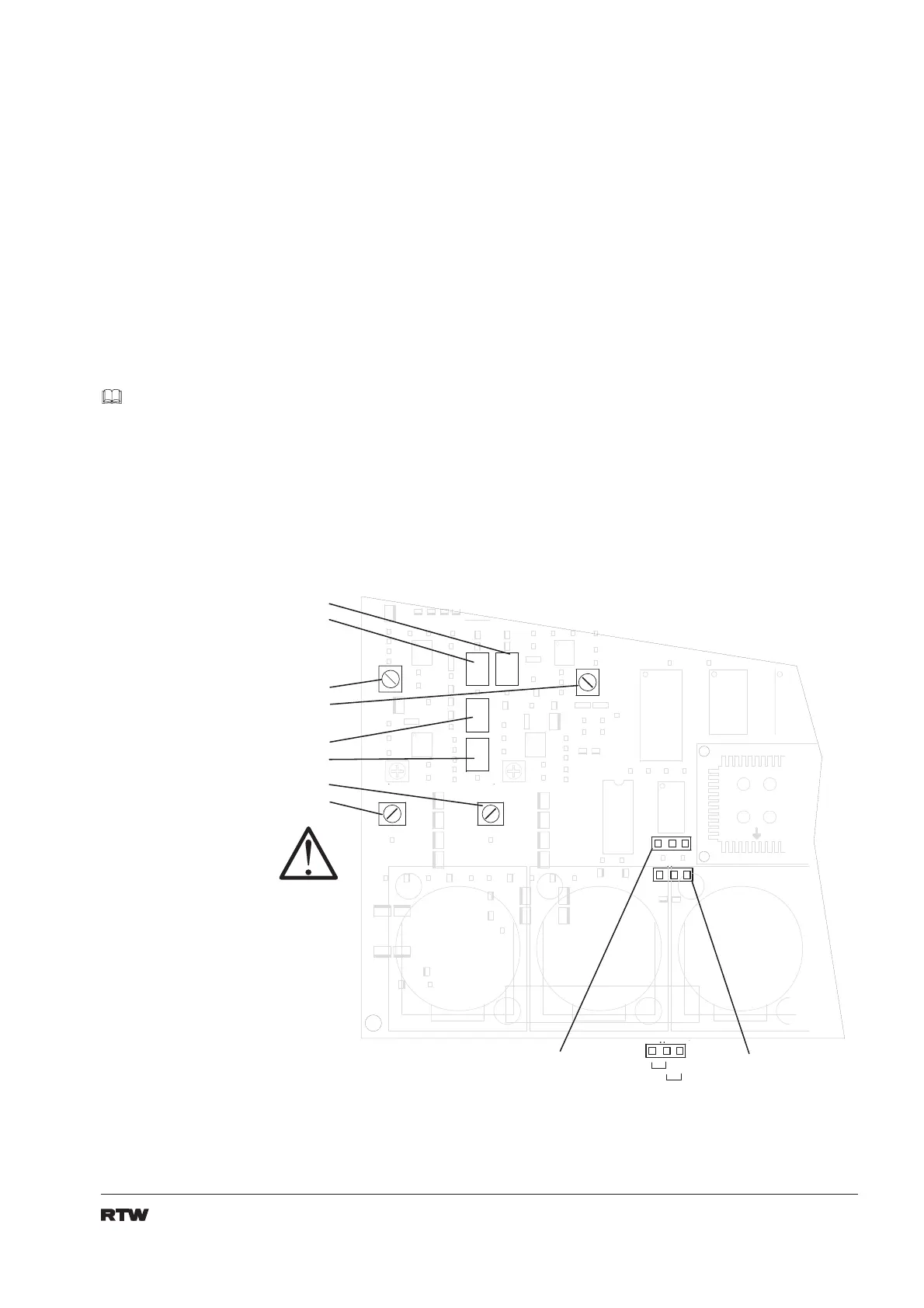
Apply a 1 kHz signal with reference level and adjust this pots for
reading reference (i. e. 0 dB or Test)
P5 (left channel input 1) CMR optimize: P11
P4 (right channel input 2) CMR optimize: P10
P9 (left channel input 3) CMR optimize: P7
P8 (right channel input 4) CMR optimize: P6
Fig. 8-1: Partitial view of input pcb
Open the unit
see 8.3.
C O D 2
C O D 3
12
3
S H L D
12
3
S H L D
12
3
S H L D
P 1 0
P 1 1
P 6
P 7
P 5
P 4
P 9
P 8
A E S / E B U - 1 - 2
I n p u t t e r m i n a t i o n
A E S / E B U - 3 - 4
I n p u t t e r m i n a t i o n
1 1 0
9
H i g h Z


 To Next Page