10 11
EN
KEYS
4_KEYS
KEYS
12
1
6
4
5
2
3
7
8 9
10
11
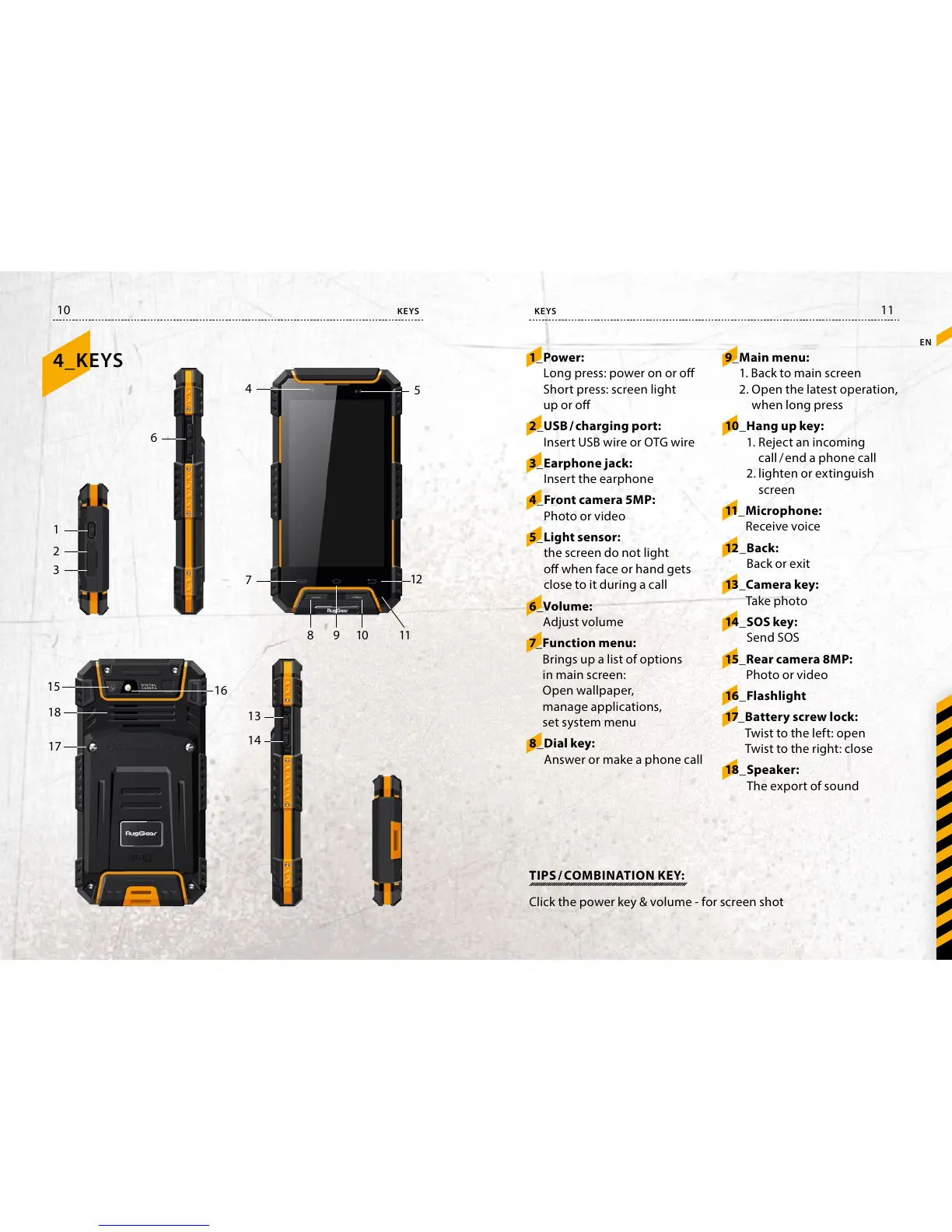
1_ Power:
Long press: power on or o
Short press: screen light
up or o
2_ USB / charging port:
Insert USB wire or OTG wire
3_ Earphone jack:
Insert the earphone
4_ Front camera 5MP:
Photo or video
5_ Light sensor:
the screen do not light
o when face or hand gets
close to it during a call
6_ Volume:
Adjust volume
7_ Function menu:
Brings up a list of options
in main screen:
Open wallpaper,
manage applications,
set system menu
8_ Dial key:
Answer or make a phone call
16
15
18
17
13
14
9_ Main menu:
1. Back to main screen
2. Open the latest operation,
when long press
10_ Hang up key:
1. Reject an incoming
call / end a phone call
2. lighten or extinguish
screen
11_ Microphone:
Receive voice
12_ Back:
Back or exit
13_ Camera key:
Take photo
14_ SOS key:
Send SOS
15_ Rear camera 8MP:
Photo or video
16_ Flashlight
17_ Battery screw lock:
Twist to the left: open
Twist to the right: close
18_ Speaker:
The export of sound
TIPS / COMBINATION KEY:
Click the power key & volume - for screen shot



 To Next Page