20
About Your Rumble Tu Breeze
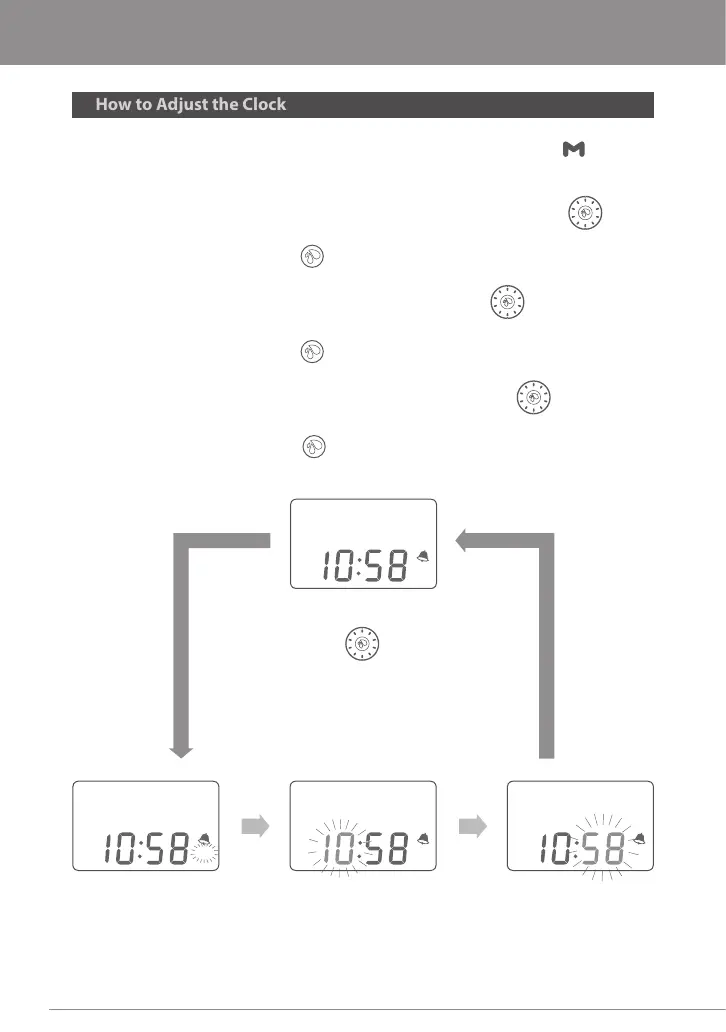
1. While in the Clock/Standby Mode, press and hold the M Button for 3
seconds to go into Clock Setting mode. A beep will sound and the AM/PM
icon will ash.
2. To change between AM/PM, turn the Vacuum Adjustment Knob
clockwise or counterclockwise
3. Press the Expression Button once to change from AM/PM to the hour.
The hour number will ash.
4. To change the hour, turn the Vacuum Adjusting Knob clockwise,to
increase (+), or counterclockwise, to decrease(-), the hour.
5. Press the Expression Button again to change the minutes. The minute
number will ash.
6. To change the minutes, turn the Vacuum Adjusting Knob clock wise, to
increase (+), or counterclockwise, to decrease (-), the minutes.
7. Press the Expression Button one last time to save your settings.
Press
the Expression
Button
Press
the Expression
Button
AM
Press M Button
for more
than 3 sec
Press
the Expression
Button
** Turn
to adjust
AM / PM Adjusting "Hour" Adjusting "Minute" Adjusting
Clock
AM
AM
AM
About Your Rumble Tu Breeze


 To Next Page