4
7. Back Panel Connections
7.1 Source Input Connections
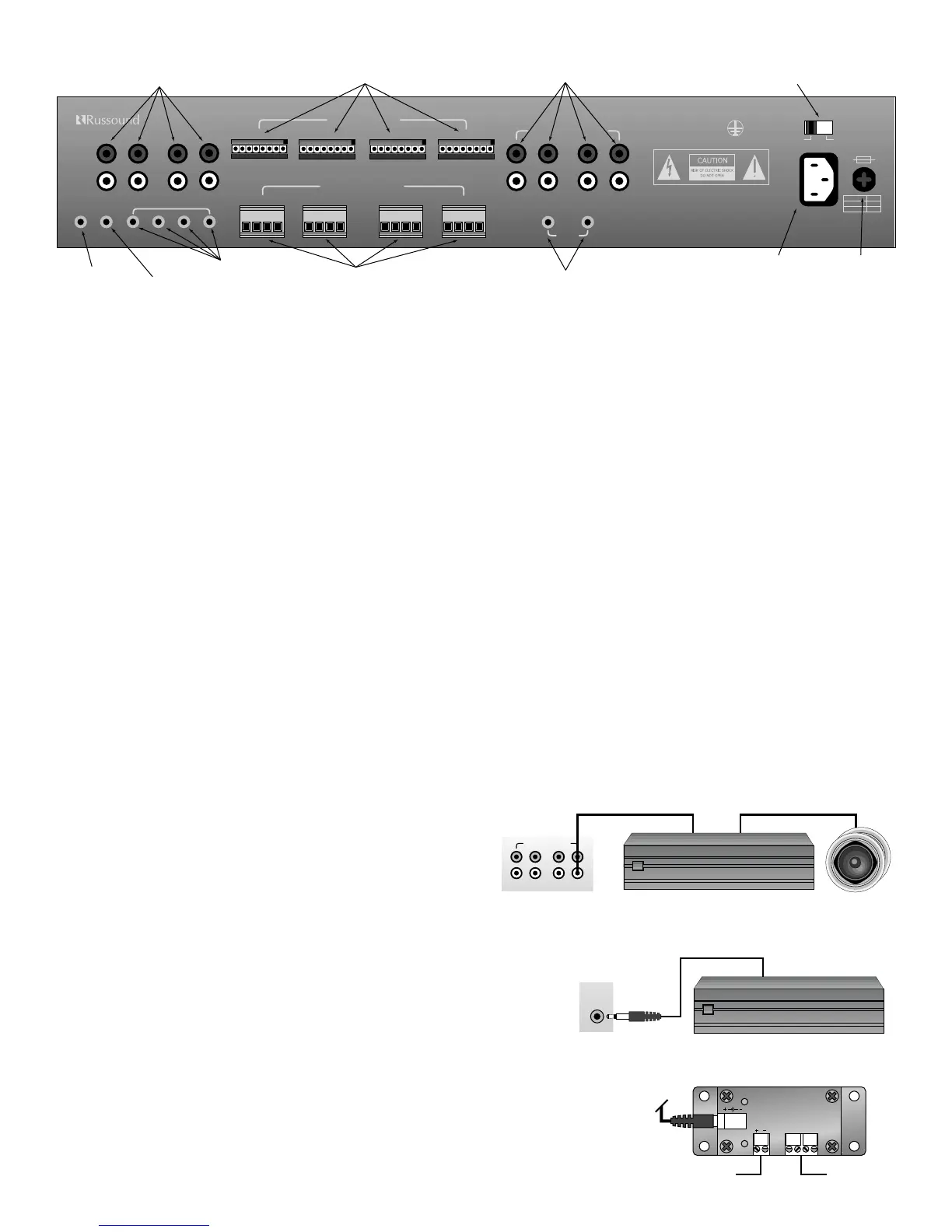
• Your source inputs are located at the top left corner of the back panel. Although the source input names are silk screened on the back
of the CA4.4pi, these names are for referenece only. Any type of source equipment can be connected to any input. Connect each
source output, left and right, using quality signal cables / patch cables. Label each cable the name of your source and the input num-
ber of the CA4.4pi you have selected. Repeat until all sources are connected. List them down below.
List 1 – Source names should be written below
Input 1 (TUNER) ______________ Input 2 (CD) ______________ Input 3 (TAPE) ______________ Input 4 (AUX) ______________
7.2 Speaker Connections
• Each speaker connection on the back panel corresponds to one room/zone. Wire your speakers by first removing the connector for
the choosen zone. Using wire strippers, strip back 1/8" of the end of the wire. Insert the proper polarity, left + to left +, left- to left- etc.,
until all wires are connected in each zone output. Label each wire with the room name and zone number. Write down the room
name to the zone number below. Note: We recommend 8 Ohm minimum speakers for each zone. However, speakers as low as 4
Ohm can be safely used in up to two zones, if necessary.
List 2 – Wire color should be written below
(Color) Left + _______________ Left - _______________ Right + _______________ Right - _______________
List 3 – Room names should be written below
Zone 1 ________________________________________ Zone 2 ________________________________________
Zone 3 ________________________________________ Zone 4 ________________________________________
7.3 Zone Pre-Amp Outputs
In applications where more power than the 20 watts per channel is
desired, connect one or more zones of the CA4.4pi to an external
amplifier. Using standard RCA connectors, wire from the pre-amp out-
puts of the CA4.4pi to the amplifier's inputs. A typical application for more power is when connecting an outside zone where the
audio power requirements would be much greater than an inside zone.
7.4 12-Volt Trigger Output
The 12 volt trigger is engaged when any of the zones are on. The trigger can be
used to engage any 12 volt triggered accessory, such as a triggered AC outlet or
audio amplifier. The connection for the trigger is made by an 1/8” phono jack. The
tip is (+) and sleeve is (-).
7.5 Mute Input
When used with the optional Doorbell or Telephone interface, the Mute Input mutes the
audio to the speakers for six seconds when either the doorbell is used or when the telephone
rings. The connection for the Mute Input is made by a 1/8” male jack. The tip is (+) and the
sleeve is (-).


 To Next Page