EasyManua.ls Logo

Russound KPSC - KPSC Physical Description; KPSC Side Panel Connector; Keypad Installation Guide; Installation Steps and Requirements

Russound KPSC
11 pages
Print Icon
To Next Page IconTo Next Page
To Previous Page IconTo Previous Page
Loading...
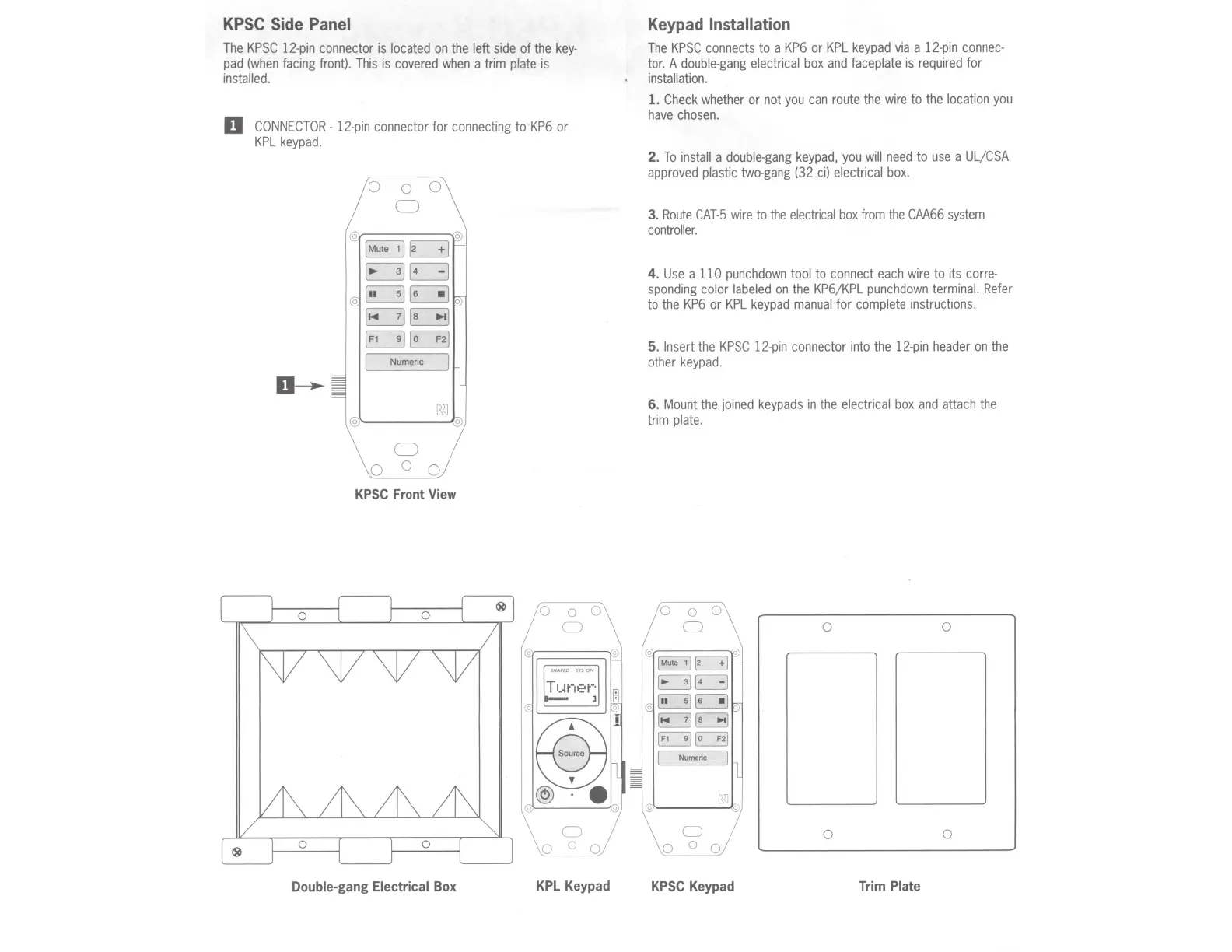
KPSC Side Panel
The
KPSC
12-pin
connector
is
located
on
the
left
side
of
the
key-
pad
(when
facing
front).
This
is
covered
when
a trim
plate
is
installed.
D
CONNECTOR-
12-pin
connector
for
connecting
to
KP6
or
KPL
keypad
.
~[3
~
E3
0
~~
E3~
~~
I
Numeric
j
0
0 0 0
KPSC
Front
View
Double-gang
Electrical
Box
0
0
KPL
Keypad
Keypad Installation
The
KPSC
connects
to a
KP6
or
KPL
keypad
via
a
12-pin
connec-
tor.
A
double-gang
electrical
box
and
faceplate
is
required
for
installation.
1.
Check
whether
or
not
you
can
route
the
wire
to
the
location
you
have
chosen.
2.
To
install
a
double-gang
keypad,
you
will
need
to
use
a
UL
/
CSA
approved
plastic
two-gang
(32
ci)
electrical
box.
3.
Route
CAT-5
wire
to
the
electrical
box
from
the
CAA66
system
controller.
4.
Use
a 110
punchdown
tool
to
connect
each
wire
to its
corre-
sponding
color
labeled
on
the
KP6/KPL
punchdown
terminal.
Refer
to
the
KP6
or
KPL
keypad
manual
for
complete
instructions.
5. Insert
the
KPSC
1
2-
pin
connector
into
the
12
-
pin
header
on
the
other
keypad
.
6.
Mount
the
joined
keypads
in
the
electrical
box
and
attach
the
trim
plate
.
0
0
0
0
0
0
0 ° 0
KPSC
Keypad
Trim
Plate

Other manuals for Russound KPSC

Related product manuals