EasyManua.ls Logo

Russound KPSC - User Manual

Russound KPSC
11 pages
Print Icon
To Next Page IconTo Next Page
Loading...
KPSC
Keypad
The
KPSC
keypad
is
an
in-wall,
Decora
®
style
single-gang
keypad
accessory
designed
to
connect
to
a
KP6
or
KPL
keypad
(wall
plate
not
included}.
The
KPSC
keypad
provides
source
control
and
numeric
control
capability
to
the
CAA66
system
keypads.
It
has
amber
backlit,
soft-touch
control
buttons.
Note:
The
KPSC
keypad
cannot
be
used
with
a
CAS44
controller
system
.
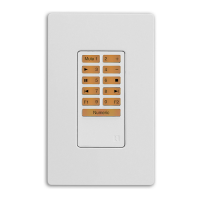
KPSC
Keypad
Front
Panel
J,
[
11
,r
A
I
~
K
nl
1...:)
uj
mJ
D
PRIMARY
CONTROLS
-
Functions
on
outer
edge
of
buttons
are
default
or
normal
operation
for
each
selected
source.
These
include
play,
stop,
forward,
back,
pause,
etc.
fl
FAVORITES-
Set
and
recall
two
favorite
settings
of
source
and
volume.
II
NUMERIC
VALUE
SHIFT-
Press
to
shift
buttons
to
numeric
control.
Numeric
Prefix
"Disc"
and
Suffix
"Enter"
commands
are
sent
upon
entering
and
exiting
Numeric
control.
Red
backlight
indicates
numeric
mode.
II
NUMERIC
ENTRY
-
Once
numeric
value
control
is
initiated,
the
buttons
now
represent
the
numeric
value
when
pressed
{0-9).

Other manuals for Russound KPSC

Question and Answer IconNeed help?

Do you have a question about the Russound KPSC and is the answer not in the manual?

Summary

KPSC Keypad Overview

KPSC Keypad Front Panel Controls

Details the front panel layout and primary control functions including numeric entry.

KPSC Physical Description

KPSC Side Panel Connector

Describes the 12-pin connector located on the left side of the keypad.

Keypad Installation Guide

Installation Steps and Requirements

Covers wire routing, electrical box requirements, wiring, and final assembly.

Safety Instructions

General Safety Guidelines

Comprehensive safety guidelines covering operation, environment, and servicing.

Operational Precautions

Handling and Care Precautions

Specific warnings and care instructions for handling and cleaning the unit.

KPSC Operation Details

Primary and Numeric Controls

Explains primary source controls and the numeric entry mode functionality.

Favorite Button Functions

Details how to program and recall favorite settings using F1 and F2 buttons.

Technical Specifications

Dimensions, Weight, and Port

Lists physical dimensions, weight, and the 12-pin keypad port.

Warranty Information

Warranty Coverage and Exclusions

Details the 2-year warranty, what it covers, and common exclusions.

Return and Service Procedure

Outlines the process for returning the unit for warranty repair.

Package Contents

Included Items

Lists the components included in the KPSC keypad package.

Summary

KPSC Keypad Overview

KPSC Keypad Front Panel Controls

Details the front panel layout and primary control functions including numeric entry.

KPSC Physical Description

KPSC Side Panel Connector

Describes the 12-pin connector located on the left side of the keypad.

Keypad Installation Guide

Installation Steps and Requirements

Covers wire routing, electrical box requirements, wiring, and final assembly.

Safety Instructions

General Safety Guidelines

Comprehensive safety guidelines covering operation, environment, and servicing.

Operational Precautions

Handling and Care Precautions

Specific warnings and care instructions for handling and cleaning the unit.

KPSC Operation Details

Primary and Numeric Controls

Explains primary source controls and the numeric entry mode functionality.

Favorite Button Functions

Details how to program and recall favorite settings using F1 and F2 buttons.

Technical Specifications

Dimensions, Weight, and Port

Lists physical dimensions, weight, and the 12-pin keypad port.

Warranty Information

Warranty Coverage and Exclusions

Details the 2-year warranty, what it covers, and common exclusions.

Return and Service Procedure

Outlines the process for returning the unit for warranty repair.

Package Contents

Included Items

Lists the components included in the KPSC keypad package.

Overview

The KPSC Keypad is an in-wall, Decora® style single-gang keypad accessory designed to connect to a KP6 or KPL keypad (wall plate not included). This keypad provides source control and numeric control capability to the CAA66 system keypads. It features amber backlit, soft-touch control buttons for ease of use. It's important to note that the KPSC keypad cannot be used with a CAS44 controller system.

Function Description

The KPSC keypad serves as an interface for controlling audio sources and entering numeric values within a compatible audio system. Its primary function is to extend the control capabilities of KP6 or KPL keypads by offering dedicated buttons for common audio operations and a numeric entry mode.

Usage Features

The KPSC keypad's front panel is organized for intuitive operation. It includes:

  • Primary Controls: These functions are located on the outer edge of the buttons and represent the default or normal operations for each selected source. These controls typically include actions such as play, stop, forward, back, and pause, allowing for comprehensive management of the active audio source.
  • Favorites: The keypad features dedicated buttons for setting and recalling two favorite settings, which can include both source selection and volume levels. This allows users to quickly access their preferred audio configurations with a single press.
  • Numeric Value Shift: A key feature of the KPSC keypad is its ability to switch into a numeric control mode. When the "Numeric" button is pressed, the keypad shifts its button functions to numeric entry (0-9). This action sends a "Prefix" command to the system. The buttons become backlit in red to indicate that the keypad is in numeric mode. Pressing the "Numeric" button a second time sends a "Suffix" command and returns the keypad to source control mode. If the "Numeric" button is not pressed a second time, a 3-second timeout will automatically send a "Suffix" command and exit the numeric control mode.
  • Numeric Entry: Once numeric value control is initiated, the buttons on the keypad represent numeric values (0-9) when pressed, enabling users to input numbers for various system functions, such as direct track selection or radio station tuning.

Keypad Installation

The KPSC keypad connects to a KP6 or KPL keypad via a 12-pin connector. For installation, a double-gang electrical box and faceplate are required. The installation process involves several steps:

  1. Wire Routing: First, verify that the necessary wiring can be routed to the chosen installation location.
  2. Electrical Box: A UL/CSA approved plastic two-gang (32 ci) electrical box is required to house the keypad.
  3. CAT-5 Wiring: Route a CAT-5 wire from the CAA66 system controller to the electrical box.
  4. Wire Connection: Use a 110 punchdown tool to connect each wire to its corresponding color-labeled terminal on the KP6/KPL punchdown terminal. Detailed instructions for this step can be found in the KP6 or KPL keypad manual.
  5. Keypad Connection: Insert the KPSC 12-pin connector into the 12-pin header on the other keypad (KP6 or KPL).
  6. Mounting: Mount the joined keypads into the electrical box and then attach the trim plate to complete the installation.

KPSC Operation Details

The KPSC keypad enhances the functionality of a KP6 or KPL keypad by providing both source control and numeric input capabilities. The amber backlighting of the buttons ensures visibility and ease of use in various lighting conditions.

When the "Numeric" button is pressed, it illuminates in red, signaling the transition to numeric entry mode. This mode allows for the input of digits from 0 to 9. The system receives a "Prefix" command upon entering this mode. To exit numeric mode and return to source control, the "Numeric" button is pressed again, which sends a "Suffix" command. If no further input is made within 3 seconds, the system automatically sends a "Suffix" command and reverts to source control.

The F1 and F2 favorite buttons are programmed by pressing and holding them. This action saves the current input source and volume level settings. These saved settings can then be recalled with a single press. Users can overwrite existing favorite settings by simply pressing and holding the button again with new desired settings.

Safety Instructions

To ensure safe and proper operation of the KPSC keypad, several safety instructions must be followed:

  • Read and Retain Instructions: Always read all safety and operating instructions before using the appliance and retain them for future reference.
  • Heed Warnings: Pay attention to all warnings on the appliance and in the operating instructions.
  • Follow Instructions: Adhere to all operating and user instructions.
  • Water and Moisture: Do not use the appliance near water (e.g., bathtubs, washbowls, kitchen sinks, laundry tubs, wet basements, or swimming pools).
  • Wall Mounting: Mount the appliance only as recommended by the manufacturer.
  • Ventilation: Ensure the appliance's location does not obstruct proper ventilation. Avoid placing it on soft surfaces (beds, sofas, rugs) or in enclosed spaces (bookcases, cabinets) that could block airflow.
  • Heat: Keep the appliance away from heat sources such as radiators, heat registers, stoves, or other heat-producing appliances (including amplifiers).
  • Power Sources: Connect the appliance only to the type of power supply specified in the operating instructions or marked on the appliance.
  • Grounding/Polarization: Do not defeat the grounding or polarization features of the appliance.
  • Object and Liquid Entry: Prevent objects from falling and liquids from spilling into the enclosure openings.
  • Damage Requiring Service: If the appliance is damaged (e.g., objects or liquids spilled, exposed to rain, abnormal operation, dropped, or damaged enclosure), it must be serviced by qualified personnel.
  • Servicing: Do not attempt to service the appliance beyond what is described in the operating instructions. Refer all other servicing to qualified service personnel.

Precautions

  • Power: Before turning on the power for the first time, carefully read the relevant section in the manual.
  • Wet Hands: Do not handle the unit with wet or damp hands. If water or any other liquid enters the cabinet, have it inspected by a qualified service person.
  • Care: Periodically wipe the front panel with a soft cloth. Avoid using rough materials, thinners, alcohol, or other chemical solvents, as these can damage the finish or remove panel lettering.

Maintenance Features

The KPSC keypad is designed for durability and minimal maintenance. Regular cleaning of the front panel with a soft cloth is recommended to preserve its appearance. Avoid harsh chemicals or abrasive materials to prevent damage to the finish or lettering.

In the event of a malfunction or damage, the device is covered by a warranty. For any issues requiring service, it is crucial to contact Russound for a Return Authorization number before shipping the unit for repair. This ensures proper handling and adherence to warranty terms. The warranty covers defects in materials and workmanship for two years from the date of purchase, with Russound replacing defective parts and correcting workmanship issues at no charge.

However, the warranty does not cover damage from abuse, accidents, misuse, negligence, improper installation, power surges, lightning strikes, normal wear, altered products, or products with removed/defaced serial numbers. Purchasing from unauthorized dealers also voids the warranty.

When returning the unit for repair, it must be securely packed in a corrugated container with at least three inches of resilient material to protect it from transit damage.

This comprehensive description highlights the KPSC keypad's functionality, ease of use, installation process, and important safety and maintenance guidelines, ensuring users can effectively integrate and operate the device within their audio systems.

Russound KPSC Specifications

General IconGeneral
CategoryKeypad
ModelKPSC
ManufacturerRussound
FinishWhite
IR RepeaterNo
CompatibilityRussound multi-room audio systems
ControlSource selection, volume control, power
DisplayLED indicators
Voltage12VDC
Communication ProtocolProprietary Russound protocol
MountingWall mount
Dimensions4.5" x 2.75" x 1.25" (114mm x 70mm x 32mm)

Related product manuals