9
Controlling the Media Server
EXIT - Backs out of current menu (same as left arrow)
MENU RIGHT - Navigates to the right within a menu
MENU HOME - Returns to the home page (What’s Playing)
NEXT SONG - Advances to the next song in the theme
PLAY - Selects and plays the song
STREAM SELECT - Selects Stream 1, 2 and 3 for control of that stream
POWER - Places the selected stream in/out of standby mode
FAVORITES - Saves and recalls preset favorites
PREVIOUS SONG - One tap starts song over, two taps returns to the previous song
MENU DOWN - Navigates down within a menu
INFO - Advances to the More Details screen under “What’s Playing”
OK - Selects highlighted item on page
MENU LEFT - Navigates to the left within a menu
HELP - Advances to the Help page
MENU UP - Navigates up within a menu
GENRE - Advances to the Genre list when selecting music
THEME - Advances to the Theme list when selecting music
ARTIST - Advances to the Artist list when selecting music
TITLE - Advances to Word Search when selecting music
1
2
3
4
5
6
7
8
9
10
11
12
13
14
15
16
17
18
19
SMS3 Remote Control
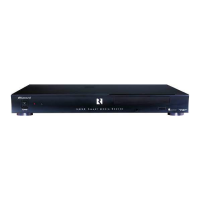
The SMS3 Remote Control is
used to control the SMS3 by
pointing it directly at the front
of the unit or at an IR receiver
interfaced with the audio
system.


 To Next Page