8
USE
CONTROL PANEL AND REMOTE CONTROL
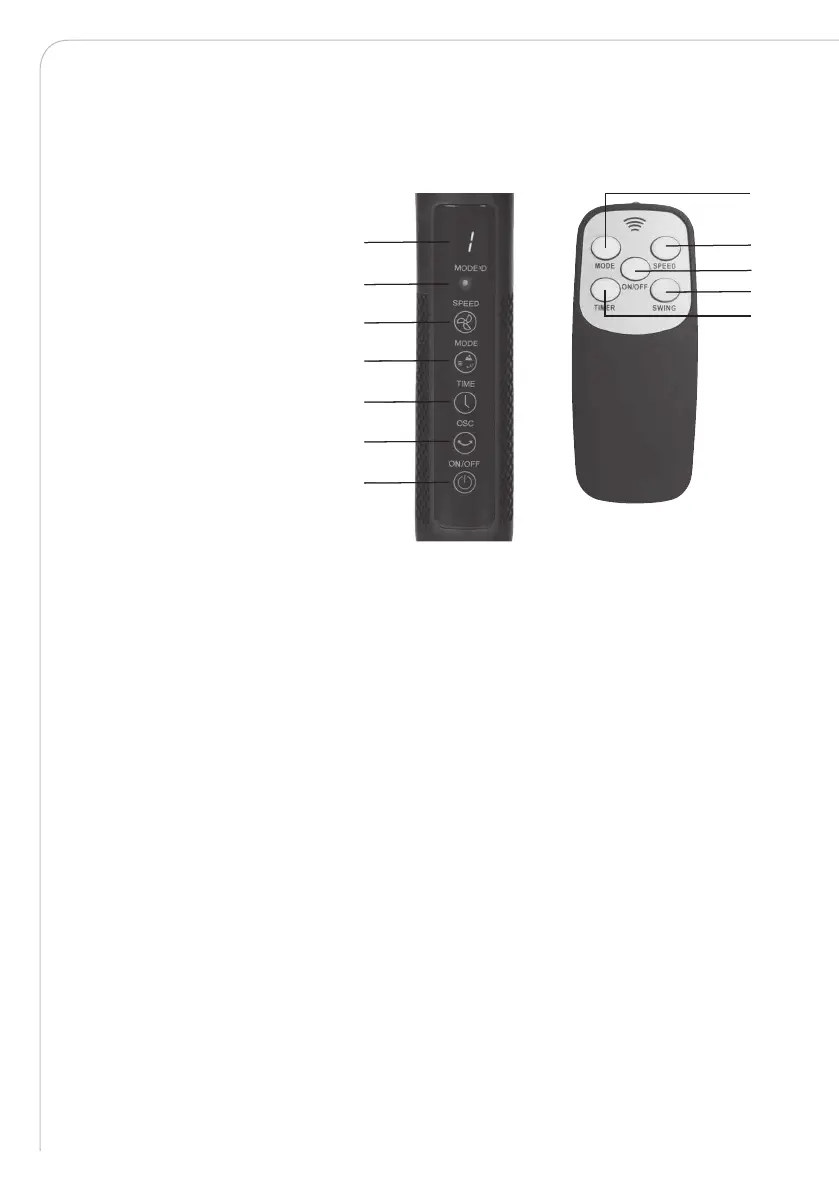
The fan can be operated both from the control panel and using the remote control. The
functions of the remote control buttons are the same as the functions of the buttons on
the control panel.
OPERATION
Plug the supply cord into a suitable socket. The indicator screen shows a white light.
1. Press the ON/OFF button to start the fan.
2. Press the speed button to select the desired wind speed. There are three settings
indicated by the icons on the indicator screen:
1 = low speed; 2 = medium speed; 3 = high speed
3. Press the mode selection button to set the desired operation mode from normal,
natural and sleep mode. When the fan is in normal mode, the indicator light turns red.
When in natural mode, the indicator light turns green. When in sleep mode,
the indicator light turns o.
4. TIMER: Press the timer button to set the number of hours the fan will automatically
switch o after. You can set it from 0 to 9 hours. The set value will be shown on the
indicator screen. When the screen displays “0”, the timer is cancelled. When
the selected number of hours has passed, the fan will switch o automatically.
5. Oscillation: Press the oscillation button to start oscillation for widespread air
distribution. Press the button once more to stop oscillation.
6. Tilting angles: By pushing the fan-guard, you can adjust the fan to the preferred elevation.
2
5
3
1
4
7
6
2
3
4
5
1
1. ON/OFF button
2. Speed button
3. Mode selection button
4. Timer setting button
5. Oscillation button
6. Mode indicator light
7. Indicator screen


 To Next Page