800.851.7347 www.rycominstruments.com
6
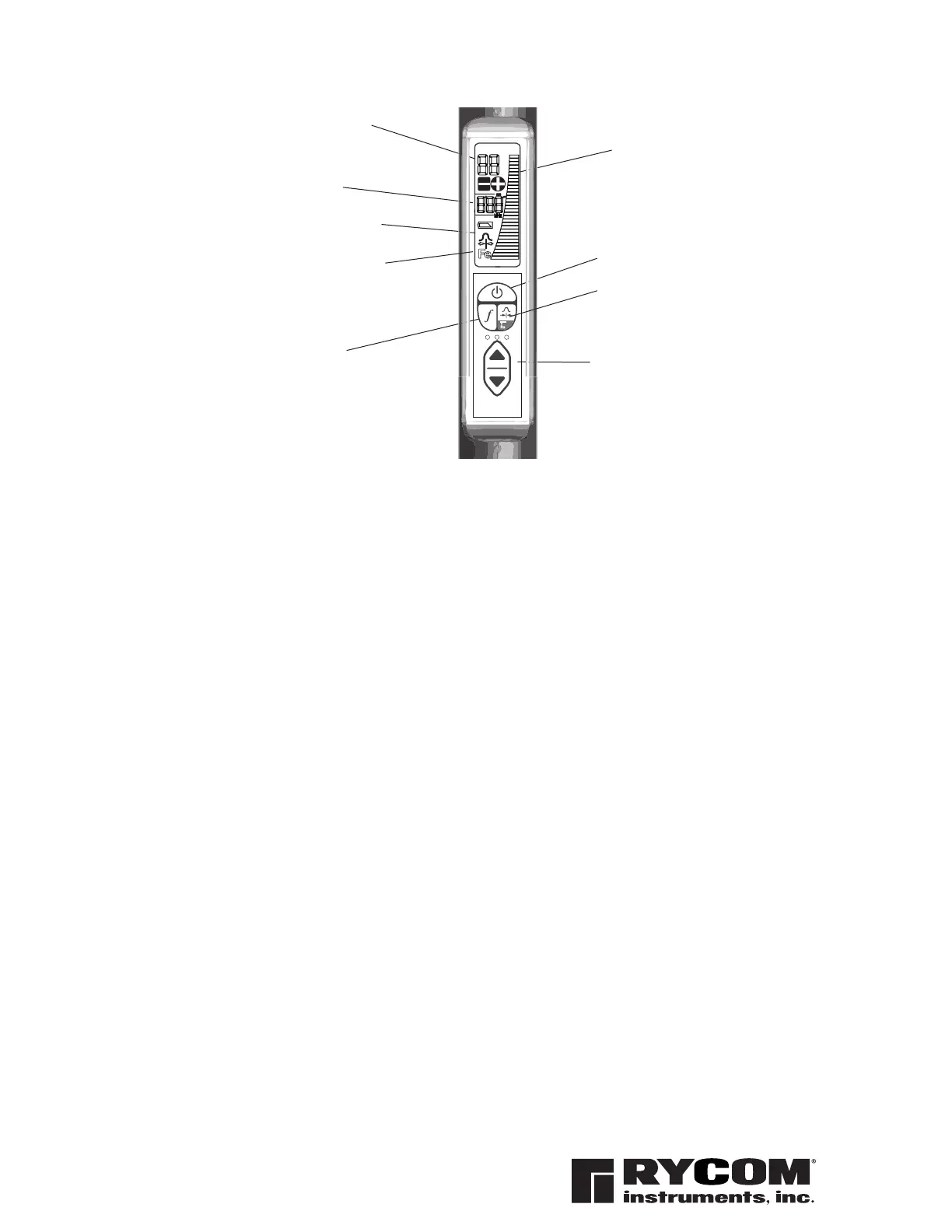
RELATIVE SIGNAL
STRENGTH BARGRAPH
(single bar shows gain
setting)
OPERATION MODE
Displays selected
operation and or
selected frequency
avaiable to model
FREQUENCY
ADJUSTS GAIN UP OR
DOWN
ON / OFF
DISPLAYS ABSOLUTE
SIGNAL STRENGTH
Absolute Signal Strength
The Stick Locator
receiver provides the operator with a direct measurement of the
receiver’s signal strength. The measurement is displayed with two numerical
digits (ex: 85) located at the top of the LCD display. The measurement range is
from 0 to 99 indicating a very weak signal (0) to a very strong signal (99). Absolute
Signal Strength is independent of the GAIN setting or meter reading. It gives the
operator information about the actual amount of signal being radiated from the
conductor and received by the receiver.
The Absolute Signal Strength will not be displayed if the gain is too high or too low.
Adjust the GAIN to move the meter reading to mid-scale. The numerical display will
change from ‘--’ to a valid measurement.
The GAIN up and down buttons are used to increase and decrease the gain in
small amounts.
Gain Change Indication
Low Battery
The Stick Locator
will indicate low battery condition by displaying the low battery
icon on the LCD screen.
LOW BATTERY ICON
ON/OFF Button
The unit will load settings from previous usage.
FREQUENCY Button
Toggles through avaiable frequencies (model specific) 8kHz, 33kHz & 82kHz.
MODE Button & DEPTH Button
Mode selects between 3 modes, peak locating mode, left-right guidance mode
and ferrous metal detection mode. Depress and hold for 3 seconds for depth
reading.
GAIN Button (Up or Down)
Adjusts the gain up or down. Gain level displayed as solid or missing bar on bar
graph.
The Stick Receiver Controls and Indicators
FREQUENCY
MODE


 To Next Page