6 — English
OPERATION
LCD FUNCTIONS
See Figure 1, page 7.
SMART PHONE APP
Download the RYOBI App from
the Google Play Store or Apple
App Store for the full experience
of your RYOBI battery charger
LCD screen.
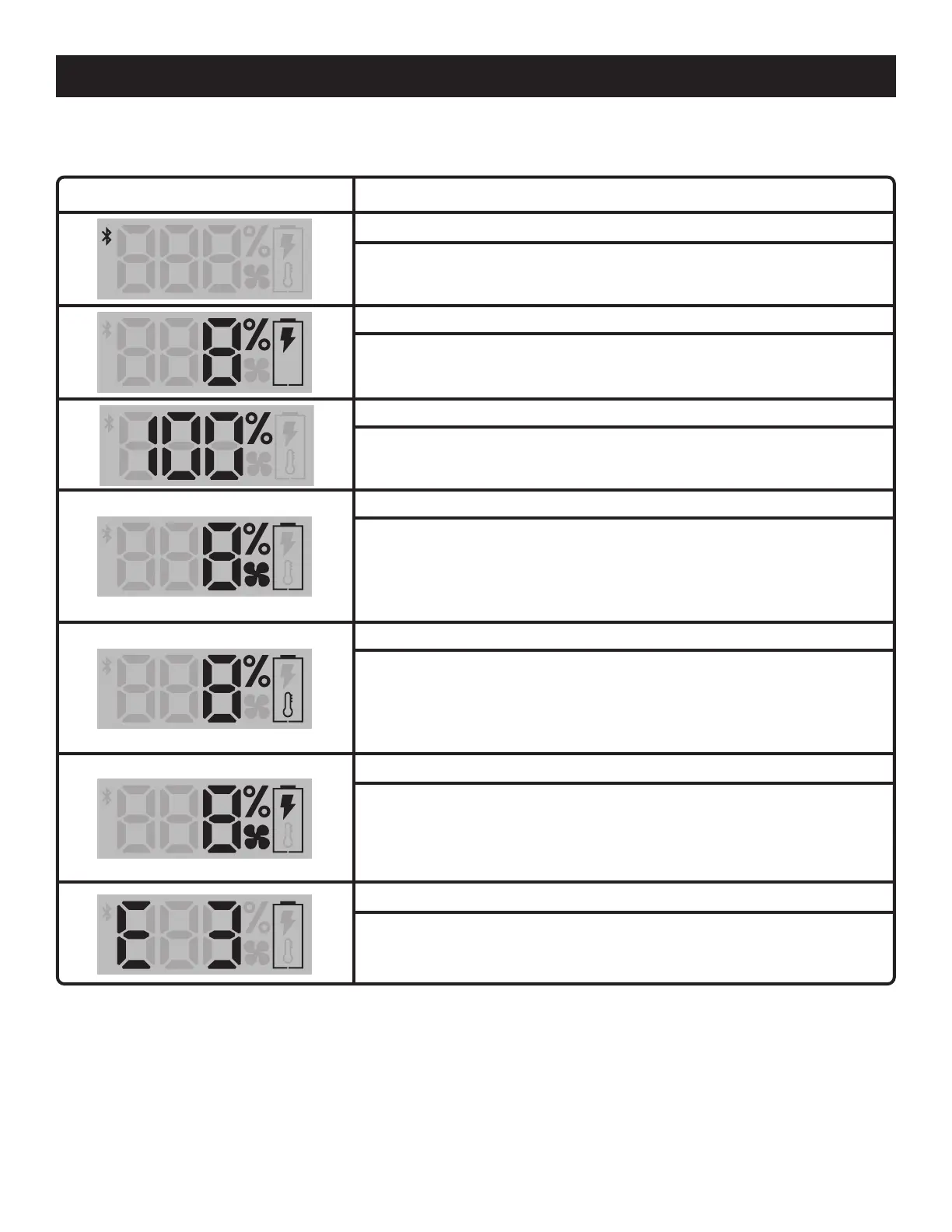
LCD Screen Function
Bluetooth
®
The Bluetooth
®
indicator will blink while pairing. Once the charger is paired
the Bluetooth
®
symbol remains illuminated. The charger connects to a smart
device through the RYOBI 40V Hyper Charger App.
Charging
The battery symbol is illuminated. The thunderbolt symbol blinks when
charging. The percent of battery charged is indicated.
Charging percent
The LCD indicates the state of charge percent of the battery. When
charging is finished the LCD shows 100% and the battery icon turns off.
Battery over temperature
When a hot battery is placed on the charger, the battery’s state of charge
will be displayed, the battery symbol will be on, and the fan symbol will blink
to indicate the charger is actively cooling the battery down to a chargeable
temperature.
Battery under temperature
When a cold battery is placed on the charger, the battery’s state of charge
will be displayed, the battery symbol will be on, and the thermometer symbol
will be on until the battery warms to a chargeable temperature.
Cooling Function
Active cooling vents are triggered when the battery is in an over temperature
state or when the battery becomes warm during charging. This function
helps keep the battery cool during charge.
Battery Error
LCD screen shows an error code for the battery pack or charger;
contact customer service for support.
This product has a Three-year Limited Warranty for personal, family, or household use; one
year if used for any other purpose, including without limitation commercial or rental use.
For warranty details, visit www.ryobitools.com or call (toll free) 1-800-860-4050.
NOTE: MAINTENANCE INFORMATION BEGINS ON PAGE 7 AFTER FRENCH AND SPANISH
LANGUAGE SECTIONS. ILLUSTRATIONS START ON PAGE 8.


 To Next Page