This document is a user manual for the Ryobi ONE+ Charger, model RC18120. It provides comprehensive information regarding the charger's function, technical specifications, usage, and maintenance.
Function Description:
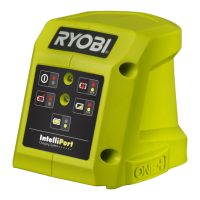
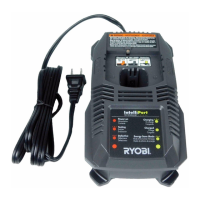
The Ryobi ONE+ Charger (RC18120) is specifically designed to charge Ryobi ONE+ Lithium-Ion battery packs. It is intended for indoor use only, in dry conditions, and should not be used to charge any other type of battery, as a power supply, or in explosive or inflammable environments. The charger features an IntelliPort™ Lithium+ Charging System, which is an intelligent charging system designed to optimize battery charging. It includes LED indicators to display the charging status, such as power on, testing (for hot, cold, or deeply discharged batteries), charging, and charged. The charger also indicates if a battery pack or the charger itself is defective.
Important Technical Specifications:
- Model: RC18120
- Charger Input: 220-240 V ~ 50 Hz 60 W
- Charger Output: 18 V 2A
- Compatible Battery Voltage: 18 V
- Compatible Battery Type: Lithium-Ion
- Operating Temperature: 0°C - 40°C
- Time-lag fuse: 2A
- Compatible Battery Packs (Ryobi ONE+ Lithium-Ion):
- RB18L13 (1.3 Ah, 5 cells, approx. 40 minutes charging time)
- RB18L15 (1.5 Ah, 5 cells, approx. 45 minutes charging time)
- RB18L20 (2.0 Ah, 5 cells, approx. 60 minutes charging time)
- RB18L25 (2.5 Ah, 5 cells, approx. 75 minutes charging time)
- RB18L26 (2.6 Ah, 10 cells, approx. 80 minutes charging time)
- RB18L40 (4.0 Ah, 10 cells, approx. 120 minutes charging time)
- RB18L50 (5.0 Ah, 10 cells, approx. 150 minutes charging time)
- Note: Charging times may vary depending on battery condition.
Usage Features:
The charger is designed for ease of use with clear LED indicators for various charging statuses.
- Initial Use: Battery packs are shipped in a low charge state and should be charged before first use.
- LED Indicators:
- Power On (No battery pack): Red LED ON, Green LED OFF – Indicates the charger is ready to charge.
- Hot Battery Pack: Red LED Flashing, Green LED OFF – Charger waits for the battery to cool before initiating fast charge.
- Cold Battery Pack: Red LED Flashing, Green LED OFF – Charger waits for the battery to warm up before initiating fast charge.
- Deeply Discharged Battery: Red LED Flashing, Green LED OFF – Charger pre-charges the battery to a normal voltage before beginning fast charge.
- Charging (Fast charging): Red LED OFF, Green LED Flashing.
- Charged (Charging complete): Red LED OFF, Green LED ON.
- Defective Battery Pack or Charger: Red LED Flashing, Green LED Flashing. If this occurs, users are advised to remove and reinstall the battery pack. If the status repeats, try a different battery. If the new battery charges normally, the original pack is defective. If the new battery also indicates "Defective," the charger may be defective.
- Charging Hot Battery Packs: If a battery pack becomes hot from continuous tool use, it should be allowed to cool down for approximately 30 minutes before recharging to ensure optimal performance and safety.
- Placement: The charger and battery pack should be placed in a location where the temperature is between 10°C and 38°C for best results.
- Wall Mounting: The charger features a keyhole hanger for convenient wall mounting. Instructions are provided for secure installation, ensuring the charger is not mounted in a way that obstructs ventilation or could lead to damage.
Maintenance Features:
- General Care: The charger should be kept clean and free from dirt and dust. Solvents should not be used on plastic parts as they can cause damage. A clean cloth or soft brush is recommended for cleaning.
- Safety Precautions:
- Always remove the charger plug from the power socket when not in use or during cleaning.
- Do not modify, disassemble, or attempt to repair the product yourself. If the supply cord is damaged, it must be replaced by the manufacturer, its service agent, or similarly qualified persons to avoid hazards.
- Prevent metallic objects or conductive materials from contaminating the charger or battery contacts to avoid short circuits, fire, or explosion.
- Do not charge batteries that show signs of electrolyte leakage or are damaged. Dispose of them properly and replace damaged battery packs immediately.
- Storage: Store the charger in a cool, dry place between 10°C and 25°C. Avoid storing it in a vehicle during hot or cold conditions. Ensure no metal filings or swarf can fall into the vents during storage, as this could cause serious injury when next used.
- Environmental Protection: The manual emphasizes recycling raw materials instead of disposing of electrical waste with household waste. Users are advised to check with local authorities or retailers for recycling advice. The machine, accessories, and packaging should be sorted for environmentally friendly recycling.
Safety Warnings:
The manual includes several warnings to ensure safe operation:
- Electrical Safety: Mains voltage must correspond to the product's specifications. Before use, check for damage to the enclosure, cable, and adaptor plug. Do not use if damaged.
- Environmental Conditions: The product must not be damp and should never be used in a damp environment. It is for indoor use only.
- Battery Safety: Do not recharge primary (non-rechargeable) cells. Do not charge batteries that have leaked or are damaged.
- Flammable Materials: Do not operate the product on a combustible surface or near flammable materials (e.g., cloth, paint, aerosols, petrol).
- Ventilation: Do not cover any ventilating slots and ensure adequate ventilation during operation.
- Physical Damage: Do not use the product if it has suffered heavy shock, jolting, or other damage.
- Hazardous Voltages: Hazardous voltages are present within the product; do not disassemble. There are no user-serviceable parts inside. For damage or failure, return to an authorized Ryobi service center.
This comprehensive guide ensures users can safely and effectively operate and maintain their Ryobi ONE+ Charger.

 Need help?
 General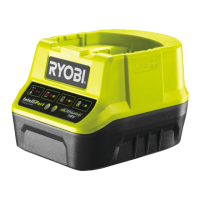

 To Next Page