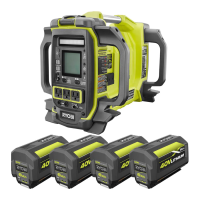
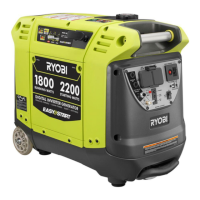
This document describes the RY36BI1800A Cordless Power Hub Inverter from RYOBI, a device designed to provide portable electrical power and charging capabilities for various devices.
Function Description
The RY36BI1800A is a cordless power hub inverter that serves two primary functions:
- Operating and charging USB-powered devices: It provides both USB-A and USB-C ports for charging.
- Supplying electrical power for compatible AC appliances and devices: It features AC outlets for this purpose.
The product is intended for indoor use only and should not be used for any other purpose. It operates using RYOBI 36V MAX POWER battery packs. The main power button must be on for the USB ports to be active.
Important Technical Specifications
Model: RY36BI1800A
Rated input voltage: 36 V d.c.
DC Output:
- USB A (port 1 + port 2): 5 V d.c., Total current 2.1 A
- USB A (port 3 + port 4): 5 V d.c., Total current 2.1 A
- USB C (each port): 5 V d.c., 3A / 12 V d.c., 3A / 20 V d.c., 3 A
AC Output:
- Rated AC power output: 1600 VA (1800 VA < 3 min)
- Surge (starting) power: 4500 VA
- AC Output frequency: 50 Hz
- AC Output voltage: 230 V a.c.
Charger:
- Charger input: 230 V a.c., 50 Hz
- Charger output: 36 V d.c.
Ingress protection rating: IP20
Operating temperature range: 0 °C to 40 °C (for product operation), -20 °C to 49 °C (for battery pack temperature during operation), 0 °C to 45 °C (for battery pack temperature during charging).
Compatible Battery Packs and Power Output:
The working AC power output depends on the battery capacity and the number of battery packs installed. To achieve 1800 VA for 3 minutes and then 1600 VA of continuous power, a minimum of two 4.0 Ah battery packs must be used.
- BPL3620D (10 cells, 2.0 Ah): 700 VA (x1), 1500 VA (x2), 1600 VA (1800 VA < 3 min) (x3), 1600 VA (1800 VA < 3 min) (x4)
- BPL3640D/BPL3640D2 (20 cells, 4.0 Ah): 1350 VA (x1), 1600 VA (1800 VA < 3 min) (x2, x3, x4)
- BPL3650D/BPL3650D2 (20 cells, 5.0 Ah): 1350 VA (x1), 1600 VA (1800 VA < 3 min) (x2, x3, x4)
- RY36B60A (30 cells, 6.0 Ah): 1400 VA (x1), 1600 VA (1800 VA < 3 min) (x2, x3, x4)
- RY36B90A (30 cells, 9.0 Ah): 1450 VA (x1), 1600 VA (1800 VA < 3 min) (x2, x3, x4)
- RY36B12A (30 cells, 12 Ah): 1550 VA (x1), 1600 VA (1800 VA < 3 min) (x2, x3, x4)
Compatible Chargers: BCL36.., RY36.. (e.g., 720423005)
Usage Features
Controls and Indicators:
- LCD panel: Displays status and condition, including session runtime, BLUETOOTH connection status, battery status (for each installed pack), output power, shutdown timer, and charging status.
- USB A charging ports (4 ports total)
- USB C charging ports (2 ports total)
- Area/warning light
- Carry handle
- Battery port LED: Indicates battery status (Power, Testing, Error, Charging, Ready).
- Battery port (4 ports total)
- Task light control button
- LCD backlight control button
- BLUETOOTH pairing / session runtime button: Activates BLUETOOTH connection and displays session runtime when a timer is active.
- AC output/reset button: Activates AC output and resets the power hub in case of overload.
- Main power / restart button: Turns the product on/off and restarts it.
- Charger input jack
- Parallel kit terminals: For connecting multiple power hub inverters of the same model using a parallel kit (RAC792).
- AC outlets (2 outlets total)
Operation:
- Installing Battery Packs: Insert RYOBI 36V MAX POWER battery packs into the battery ports. The battery port LEDs will indicate their status.
- Turning On/Off: Press and hold the main power button for 2 seconds to turn the unit on or off.
- USB Charging: Ensure the main power button is on. Connect USB devices to the USB-A or USB-C ports.
- AC Power Output: After turning on the main power, press and hold the AC output button for 2 seconds to activate the AC outlets. Connect compatible AC appliances.
- Charging Battery Packs: Connect the charger to the charger input jack and then to a power outlet. The LCD screen will show charging status, and the active battery bar will flash. Only one battery pack is charged at a time.
- Parallel Operation: Connect two RY36BI1800A units using the RAC792 parallel kit cable to increase available power. Both units must be the same model.
- Task Light: Use the task light control button to turn the area/warning light on/off.
- LCD Backlight: Use the LCD backlight control button to adjust the screen brightness.
- BLUETOOTH Connectivity: Pair the inverter with a BLUETOOTH-enabled iOS or Android device to monitor and control the unit, including setting a shutdown timer.
Safety Features:
- Automatic shutdown: The product automatically turns off when overheated to prevent damage.
- Overload protection: If the output wattage exceeds the normal operating range, the inverter will indicate an overload, and the AC output can be reset using the AC output/reset button.
- Low voltage shutdown: If battery packs are discharged, the unit will shut down.
- Error messages: The LCD displays various error messages for high/low temperature, incompatible battery pack, low battery, no battery pack in slot, battery fault, and system fault.
Maintenance Features
General Maintenance:
- Cleaning: Turn off the product and remove the battery pack before cleaning. After each use, clean plastic parts with a soft, dry cloth. Do not use brake fluids, gasoline, petroleum-based products, penetrating oils, or bleach-containing products on plastic parts, as these can cause damage. Do not use water to clean the product.
- Storage: Turn off the product, remove the battery pack, and allow it to cool down before storing. Store in a cool, dry, well-ventilated place inaccessible to children and away from corrosive agents. Do not store outdoors.
- Transportation: Remove the battery pack and secure the product against movement or falling during transportation in vehicles.
- Servicing: Servicing should only be performed by a qualified service technician at an authorised service centre. Do not disassemble the product yourself.
Troubleshooting:
The manual provides a comprehensive troubleshooting guide for common issues, including:
- Product not turning on: Check battery charge, ensure the main power button is held for 2 seconds.
- AC receptacle not working: Ensure AC output is active (held for 2 seconds), disconnect charger if connected, try a different device.
- Unexpected shutdown: Check battery pack temperature (must be between -20 °C and 49 °C), recharge low batteries, or have faulty battery packs serviced.
- Charger not working: Check battery pack temperature (must be between 0 °C and 45 °C), reinstall battery pack, try another battery pack or charger.
- Error messages on LCD: Follow specific solutions for each error, such as allowing the battery pack to reach acceptable temperatures, removing incompatible battery packs, recharging low batteries, reinstalling battery packs, or contacting a service center for battery faults or system errors.
- Overload: Remove the load and press the reset button.
- High/Low temperature warning/shutdown: Allow the product to cool down or warm up to an acceptable temperature.
- Low voltage warning/shutdown: Disconnect some devices, recharge battery packs, or replace faulty battery packs.
- System fault: Visit www.ryobitools.eu or call an authorised service center.



 To Next Page
 General