15
LOCKING THE CARRIAGE BACK (After cutting a key)
Push DOW
N on the carriage’s large “tear-drop” knob until the carriage “clicks” into the locked position.
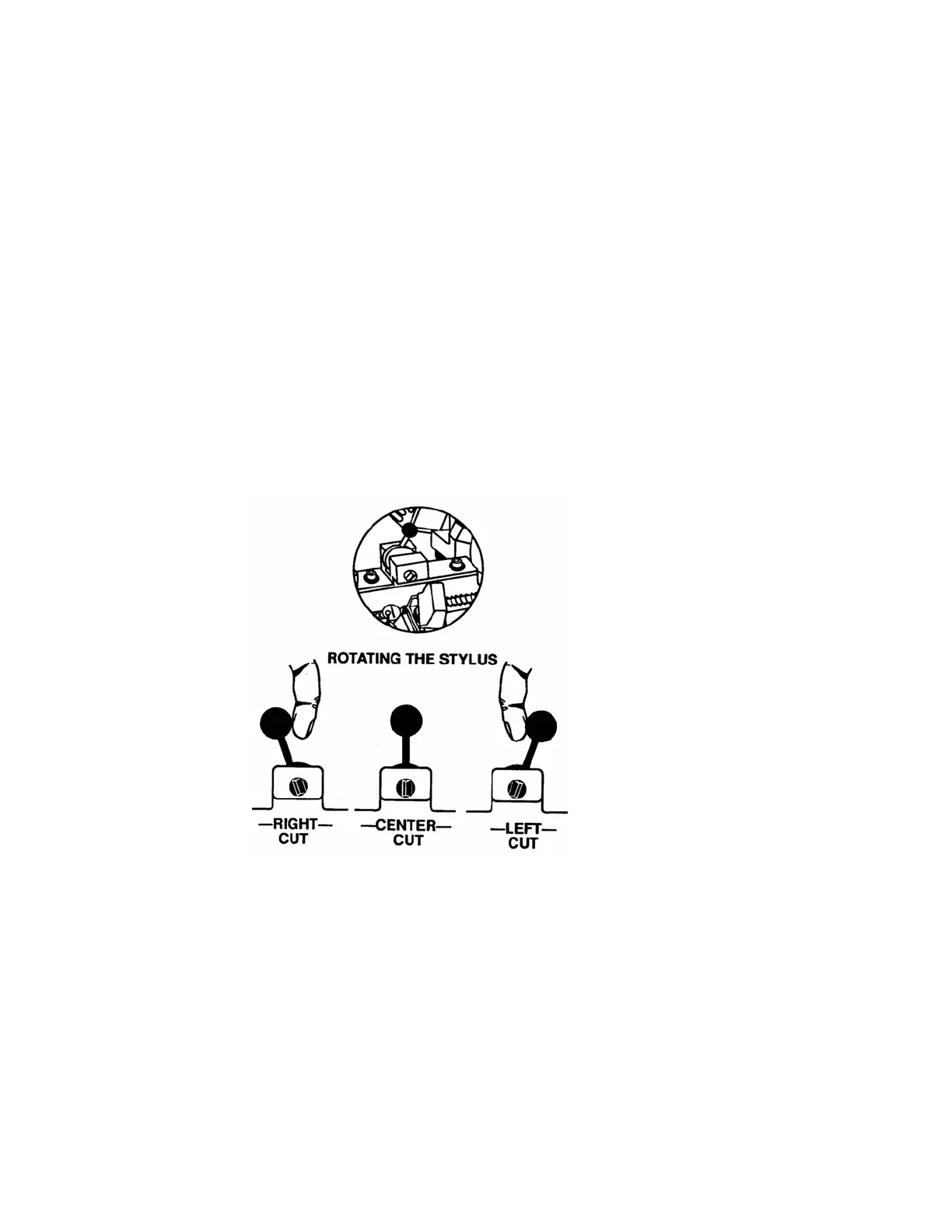
11. ROTATING THE STYLUS (Medeco duplication)
The RY256’s stylus can be rotated from
the “center” (straight up) position- to the left or to the right.
Rotating the stylus is accomplished by moving the small black knob attached to the stylus either to the left
or to the right of “center” position. There is no locking action required to “lock” the stylus in position-
instead we provide an efficient ball and spring “detent” device that you can “feel” when moving the stylus
from position to position. See figure 13 below
CENTER CUT POSITION- Straight UP
LEFT CUT POSITION- Move the small black knob to the right.
RIGHT CUT POSITION- Move the small black knob to the LEFT.
FIGURE 13
12. CUTTING STANDARD KEYS
Leave stylus in the CENTER position-straight UP
CUTTING MEDECO KEYS
A) Cut all CENTER cuts first.
B
) Cut all Left cuts
second.
C)
Cut all RIGHT cuts third.


 To Next Page