92 Saab 9-5 Audio System
Cassette player
Before playing a tape, make sure that the
label is secure and that the cassette is not
warped, otherwise the cassette can
become jammed in the deck. The cassette
player automatically senses whether the
tape is normal or metal (Type I or Type II).
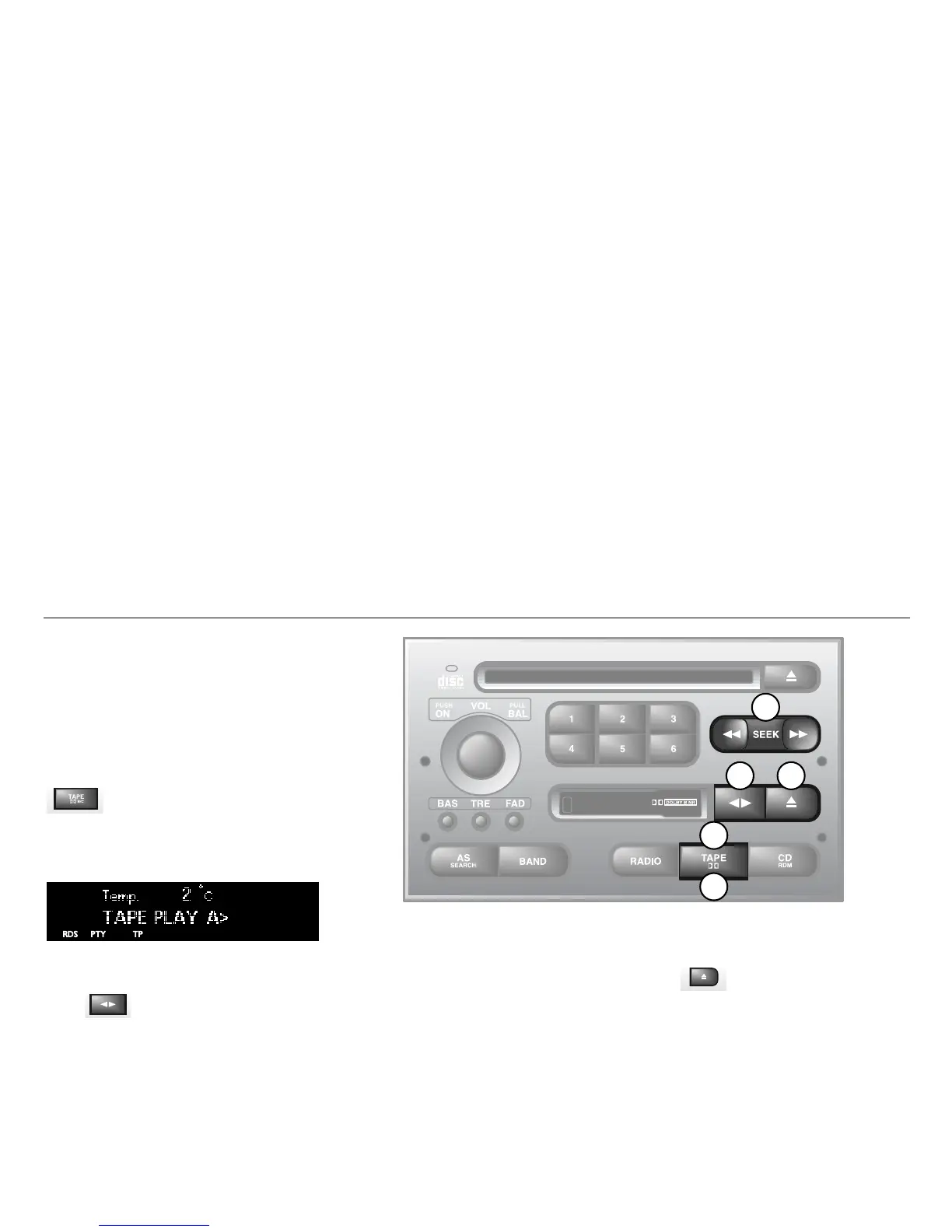
TAPE (1)
Turn on the cassette player by pressing
or by inserting a cassette in the
deck, with the exposed tape to the right.
Playback will start with the side that is facing
up (indicated by A on the display). The dis-
play will now be as follows:
Playback direction (2)
To play the other side of the tape,
press .
The deck will automatically change the play-
back direction when the end of the tape is
reached, be it during playback, fast
forward/rewind or music search.
Dolby
®
noise reduction (3)
Press TAPE/DOLBY to switch on
Dolby NR B.
Dolby B should be on for playback of tapes
recorded with Dolby B, and off for those
recorded without Dolby B.
Eject button (4)
To stop playback of a tape, press the eject
button or select another source.
If you select another source without press-
ing the eject button, the tape will remain in
the deck but the head and pinch rollers will
be clear of the tape. The same applies if the
Audio System is switched off while a tape is
being played. Tapes can still be ejected
when the system is turned off.
IB1844
3
5
2 4
1














 To Next Page