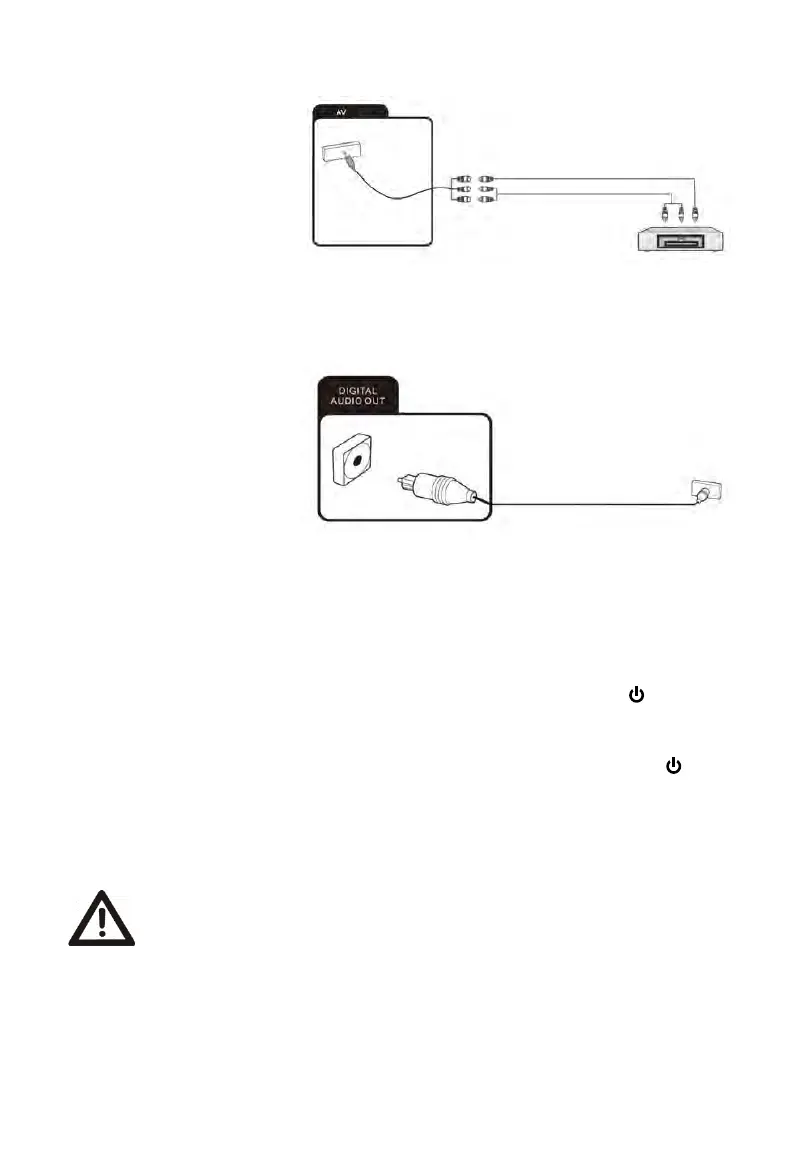
Connecting an external device with AV output
Connect external devices
via the AV IN jack directly to
TV by using a Mini
cable.
In order to play the audio and
video signal fed in from the
external device on the TV,
select the signal source “AV”.
Getting started
Powering the TV set on and off
Powering on
Check that the TV is in standby mode. This means the mains cable must be connected to a
working mains socket.
Powering off
To power the TV off, either press the Power button on the device or press the
button
on the remote control.
After use
Cleaning
Warning: Make sure the device is unplugged from the mains power before
cleaning. Otherwise, there is a risk of electrocution!
Never spill or spray any type of liquid into the unit. Only use a clean, dry cloth for cleaning
the casing. Never use aggressive liquids. When very dirty, use a slightly dampened cloth.
Clean the screen with a special cleaning cloth for screens.
AV
Connecting
a
digital
audio
system
You can connect your TV set to a digital audio system.
Connect
the
other
end
of
the
coaxial
audio cable to the
external device.
Then press the power button on the device or the
button on
the remote to turn on the TV.


 To Next Page