your tuner to the
TUNER CH A
input on the 3000.
Connect the cable from the right output of the tuner
to the
TUNER
CH
B
input.
AUX
-
This high-level input is provided for items
such as second tuner, ceramic phono cartridge or a
playback tape deck.
TAPE
1
&
TAPE
2
-
Two full tape circuits are provided
on the 3000. To connect a tape deck or other component
to the
TAPE
1 circuit, use the following procedure.
The left (A) and right (B) outputs of the tape deck or other
component are connected by audio cables to the jacks
on the back of the 3000 marked
TAPE
1
IN CH A
and
TAPE
1
IN CH
B. The inputs of the tape recorder
are connected to the jacks on the 3000 marked
TAPE
1
OUT
CH
A
and
TAPE
1
OUT CH
B.
The same procedure is used for the connection of a
tape deck or other component to the
TAPE
2 circuit.
Other components normally connected in these circuits
are equalizers, noise reduction systems and decoders.
The control flexibility offered by these two circuits
is discussed in the
OPERATION
section of this manual.
MAIN OUT
1 and
MAIN OUT
2
The 3000 was designed specifically for operation with
SAE Basic Power Amplifiers. However, it is eminently
suited to drive any other stereo power amplifier, or a pair
of monophonic power amplifiers. If two monophonic
amplifiers are used for stereo, it is strongly suggested
that they be a matched pair.
MAIN
1 and
MAIN
2 outputs
are connected directly to the amplifier inputs. Connect the
MAIN OUT
1 CH
A
to the left input on the stereo power
amplifier. Connect the
MAIN OUT
1
CH
B
to the right
input on the stereo amplifier. An additional stereo power
amplifier may be hooked up in the same manner to the
MAIN
2 outputs.
With the power switch in the OFF position, plug the
line cord into any outlet furnishing 105-125 volts, 50 to 60 Hz.
AC OUTLETS
-
Four AC convenience receptacles are
provided on the rear panel. These receptacles are designed
to power your associated equipment. Two outlets are
SWITCHED,
and power is supplied to these when
the 3000 is switched on, the other two are
UNSWITCHED,
and power is always available at these outlets as long as
the 3000 is plugged in. These unswitched outlets are
usually for turntables and changers. The 3000 AC receptacles
are two prong and are designed for 2 prong plugs only.
Connecting amplifiers with 3 prong plugs by either removing
the ground prong, or using a 3 to 2 adapter is not
recommended and may be hazardous.
OPERATlOfl OF COnTROLS
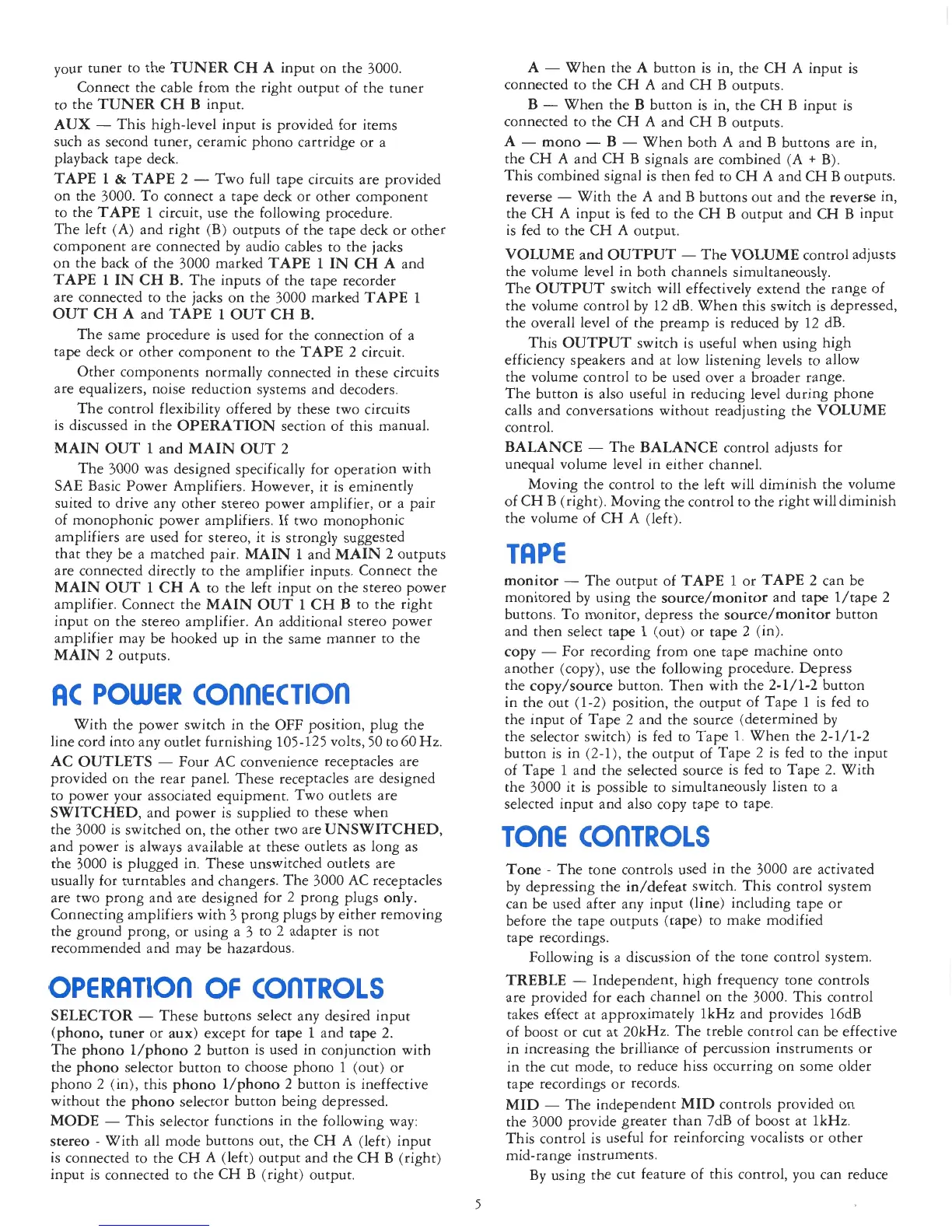
SELECTOR
-
These buttons select any desired input
(phono, tuner or aux) except for tape 1 and tape
2.
The phono l/phono
2
button is used in conjunction with
the phono selector button to choose phono
1
(out) or
phono 2 (in), this phono l/phono 2 button is ineffective
without the phono selector button being depressed.
MODE
-
This selector functions in the following way:
stereo
-
With all mode buttons out, the CH A (left) input
is connected to the CH A (left) output and the CH
B
(right)
input is connected to the CH
B
(right) output.
A
-
When the
A
button is in, the CH A input is
connected to the CH A and CH B outputs.
B
-
When the
B
button is in, the CH B input is
connected to the CH A and CH B outputs.
A
-
mono
-
B
-
When both A and
B
buttons are in,
the CH A and CH B signals are combined (A
+
B).
This combined signal is then fed to CH A and CH B outputs.
reverse
-
With the
A
and B buttons out and the reverse in,
the CH
A
input is fed to the CH B output and CH
B
input
is fed to the CH A output.
VOLUME
and
OUTPUT
-
The
VOLUME
control adjusts
the volume level in both channels simultaneously.
The
OUTPUT
switch will effectively extend the range of
the volume control by 12 dB. When this switch is depressed,
the overall level of the preamp is reduced by 12 dB.
This
OUTPUT
switch is useful when using high
efficiency speakers and at low listening levels to allow
the volume control to be used over a broader range.
The button is also useful in reducing level during phone
calls and conversations without readjusting the
VOLUME
control.
BALANCE
-
The
BALANCE
control adjusts for
unequal volume level in either channel.
Moving the control to the left will diminish the volume
of CH
B
(right). Moving the control to the right willdiminish
the volume of CH A (left).
monitor
-
The output of
TAPE
1
or
TAPE
2 can be
monitored by using the source/monitor and tape l/tape 2
buttons. To monitor, depress the source/monitor button
and then select tape
1
(out) or tape 2 (in).
copy
-
For recording from one tape machine onto
another (copy), use the
€allowing
procedure. Depress
the copy/source button. Then with the 2-1/1-2 button
in the out (1-2) position, the output of Tape
1
is fed to
the input of Tape 2 and the source (determined by
the selector switch) is fed to Tape
I.
When the 2-1/1-2
button is in (2-I), the output of Tape 2 is fed to the input
of Tape
1
and the selected source is fed to Tape
2.
With
the 3000 it is possible to simultaneously listen to a
selected input and also copy tape to tape.
TOnE COnTROLS
Tone
-
The tone controls used in the 3000 are activated
by depressing the iddefeat switch. This control system
can be used after any input (line) including tape or
before the tape outputs (tape) to make modified
tape recordings.
Following is a discussion of the tone control system.
TREBLE
-
Independent, high frequency tone controls
are provided for each channel on the 3000. This control
takes effect at approximately lkHz and provides l6dB
of boost or cut at 20kHz. The treble control can be effective
in increasing the brilliance of percussion instruments or
in the cut mode, to reduce hiss occurring on some older
tape recordings or records.
MID
-
The independent
MID
controls provided on
the 3000 provide greater than 7dB of boost at 1kHz.
This control is useful for reinforcing vocalists or other
mid-range instruments.
By using the cut feature of this control, you can reduce


 To Next Page
 Loading...