PROGRAMMING MACHINE FUNCTIONS
The user can change some machine operating parameters to suit his/her personal needs.
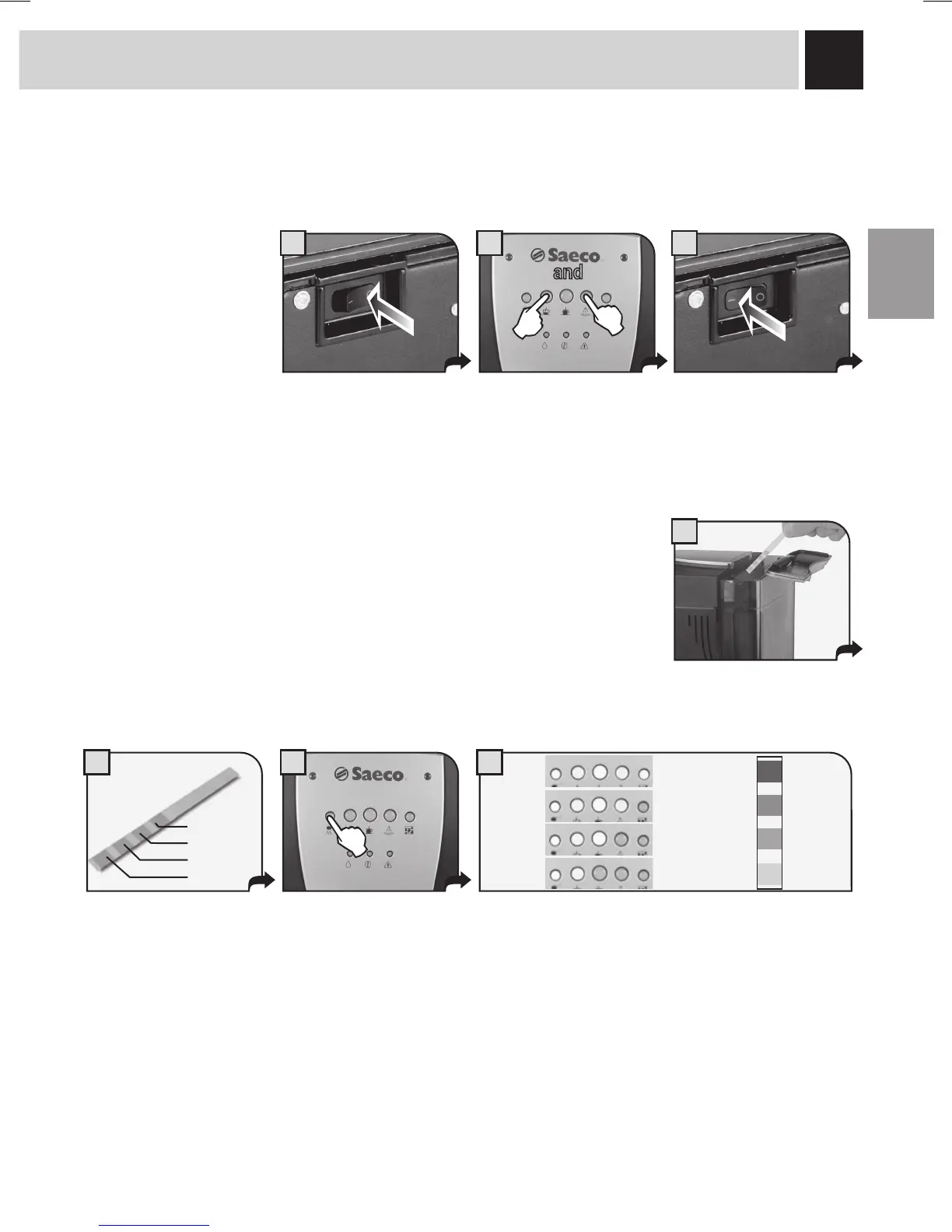
PROGRAMMING START
WATER HARDNESS
Procedure for accessing
machine programming
mode.
Turn the machine off.
and
Press the buttons together. Keeping the buttons pressed down,
turn on the machine.
The hardness of tap water may vary depending on the region. For this reason, the appliance
can be set according to the water hardness in the place where it is to be used, expressed
on a scale of 1 to 4.
The appliance is factory set on a hardness value of 3*. The setting should be adjusted
according to the level of water hardness in the local area.
Dip the strip in water for 1
second.
Check how many squares
change colour.
Hardness 4
Hardness 3
Hardness 2
Hardness 1
Press the button to program
the water hardness.
Set the machine according to these indications.
The degree of hardness will be signalled by the indicator
lights.
Hardness 4
Hardness 3*
Hardness 2
Hardness 1


 To Next Page