INTEGRA/-S/-G/-GS User Manual WEB GUI
SAF Tehnika JSC
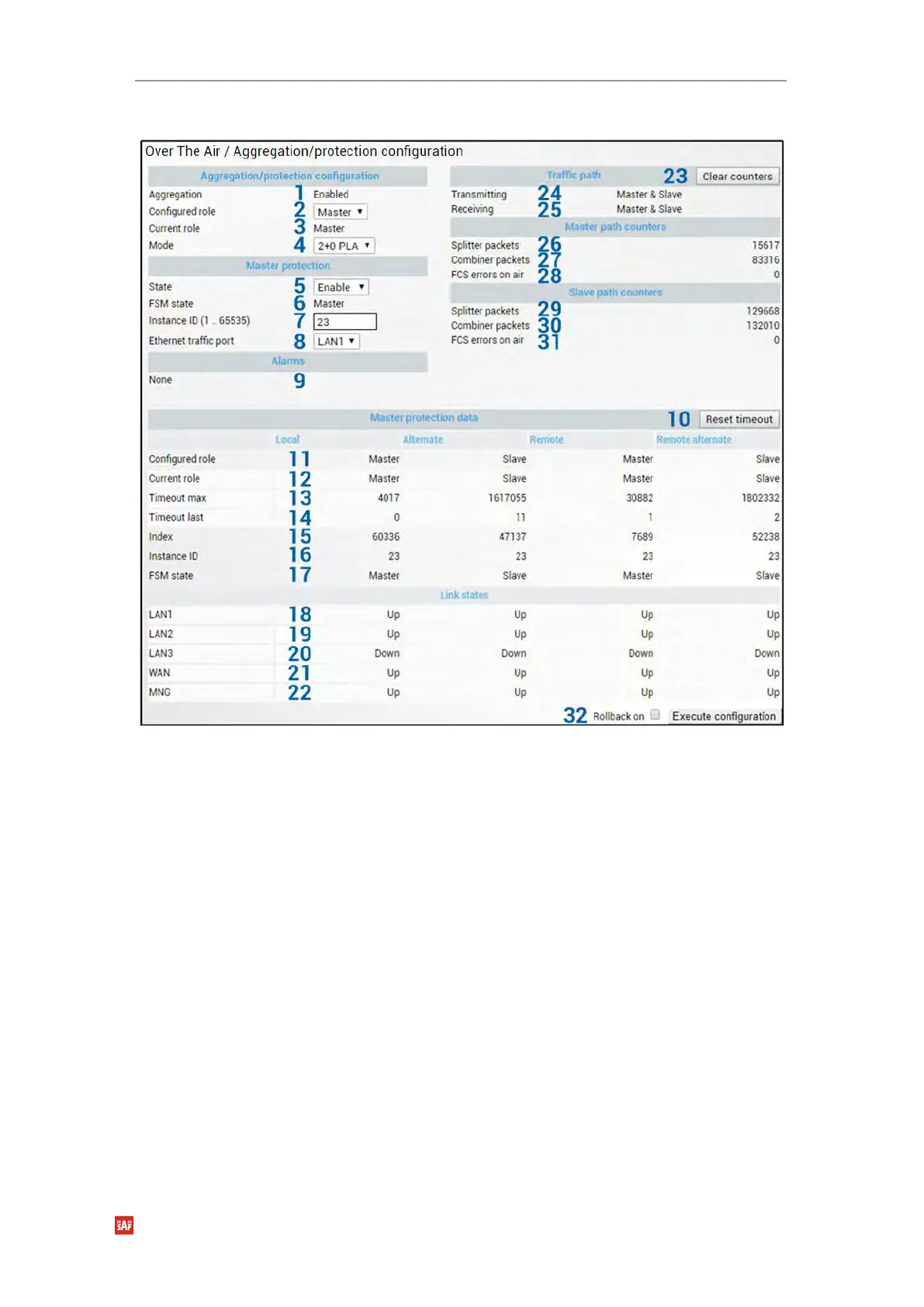
Master modify mode after enabling aggregation
When all four Integra/Integra-S/Integra-G/Integra-GS FODUs are successfully configured
and interconnected, the status of the Master unit should look as shown above.
Explanation of status/configuration fields
Aggregation configuration
1) Aggregation - Indicates whether aggregation is enabled or disabled.
2) Configured role – Indicates the configured role (status mode); allows specifying
aggregation role (modify mode).
3) Current role – Indicates the current role. It may differ from the configured role in case
Master protection is enabled, the alternate device is or was not available and
reconfiguration to 1+0 configuration took place.
4) Mode – “2+0 PLA” for 2+0 Physical Layer Aggregation. “1+1 HSB” for 1+1 Hot
StandBy protection.
Master protection
5) State – Indicates whether Master protection is enabled or disabled (status mode);
allows enabling or disabling Master protection (modify mode). (For 1+1 configuration
always in Enable state)
6) FSM state – Indicates current Finite State Machine’s state. Will be visible only when
Master protection is enabled.


 To Next Page
 Loading...
