INTEGRA/-S/-G/-GS User Manual WEB GUI
SAF Tehnika JSC
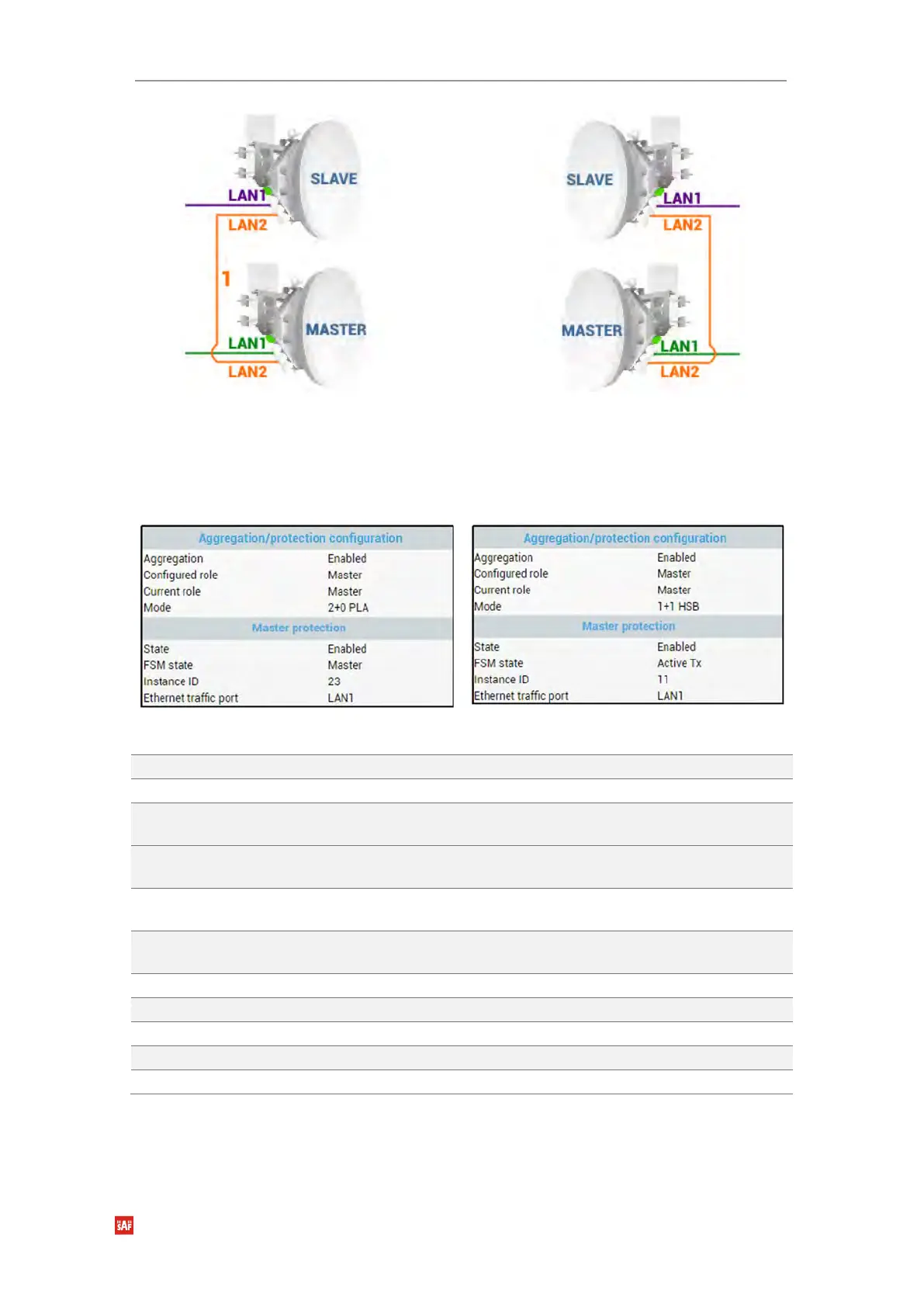
Configuration for both Master FODUs
CLI commands (Chapter 4: COMMAND LINE INTERFACE)
Use to show aggregation status, statistics, and alarms.
Use to clear the aggregation statistics.
Aggr role {none|master|slave}
Use to specify 2+0 aggregation role – Master or Slave.
“none” disables aggregation.
Aggr role {none|master 1+1|
slave 1+1}
Use to specify 1+1 Hot StandBy role – Master or Slave.
“none” disables aggregation.
Aggr force {none|master|slave}
Use to force traffic to transmit solely via Master or Slave
FODU.
Aggr mprot enable <id>
{LAN1|LAN3}
Use to enable master protection by specifying instance ID
and traffic port – LAN1 or LAN3.
Use to disable master protection.
Use to show master protection refresh data.
Use to reset master protection refresh data counters.
Use to show the status of all 2+0 devices.
Use to change FSM state. For testing purposes only!
Over The Air → Modem → Header compression
In many applications such as Voice over IP (VoIP), interactive gaming, or messaging, the
size of the header is significant compared to the size of the payload. Over the end-to-end


 To Next Page
 Loading...
