INTEGRA/-S/-G/-GS User Manual WEB GUI
SAF Tehnika JSC
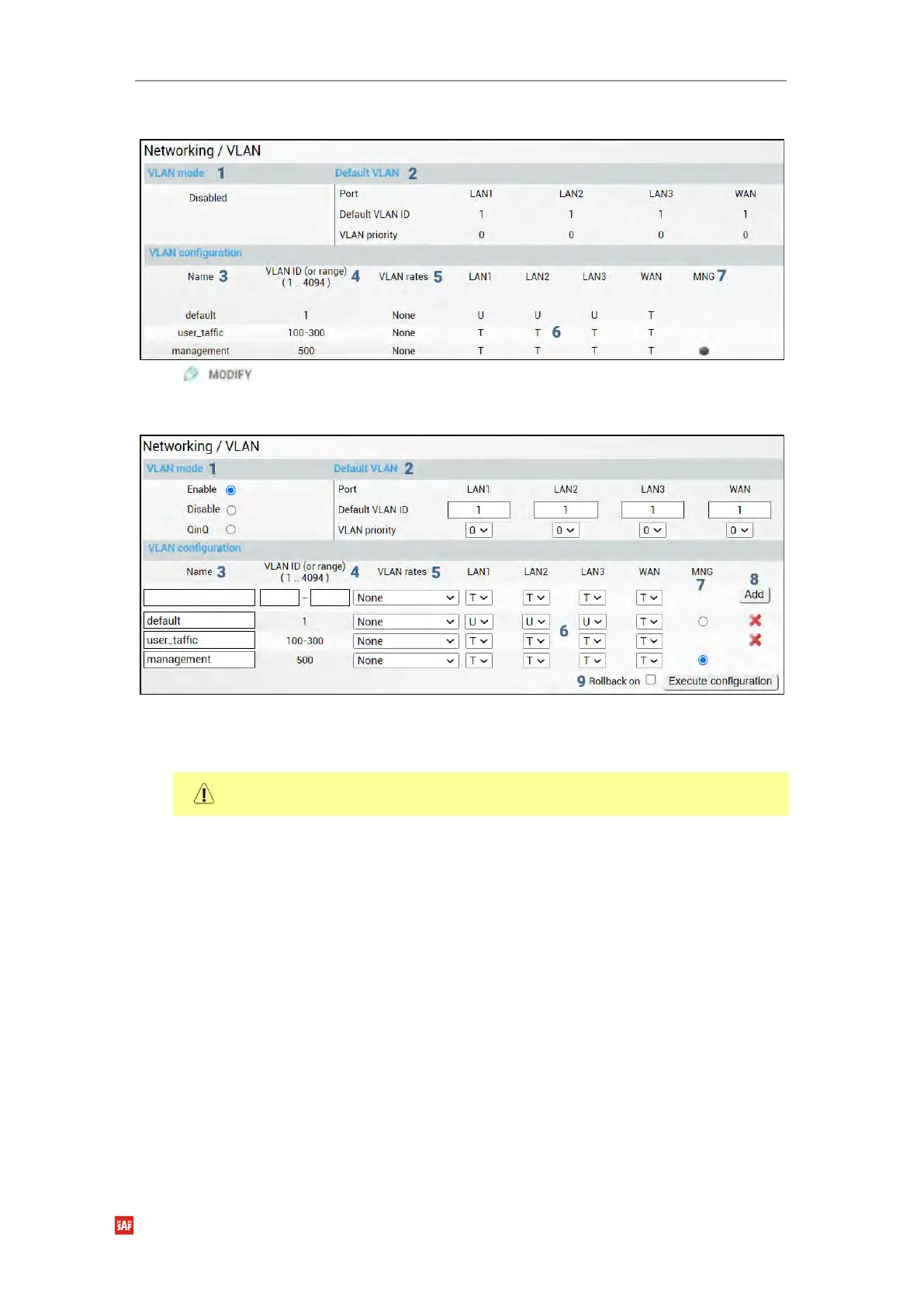
Status mode
Press button.
Modify mode
1) VLAN mode – Indicates VLAN operational mode. The default is “Disable” – 802.1Q
disabled. Change to “Enable” to enable 802.1Q VLAN support. Change to “QinQ” to
enable 802.1ad QinQ VLAN support.
As soon as you enable VLAN operational mode connectivity with untagged traffic will
be lost.
2) Default VLAN – Indicates Default VLAN IDs and VLAN priorities on LAN and WAN
ports (status mode); allows specifying the default VLAN ID and priorities on each of
LAN and WAN ports (modify mode). Specified VLAN ID and priority will be added to
untagged ingress packets. VLAN priority will be removed from tagged egress packets
on particular ports as well, but the VLAN ID will be removed according to the
tagged/untagged configuration (see below) of that particular port.
3) Name – Indicates configured (if assigned) VLAN ID or VLAN ID range names (status
mode); allows entering a name for each entry, i.e. individual VLAN ID or VLAN ID
range (modify mode).
4) VLAN ID (or range) (1 .. 4094) – Indicates configured VLAN IDs and VLAN ID ranges
(status mode); allows entering individual VLAN IDs or VLAN ID ranges, e.g. “100-300”,
“500” (modify mode).
5) VLAN rates – Indicates configured VLAN rate (status mode); allows selecting a
defined VLAN rate (modify mode). Please refer to the chapter Networking
→
Ethernet
→
VLAN rates.
- T/U/D – Indicates whether VLAN ID entries are configured in U - untagged (access)
mode, T - tagged (trunk) mode, or D - disabled (status mode); allows changing VLAN


 To Next Page
 Loading...
