EasyManua.ls Logo

Safeline EVAC - User Manual

Safeline EVAC
32 pages
Print Icon
To Next Page IconTo Next Page
Loading...
www.safeline-group.com
01.2022 © 2022 SafeLine and all the SafeLine products and
accessories are copyrighted by law.
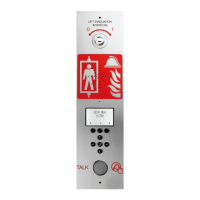
TALK
LIFT EVACUATION
INTERCOM
Complies to EN81–28 and EN81–70 standards.
PATENT 08163634.2
Fire Communication
SafeLine EVAC v.2.1.0 EN
EVAC manual
Question and Answer IconNeed help?

Do you have a question about the Safeline EVAC and is the answer not in the manual?

Summary

Technical Specifications

Main Unit Specifications

Details power, inputs, outputs, size, weight, and IP code for the main unit.

Floor;Car Station Specifications

Specifies power, inputs, outputs, and IP code for floor and car stations.

LMS Unit Specifications

Lists power, inputs, relay outputs, and PSU for the LMS unit.

Bus Cable Specifications

Covers the maximum cable length for the bus cable.

General Information and Safety

Safety Precautions for Installation

Emphasizes professional installation, intended use, modifications, and general safety standards.

Manufacturer Liability Exclusion

Manufacturer's liability limitations regarding accidents, misuse, incorrect installation, and unauthorized changes.

Declaration of Conformity Access

Information on downloading the declaration of conformity from the website.

Product Overview

Mounting Dimensions Guide

Provides detailed mounting dimensions for Entrance station, LMS Unit, Floor station, and Car station.

Entrance Station Overview

Entrance Station Components

Describes the components of the Entrance Station: Switch, Speaker, Microphone, Display, Function keys, PTT.

Entrance Station Backside Details

SD Card & Firmware Ports

Details the SD card slot and USB port for firmware updates.

Input;Output & Communication Ports

Describes CAN termination, outputs, inputs, speaker, and RJ45 port.

Entrance Station LED Indicators

Explains the function of CAN ERR and System LEDs.

Floor Station Overview

Floor Station Components

Details the components of the floor station: Speaker, Microphone, and Alarm button with LED.

Floor Station Backside Details

Communication & Termination Ports

Covers RJ45 port, CAN termination switch, and USB port for firmware updates.

Input;Output & Address Selection

Describes inputs, outputs, SD card, and bus address selectors.

Floor Station Alarm Button

Shows the location of the alarm button.

Car Station Overview

Car Station Components

Details the speaker and microphone components of the car station.

Car Station Backside Details

Describes RJ45, CAN termination, USB, LEDs, SD card, and bus address selectors.

Connection Board and System

Connection Board Terminals

Lists and explains the 7-pin connector terminals for power, CAN bus, and audio.

RJ45 Connector Usage

Explains the RJ45 connector for floor or car stations.

LMS Unit System Role

Explains the LMS unit's role in sending messages and powering the EVAC system.

Entrance Station System Role

Defines the entrance station as the master unit controlling the system.

LMS Unit Details

LMS Unit Connections & Indicators

Details LED indicators, RS232, USB, CAN LEDs, termination switches, communication connectors, and PSU.

LMS Inputs & Relay Outputs

Explains the function of inputs and relay output changeover contacts.

Installation Procedures

Cable Preparation Guide

Instructions on how to cut and prepare the connection cable with RJ45 plugs.

Heartbeat Message Functionality

Describes the heartbeat message for unit identification and system status monitoring.

Address & CAN Termination Setup

Unit Addressing Procedures

Explains how to assign unique addresses to units like car and floor stations.

CAN Bus Termination Settings

Details the TERM switch settings for LMS, car, and floor stations on CAN buses.

Quick Setup Guide

Accessing Setup Menus

Steps to enter the setup menu via key sequence and PIN.

Adjusting Unit Volumes

Instructions for adjusting speaker volumes for Entrance, Car, and Floor stations.

Configuring Node Labels

Guide to setting display labels for nodes in EVAC/connect mode.

Setting Relay Functions

How to select and configure relay functions for the LMS unit.

Exiting Setup and Saving

Procedure to exit the setup menu and save changes.

Wiring Diagrams

LMS Unit Wiring Connections

Illustrates connections for power, CAN, inputs, and relay outputs on the LMS board.

CAN Bus Wiring Example

Shows wiring for up to 2 car units and CAN 1 connection to floor stations.

System Operating Modes

Accessing System Menus

Describes how to enter SETUP and CONNECT menus using key sequences and PIN.

Changing System Language

How to change the default language from English to German.

Operating Functions Explained

Connecting to System Units

Outlines methods for connecting to units in STANDBY and EVAC modes, and communication priority.

EVAC Menu and Alarm Handling

Describes how alarms are displayed and how to connect to them in the EVAC menu.

Unit Connection Methods

Explains how to connect to the car station in EVAC mode and floor stations with registered alarms.

Setup Menu Configuration Steps

Details parameter setup in the entrance station's SETUP menu and saving changes.

EVAC Mode Operations

STANDBY Mode Description

Describes the default idle state, allowing access to setup and connect menus.

EVAC Mode Usage

Explains using the system for evacuation, triggering calls from floor stations.

FIRE Mode Usage

Details the FIRE mode for intercom communication, often linked to fire fighter keys.

Floor Station Operations

Floor Station Node ID Setup

Explains the need for unique CAN-bus node IDs and addressing for floor stations.

Floor Station Operating Modes

Details STANDBY, EVAC, and FIRE modes for floor stations.

Entrance Station Operations

Entrance Station Master Role

Defines the entrance station as the central control unit for the EVAC system.

Entrance Station Mode Behavior

Explains STANDBY, EVAC, and FIRE modes as they apply to the entrance station.

System Configuration Settings

Core System Configuration

Covers max nodes, Fire Mode setup, Admin/User PINs, and Broadcast sound files.

Testing and Time Configuration

Details test sound, date, time, and self-test configuration.

Configuration Management Options

Explains reading config from SD, factory reset, and language selection.

Setup Menu: Entrance Station

Entrance Station Settings Details

Covers backlight, volume, input functions (PTT, FIRE, EVAC), and output functions (PTT_ACK, FIRE, EVAC).

Hardware & Software Version Info

Information on viewing hardware and software versions.

Setup Menu: Car Station

Car Station Settings Details

Details volume, mic level, input functions (Off, Alarm button), and output functions (Off, Alarm button ACK).

Setup Menu: Node Management

Node Configuration Parameters

Settings for node state (active/inactive), labels, inputs, and outputs.

Node Volume & Sound Files

Adjusting speaker volume and configuring sound file playback modes.

Node Indication & Version Info

Selecting nodes to indicate and viewing hardware/software versions.

Setup Menu: Log & LMS

Log & Error Management Procedures

Reading the log file and current errors from the system.

LMS Trigger Configuration

Settings for activating LMS triggers, sending test messages, and relay functions.

Version & Code Information

Information on hardware/software versions and LMS codes for triggers.

EVAC Configuration Options

SD Card Functionality

Explains the role of the SD card for logs and sound files on entrance and floor stations.

Sound File Triggering

How floor stations can play sound files manually or automatically via triggers.

Log File Analysis

Log File Entry Structure

Describes the format of log entries: ENTRY, TIME, CODE, DATA.

Interpreting Log Codes

Lists hex codes for various system events and errors.

Service & Error Diagnostics

Error List Overview

Explains the 'i' symbol for errors and how to view the error list.

Error Code Interpretation

Lists common error codes and their meanings, with examples.

EU Declaration of Conformity

Product Compliance & Standards

Lists product details, EC directives, and applied standards for conformity.

Manufacturer Declaration Details

Contains signature and details of the Technical Manager.

Summary

Technical Specifications

Main Unit Specifications

Details power, inputs, outputs, size, weight, and IP code for the main unit.

Floor;Car Station Specifications

Specifies power, inputs, outputs, and IP code for floor and car stations.

LMS Unit Specifications

Lists power, inputs, relay outputs, and PSU for the LMS unit.

Bus Cable Specifications

Covers the maximum cable length for the bus cable.

General Information and Safety

Safety Precautions for Installation

Emphasizes professional installation, intended use, modifications, and general safety standards.

Manufacturer Liability Exclusion

Manufacturer's liability limitations regarding accidents, misuse, incorrect installation, and unauthorized changes.

Declaration of Conformity Access

Information on downloading the declaration of conformity from the website.

Product Overview

Mounting Dimensions Guide

Provides detailed mounting dimensions for Entrance station, LMS Unit, Floor station, and Car station.

Entrance Station Overview

Entrance Station Components

Describes the components of the Entrance Station: Switch, Speaker, Microphone, Display, Function keys, PTT.

Entrance Station Backside Details

SD Card & Firmware Ports

Details the SD card slot and USB port for firmware updates.

Input;Output & Communication Ports

Describes CAN termination, outputs, inputs, speaker, and RJ45 port.

Entrance Station LED Indicators

Explains the function of CAN ERR and System LEDs.

Floor Station Overview

Floor Station Components

Details the components of the floor station: Speaker, Microphone, and Alarm button with LED.

Floor Station Backside Details

Communication & Termination Ports

Covers RJ45 port, CAN termination switch, and USB port for firmware updates.

Input;Output & Address Selection

Describes inputs, outputs, SD card, and bus address selectors.

Floor Station Alarm Button

Shows the location of the alarm button.

Car Station Overview

Car Station Components

Details the speaker and microphone components of the car station.

Car Station Backside Details

Describes RJ45, CAN termination, USB, LEDs, SD card, and bus address selectors.

Connection Board and System

Connection Board Terminals

Lists and explains the 7-pin connector terminals for power, CAN bus, and audio.

RJ45 Connector Usage

Explains the RJ45 connector for floor or car stations.

LMS Unit System Role

Explains the LMS unit's role in sending messages and powering the EVAC system.

Entrance Station System Role

Defines the entrance station as the master unit controlling the system.

LMS Unit Details

LMS Unit Connections & Indicators

Details LED indicators, RS232, USB, CAN LEDs, termination switches, communication connectors, and PSU.

LMS Inputs & Relay Outputs

Explains the function of inputs and relay output changeover contacts.

Installation Procedures

Cable Preparation Guide

Instructions on how to cut and prepare the connection cable with RJ45 plugs.

Heartbeat Message Functionality

Describes the heartbeat message for unit identification and system status monitoring.

Address & CAN Termination Setup

Unit Addressing Procedures

Explains how to assign unique addresses to units like car and floor stations.

CAN Bus Termination Settings

Details the TERM switch settings for LMS, car, and floor stations on CAN buses.

Quick Setup Guide

Accessing Setup Menus

Steps to enter the setup menu via key sequence and PIN.

Adjusting Unit Volumes

Instructions for adjusting speaker volumes for Entrance, Car, and Floor stations.

Configuring Node Labels

Guide to setting display labels for nodes in EVAC/connect mode.

Setting Relay Functions

How to select and configure relay functions for the LMS unit.

Exiting Setup and Saving

Procedure to exit the setup menu and save changes.

Wiring Diagrams

LMS Unit Wiring Connections

Illustrates connections for power, CAN, inputs, and relay outputs on the LMS board.

CAN Bus Wiring Example

Shows wiring for up to 2 car units and CAN 1 connection to floor stations.

System Operating Modes

Accessing System Menus

Describes how to enter SETUP and CONNECT menus using key sequences and PIN.

Changing System Language

How to change the default language from English to German.

Operating Functions Explained

Connecting to System Units

Outlines methods for connecting to units in STANDBY and EVAC modes, and communication priority.

EVAC Menu and Alarm Handling

Describes how alarms are displayed and how to connect to them in the EVAC menu.

Unit Connection Methods

Explains how to connect to the car station in EVAC mode and floor stations with registered alarms.

Setup Menu Configuration Steps

Details parameter setup in the entrance station's SETUP menu and saving changes.

EVAC Mode Operations

STANDBY Mode Description

Describes the default idle state, allowing access to setup and connect menus.

EVAC Mode Usage

Explains using the system for evacuation, triggering calls from floor stations.

FIRE Mode Usage

Details the FIRE mode for intercom communication, often linked to fire fighter keys.

Floor Station Operations

Floor Station Node ID Setup

Explains the need for unique CAN-bus node IDs and addressing for floor stations.

Floor Station Operating Modes

Details STANDBY, EVAC, and FIRE modes for floor stations.

Entrance Station Operations

Entrance Station Master Role

Defines the entrance station as the central control unit for the EVAC system.

Entrance Station Mode Behavior

Explains STANDBY, EVAC, and FIRE modes as they apply to the entrance station.

System Configuration Settings

Core System Configuration

Covers max nodes, Fire Mode setup, Admin/User PINs, and Broadcast sound files.

Testing and Time Configuration

Details test sound, date, time, and self-test configuration.

Configuration Management Options

Explains reading config from SD, factory reset, and language selection.

Setup Menu: Entrance Station

Entrance Station Settings Details

Covers backlight, volume, input functions (PTT, FIRE, EVAC), and output functions (PTT_ACK, FIRE, EVAC).

Hardware & Software Version Info

Information on viewing hardware and software versions.

Setup Menu: Car Station

Car Station Settings Details

Details volume, mic level, input functions (Off, Alarm button), and output functions (Off, Alarm button ACK).

Setup Menu: Node Management

Node Configuration Parameters

Settings for node state (active/inactive), labels, inputs, and outputs.

Node Volume & Sound Files

Adjusting speaker volume and configuring sound file playback modes.

Node Indication & Version Info

Selecting nodes to indicate and viewing hardware/software versions.

Setup Menu: Log & LMS

Log & Error Management Procedures

Reading the log file and current errors from the system.

LMS Trigger Configuration

Settings for activating LMS triggers, sending test messages, and relay functions.

Version & Code Information

Information on hardware/software versions and LMS codes for triggers.

EVAC Configuration Options

SD Card Functionality

Explains the role of the SD card for logs and sound files on entrance and floor stations.

Sound File Triggering

How floor stations can play sound files manually or automatically via triggers.

Log File Analysis

Log File Entry Structure

Describes the format of log entries: ENTRY, TIME, CODE, DATA.

Interpreting Log Codes

Lists hex codes for various system events and errors.

Service & Error Diagnostics

Error List Overview

Explains the 'i' symbol for errors and how to view the error list.

Error Code Interpretation

Lists common error codes and their meanings, with examples.

EU Declaration of Conformity

Product Compliance & Standards

Lists product details, EC directives, and applied standards for conformity.

Manufacturer Declaration Details

Contains signature and details of the Technical Manager.

Safeline EVAC Specifications

General IconGeneral
BrandSafeline
ModelEVAC
CategoryIntercom System
LanguageEnglish

Related product manuals