7
EN
STEP 2:
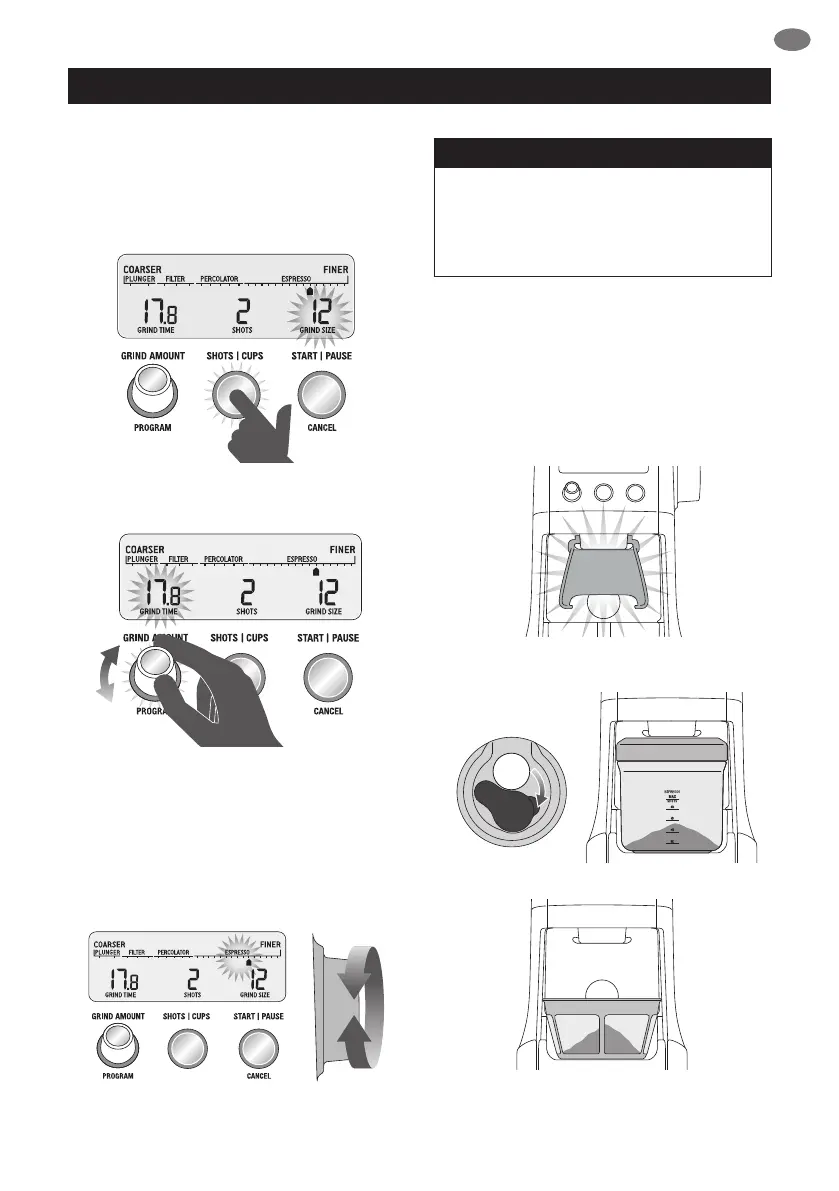
Selecting your SHOTS / CUPS
Select the desired amount of ground coee
required by pressing the SHOTS / CUPS button.
Rotate the Grind Amount Dial to adjust the grinding
time to achieve the correct amount of coee.
STEP 3:
Select your grind size
For espresso, we recommend selecting Grind Size
setting 12 as a starting point and moving the Grind
Size dial Coarser or Finer to adjust the ow of
espresso as required.
NOTE
If the Grind Size Dial is tight, run the grinder
by pressing the START / PAUSE / CANCEL
button while turning the Grind Size Dial. This
will release coee grounds caught between
the burrs.
GRINDING INTO GRINDS
CONTAINER OR COFFEE FILTER
STEP 1:
Remove cradle by sliding out from under the
grind outlet.
PULL
Slide in grinds container with cap open or coee
lter directly under grind outlet.
OPERATING YOUR NEW APPLIANCE



 To Next Page