EasyManua.ls Logo

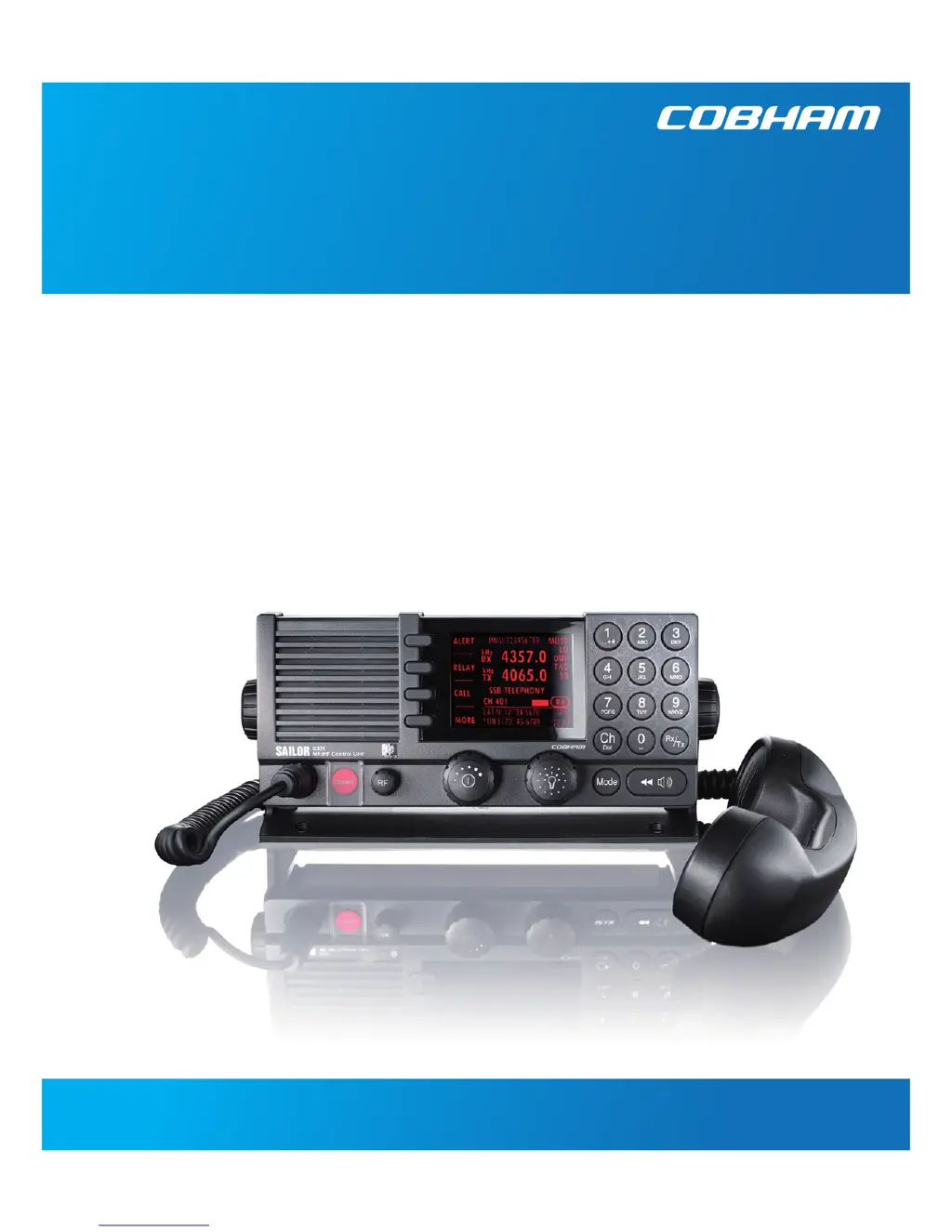
Sailor 6300 MF/HF DSC - User Manual

Sailor 6300 MF/HF DSC
86 pages
Print Icon
To Next Page IconTo Next Page
Loading...
SAILOR 6300 MF/HF DSC
User manual
150W/150W FCC/250W/500W

Questions and Answers

Summary

Safety Summary and Precautions

Ground the Equipment

Ensures the equipment chassis and cabinet are connected to an electrical ground.

Explosive Atmosphere Precautions

Instructions regarding operation in the presence of flammable gases or fumes.

Live Circuit Safety

Caution against removing covers and servicing live circuits.

Service Personnel Requirements

Specifies that general service must be done by skilled service personnel.

RF Exposure Hazards and Instructions

Antenna Safety Warning

Caution against touching the Antenna Tuning Unit or feeder wire during transmission.

Emergency Calls Procedure

Initiating a Distress Call

Steps for activating the Distress button and using the handset for voice.

Distress Message Content

Information required for a MAYDAY message: name, callsign, MMSI, position, nature.

Distress and Communication Frequencies

List of DSC, Radiotelephony, and NBDP frequencies for distress.

Training Information for FCC Equipment

Occupational Use and RF Exposure Compliance

Details FCC compliance for occupational use and RF exposure limits.

Relevant RF Standards and Guidelines

Lists FCC, IEEE, and ANSI standards related to RF exposure.

Warning on RF Energy Exposure

Alerts users about RF energy generated during transmission and health hazards.

Installation and RF Exposure Compliance

Antenna Placement Guidelines

Specifies minimum distances for antenna mounting to comply with RF exposure.

Vessel Installation Requirements

Details requirements for antenna mounting on vessels based on deck occupancy.

Public Area Antenna Placement

Guidelines for placing antennas in public areas or near unaware individuals.

Front Panel Controls

Description of Front Panel Controls

Detailed explanation of each numbered control on the front panel of the radio.

Chapter 2: Operation Guide

General Use and Navigation

Basic instructions for powering on, using the radio, and MMSI number entry.

Power, Volume, and Antenna Tuning

Selecting Operating Modes (SSB, AM, DSC, Telex)

Mode Selection and Functionality Guide

Explains the SSB, AM Broadcast, DSC, and Telex modes and their uses.

ITU Channel and Frequency Selection

Procedure for selecting ITU channels and entering RX/TX frequencies.

Frequency Tuning and RF Gain Adjustment

Position and MMSI Information

Basic MF;HF Radio Communication

Making Radio Telephone Calls Guide

Quick guide for making ship-to-ship and ship-to-shore radio calls.

Receiving Radio Telephone Calls

Procedure for receiving and responding to incoming radio calls.

Making and Receiving Radio Telephone Calls

Procedure for Making a Radio Call

Detailed steps for initiating and conducting a radio telephone conversation.

Procedure for Receiving a Radio Call

How to handle an incoming radio call and respond appropriately.

Watch Function

Scan Functionality

DSC Calls Overview

Sending Own Distress Alert Procedure

Step-by-step guide for sending an own Distress alert via the Distress button.

Sending DSC Distress Alerts with Parameters

Specifying Distress Call Parameters

How to specify distress nature, frequency, and communication mode.

Automatic Distress Retransmission

Details on automatic retransmission of distress messages if no acknowledgement is received.

Acknowledging and Cancelling Own Distress

Receiving Distress Call Acknowledgements

How to handle acknowledgements received for own Distress calls.

Cancelling an Accidental Distress Alert

Procedure for cancelling a DSC Distress alert that was transmitted in error.

Power Failure and Distress Procedures

Distress Procedures After Power Loss

Options to resume or terminate distress sending after power interruption.

Sending Distress from Alarm Panel and Relay Calls

Distress Alerts from Alarm Panel

Instructions for sending undesignated Distress messages from the Alarm Panel.

Distress Relay (DROBOS) Procedures

How to send a Distress message on behalf of someone else (RELAY).

DROBOS Items and SEND Function

DROBOS Data Entry Details

Details on required information for DROBOS items like TYPE, MMSI, TO, DSC, NAT.

Receiving Distress Calls

DSC Call Types and Parameters

Handling Multiple Calls - DSC and Voice

Replay Function for Voice Messages

Maintenance Procedures and Checks

DSC Self Test and Temperature Specifications

Running the DSC Self Test

Procedure for performing a DSC loopback test to verify functionality.

Diagnostics: Log and System Status

Transceiver (TU) and ATU Message Explanations

Transceiver (TU) and ATU Error Explanations

Self Test Procedures

Troubleshooting Guide: Radio and Communication Issues

Troubleshooting Radio Power and Communication

Addresses issues like radio not turning on, no communication, or speaker mute.

Troubleshooting GPS Position Input

Resolves prompts for manual position entry when GPS is connected but not updating.

Troubleshooting DSC Functionality

DSC Routine Testing Procedures

Verifies DSC function by transmitting safety test calls and checking installation.

Troubleshooting Missing MMSI

Addresses issues where the MMSI number is not entered, preventing DSC operation.

Troubleshooting: Radio Time and DSC Channels

Troubleshooting Device Failures and TX Inhibit

Resolving Device Failures

Steps to take when checks and tests do not resolve operational difficulties.

Troubleshooting TX Inhibit Display

Explains the TX inhibit message and its meaning for transmission.

Summary

Safety Summary and Precautions

Ground the Equipment

Ensures the equipment chassis and cabinet are connected to an electrical ground.

Explosive Atmosphere Precautions

Instructions regarding operation in the presence of flammable gases or fumes.

Live Circuit Safety

Caution against removing covers and servicing live circuits.

Service Personnel Requirements

Specifies that general service must be done by skilled service personnel.

RF Exposure Hazards and Instructions

Antenna Safety Warning

Caution against touching the Antenna Tuning Unit or feeder wire during transmission.

Emergency Calls Procedure

Initiating a Distress Call

Steps for activating the Distress button and using the handset for voice.

Distress Message Content

Information required for a MAYDAY message: name, callsign, MMSI, position, nature.

Distress and Communication Frequencies

List of DSC, Radiotelephony, and NBDP frequencies for distress.

Training Information for FCC Equipment

Occupational Use and RF Exposure Compliance

Details FCC compliance for occupational use and RF exposure limits.

Relevant RF Standards and Guidelines

Lists FCC, IEEE, and ANSI standards related to RF exposure.

Warning on RF Energy Exposure

Alerts users about RF energy generated during transmission and health hazards.

Installation and RF Exposure Compliance

Antenna Placement Guidelines

Specifies minimum distances for antenna mounting to comply with RF exposure.

Vessel Installation Requirements

Details requirements for antenna mounting on vessels based on deck occupancy.

Public Area Antenna Placement

Guidelines for placing antennas in public areas or near unaware individuals.

Front Panel Controls

Description of Front Panel Controls

Detailed explanation of each numbered control on the front panel of the radio.

Chapter 2: Operation Guide

General Use and Navigation

Basic instructions for powering on, using the radio, and MMSI number entry.

Power, Volume, and Antenna Tuning

Selecting Operating Modes (SSB, AM, DSC, Telex)

Mode Selection and Functionality Guide

Explains the SSB, AM Broadcast, DSC, and Telex modes and their uses.

ITU Channel and Frequency Selection

Procedure for selecting ITU channels and entering RX/TX frequencies.

Frequency Tuning and RF Gain Adjustment

Position and MMSI Information

Basic MF;HF Radio Communication

Making Radio Telephone Calls Guide

Quick guide for making ship-to-ship and ship-to-shore radio calls.

Receiving Radio Telephone Calls

Procedure for receiving and responding to incoming radio calls.

Making and Receiving Radio Telephone Calls

Procedure for Making a Radio Call

Detailed steps for initiating and conducting a radio telephone conversation.

Procedure for Receiving a Radio Call

How to handle an incoming radio call and respond appropriately.

Watch Function

Scan Functionality

DSC Calls Overview

Sending Own Distress Alert Procedure

Step-by-step guide for sending an own Distress alert via the Distress button.

Sending DSC Distress Alerts with Parameters

Specifying Distress Call Parameters

How to specify distress nature, frequency, and communication mode.

Automatic Distress Retransmission

Details on automatic retransmission of distress messages if no acknowledgement is received.

Acknowledging and Cancelling Own Distress

Receiving Distress Call Acknowledgements

How to handle acknowledgements received for own Distress calls.

Cancelling an Accidental Distress Alert

Procedure for cancelling a DSC Distress alert that was transmitted in error.

Power Failure and Distress Procedures

Distress Procedures After Power Loss

Options to resume or terminate distress sending after power interruption.

Sending Distress from Alarm Panel and Relay Calls

Distress Alerts from Alarm Panel

Instructions for sending undesignated Distress messages from the Alarm Panel.

Distress Relay (DROBOS) Procedures

How to send a Distress message on behalf of someone else (RELAY).

DROBOS Items and SEND Function

DROBOS Data Entry Details

Details on required information for DROBOS items like TYPE, MMSI, TO, DSC, NAT.

Receiving Distress Calls

DSC Call Types and Parameters

Handling Multiple Calls - DSC and Voice

Replay Function for Voice Messages

Maintenance Procedures and Checks

DSC Self Test and Temperature Specifications

Running the DSC Self Test

Procedure for performing a DSC loopback test to verify functionality.

Diagnostics: Log and System Status

Transceiver (TU) and ATU Message Explanations

Transceiver (TU) and ATU Error Explanations

Self Test Procedures

Troubleshooting Guide: Radio and Communication Issues

Troubleshooting Radio Power and Communication

Addresses issues like radio not turning on, no communication, or speaker mute.

Troubleshooting GPS Position Input

Resolves prompts for manual position entry when GPS is connected but not updating.

Troubleshooting DSC Functionality

DSC Routine Testing Procedures

Verifies DSC function by transmitting safety test calls and checking installation.

Troubleshooting Missing MMSI

Addresses issues where the MMSI number is not entered, preventing DSC operation.

Troubleshooting: Radio Time and DSC Channels

Troubleshooting Device Failures and TX Inhibit

Resolving Device Failures

Steps to take when checks and tests do not resolve operational difficulties.

Troubleshooting TX Inhibit Display

Explains the TX inhibit message and its meaning for transmission.

Sailor 6300 MF/HF DSC Specifications

General IconGeneral
BrandSailor
Model6300 MF/HF DSC
CategoryMarine Radio
LanguageEnglish

Related product manuals